Ever get an email from “Amazon Support” and wonder if it’s actually Amazon? You’re not alone. With 91% of phishing attacks hiding behind fake identities, knowing how to verify an email sender is as important as learning how to lock a door.
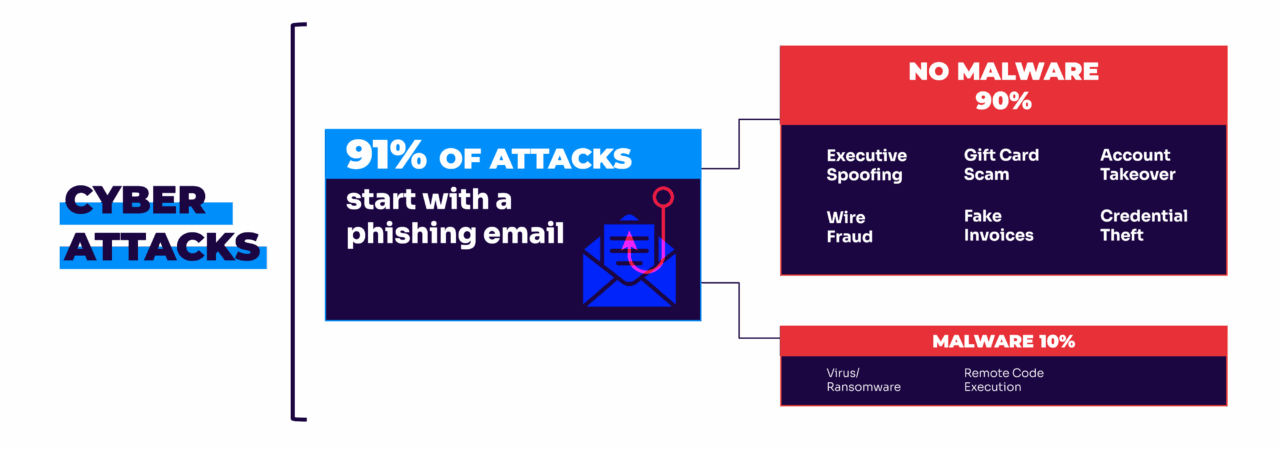
Email scams don’t just rely on bad links or obvious typos anymore—they rely on trust. Attackers impersonate real brands, coworkers, and executives to slip past filters and trick people into acting fast.
In this guide, we’ll show you:
- Step-by-step tips for spotting fake senders
- How to check if an email sender is legitimate
- Ways to verify email addresses and sender domains
- Tools and techniques for email authentication
- Why sender identity—not content—is the biggest phishing risk today
What is email sender identity?
Sender identity answers one simple question: who really sent this email?
Sender identity,aka who sent the email: Email sender information in the “From” field includes the sending domain name, email username, and sometimes the name of the person or generic account that the sender ties to this account, such as “John Smith” or “Amazon Tech Support.”
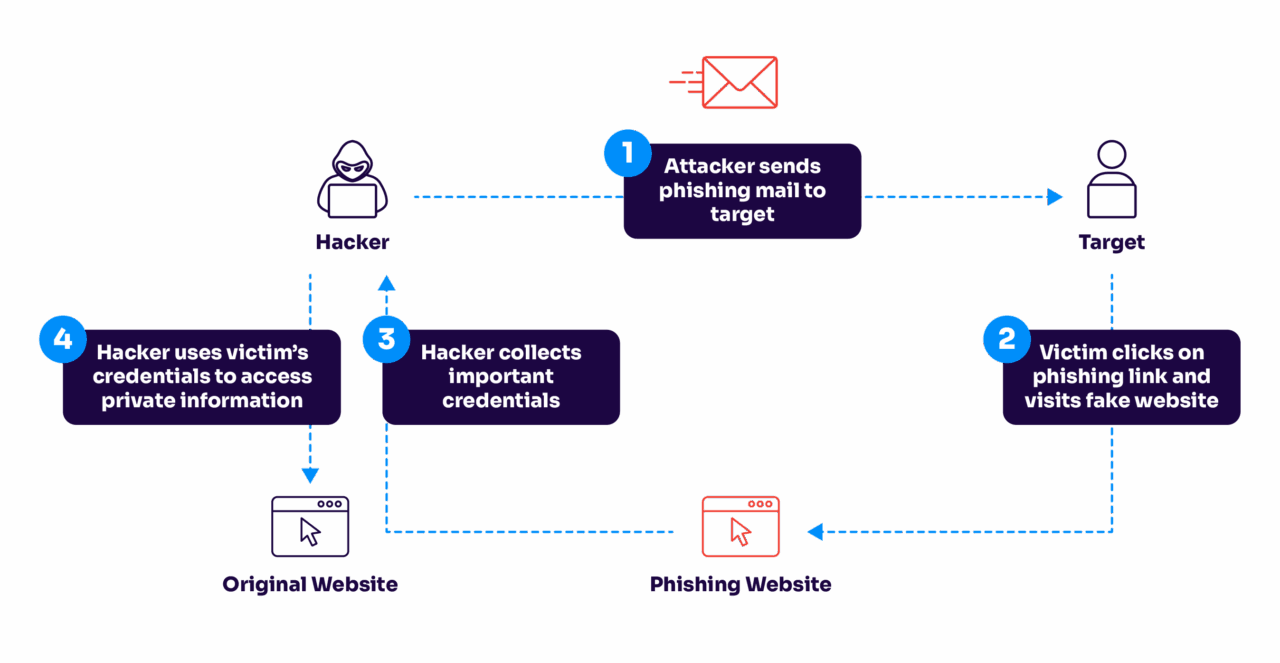
To date, the security industry has struggled to keep the lid on email fraud because it’s focused so heavily on understanding the content of email. But the more we double down on filters, link blacklisting, and other forms of content-based controls, the more the bad guys come up with new content variations that bypass these filters.
And yet, most companies are not putting enough focus on strong sender identity policies—despite the fact that deceptive identity is the primary technique used by phishers.
This mismatch between threat and response allows the majority of phishing attacks to reach users’ inboxes.
How to check if an email is legitimate
Before we dive into the technical stuff, here’s what you should look for when verifying an email sender:
1. Check the actual email address, not just the display name
Ever notice how scammers love to use display names like “Amazon Support” or “Netflix Account Team”? Here’s the thing—anyone can make their display name look legitimate. The real truth lies in the actual email address.
Legitimate:
- support@amazon.com
- help@netflix.com
Suspicious:
- amazon-support@gmail.com
- netflix.accounts@hotmail.com
2. Look at the sender domain closely
The domain (the part after the @) tells you a lot about who’s really sending the email. Scammers often use domains that look similar to legitimate ones, hoping you won’t notice the difference.
Legitimate domains:
- @netflix.com
- @amazon.com
- @microsoft.com
Suspicious domains:
- @netf1ix.com
- @arnaz0n.com
- @micros0ft-support.com
3. Check the email headers
Think of email headers as the DNA of your message—they tell you exactly where an email came from and how it got to you. Most email clients let you view these headers:
- Gmail: Click the three dots → “Show original”
- Outlook: Open email → File → Properties
- Apple Mail: View → Message → All Headers
Look for these key signs:
- “SPF: Pass”
- “DKIM: Pass”
- Matching “From” and “Return-Path” domains
How bad actors fake sender identity
It’s surprisingly easy for attackers to manipulate the identity of an email. There are three ways this can be done: exact-domain spoofing, lookalike domains, and open signups.
Exact-domain spoofing
With exact-domain spoofing, attackers appear as legitimate senders coming directly from the company’s own domain. In other words, they simply put an actual company email address in the “From” field of the phishing message. For most domains, this will be delivered in exactly the same way a legitimate message is, no matter where it was actually sent from.

Lookalike domains
Attackers don’t necessarily have to spoof the exact domain to hit their target. Many use lookalike or cousin domains to get a “close enough” counterfeit of a brand or person’s email identity. For example, they may be able to trick plenty of users simply by registering something like w1dgets.com or wdgets.com to pass off as widgets.com.
This frequently works because of the way humans process information — filling in numbers and letters smoothly and unconsciously when they scan a word with missing or transposed letters.

Open signups that use a recognizable name
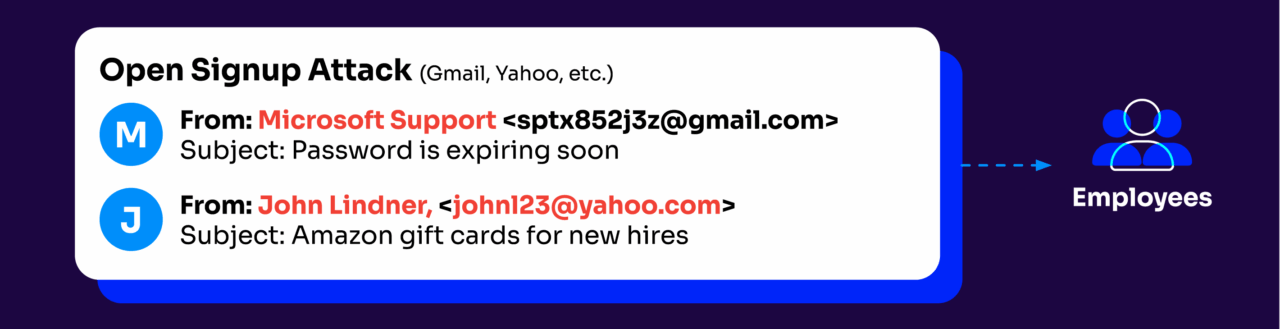
Another effective and simple method attackers use to fake sender identity is the open-signup attack. Also known as a “friendly-from” attack, this technique uses a generic email account on any number of trusted cloud email providers while assigning a “safe” looking fake display name to that address.
How to better verify email sender identity
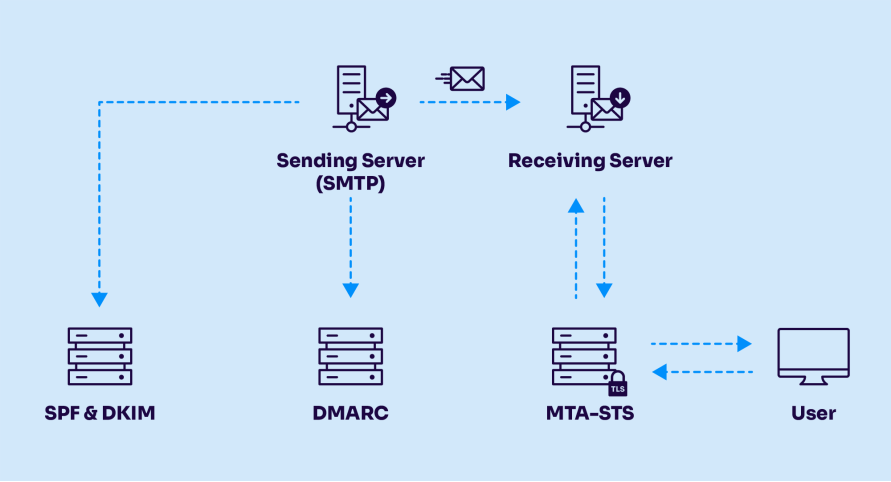
1. Implement DMARC, SPF, and DKIM
Email authentication protocols work together to prove sender legitimacy.
- Domain-based Message Authentication, Reporting & Conformance (DMARC): DMARC guarantees that emails align with established policies and provides visibility into unauthorized use of your domain. By setting up DMARC, you can specify how your domain handles emails that fail SPF or DKIM checks.
- Sender Policy Framework (SPF): SPF allows domain owners to specify which IP addresses are allowed to send email on behalf of their domain. It helps prevent attackers from sending emails from unauthorized IP addresses.
- DomainKeys Identified Mail (DKIM): DKIM adds a digital signature to your emails, allowing recipients to verify that the email hasn’t been altered in transit and that it indeed comes from your domain.
Without DMARC enforcement, spoofed emails can still reach inboxes, even if SPF or DKIM exist.
2. Use advanced email filtering solutions
Deploy advanced email filtering solutions that leverage artificial intelligence and machine learning to analyze and identify suspicious patterns and anomalies in email sender information. These solutions can detect subtle variations and inconsistencies that might indicate a phishing attempt.
3. Regularly monitor DMARC reports
Regularly review DMARC aggregate reports (RUA) to gain insights into who is sending email on behalf of your domain. These reports can help you identify unauthorized senders and take corrective actions to mitigate the risk of email spoofing.
4. Use email authentication services
Consider using specialized email authentication services that provide comprehensive management and monitoring of your email authentication protocols. These services can help double-check that your SPF, DKIM, and DMARC records are correctly configured and enforced.
5. Conduct security audits
Perform regular security audits of your email infrastructure to identify and address vulnerabilities related to email sender identity. These audits should include a review of your email authentication practices and an assessment of your overall email security posture.
Common sender email verification challenges
Let’s break down some of the trickiest situations you might run into and how to handle them.
When perfect isn’t actually perfect
You get an email that looks exactly like one from your bank—same logo, same footer, even the same writing style. However, scammers have gotten really good at copying legitimate emails. Instead of just scanning for obvious red flags like bad grammar, you need to dig deeper. Hover over links without clicking them, check if images are actually embedded (not just linked), and pay attention to how they greet you. A bank that usually says “Hi [name]” probably wouldn’t switch to “Dear Sir” out of nowhere.
The multiple sender situation
Large companies like Amazon don’t just send emails from one domain. You might get messages from amazon.com, marketplace.amazon.com, or aws.amazon.com. This is totally normal, but it can make verification tricky. The key is making sure these domains follow a pattern—they should end with the company’s main domain. You can also check the company’s help center, which usually lists their official sending domains.
The urgency problem
Getting an urgent email from your boss asking for a wire transfer? This is where things get interesting. Business email compromise scams work because they play on our natural instinct to help, especially when it seems to come from someone we trust. If you get an unexpected request about money or sensitive data, take a breath. Call or message your boss through another channel—even if the email says it’s super urgent.
Those pesky account alerts
“Your account will be suspended!” “Unusual login detected!” Sound familiar? These alerts tap into our fear of losing access to important services. Instead of clicking email links, open your browser and log in to your account directly. If there’s really an issue, it’ll show up in your account notifications.
The attachment conundrum
Unexpected attachments are like mystery packages on your doorstep—even if they seem to come from someone you know, you need to be careful. Modern scammers have gotten clever with their tricks, disguising harmful files as innocent PDFs or making them password-protected to bypass security scans. If someone sends you an unexpected file, especially one that needs a password or claims to be a shared document, reach out to the sender through another channel first.
When tools disagree
Sometimes your email security tools might give you mixed signals about whether a sender is legitimate. When this happens, it’s better to err on the side of caution. Trust the more restrictive result, and if you’re still not sure, there’s nothing wrong with verifying through another channel. No legitimate company will ever fault you for being careful with your security.
Trust your instincts. If something feels off about an email—even if you can’t put your finger on exactly what—take the time to verify. Five minutes of double-checking beats dealing with the aftermath of a successful scam.
Verify sender identity with Valimail
Implementing strong email authentication measures like DMARC, SPF, and DKIM, and leveraging advanced filtering and monitoring solutions, reduces the risk of fraudulent emails reaching your users.
Valimail is here to help. Our comprehensive email authentication solutions simplify the process of verifying sender identity to guarantee only legitimate emails reach your customers’ inboxes.
But the first step is getting visibility into your sending services. But this can be tricky when you can only find their IP addresses in a lengthy DMARC XML report.
Thankfully, Valimail Monitor identifies all of your senders by name – all for free.
The first step in verifying sender identity is creating your free Monitor account, no trials or credit cards required.
Frequently asked questions about how to verify email sender identity
How can I tell if an email sender is fake?
Start by ignoring the display name and focusing on the actual email address. Display names can say anything, but the domain after the “@” tells you who really sent the message. Compare it to the organization’s official domain listed on their website.
Next, check for subtle domain tricks like swapped letters, extra words, or unusual top-level domains (for example, .co instead of .com). If you’re still unsure, open the email headers and confirm whether SPF, DKIM, and DMARC authentication passed.
If the email creates urgency, asks for sensitive information, or pressures you to click immediately, that’s an additional red flag—even if the sender looks legitimate.
Can a phishing email still pass SPF and DKIM?
Yes, and this is one of the most misunderstood parts of email security. SPF and DKIM only confirm that an email was sent from an authorized server or signed correctly—they do not guarantee the sender identity shown to the user is legitimate.
Attackers can send phishing emails from authorized infrastructure or misaligned domains that still pass SPF and DKIM checks.
DMARC is what ties everything together. It verifies that the domain in the “From” address aligns with SPF and DKIM and tells receiving mail servers what to do when something doesn’t match. Without DMARC enforcement, spoofed emails can still reach inboxes.
Why do phishing emails still reach inboxes even with security tools in place?
Because many organizations rely too heavily on content-based detection. Filters that analyze links, attachments, or wording can be bypassed with small changes, especially with AI-generated phishing content.
Another major reason is the lack of DMARC enforcement. Many domains publish DMARC in monitoring mode only, which provides visibility but doesn’t block fraudulent messages.
As long as attacker emails aren’t explicitly rejected, inboxes remain vulnerable—even with modern security tools.
What is the difference between a spoofed domain and a lookalike domain?
A spoofed domain uses the exact legitimate domain in the “From” field (for example, billing@company.com,), even though that company didn’t actually send the email.
A lookalike domain is a different domain that visually resembles the real one, such as compány.com, cornpany.com, or company-support.com.
Both are effective, but exact-domain spoofing is far more dangerous because it looks completely authentic unless DMARC is enforced.
Use Valimail’s free tool to find lookalike domains that could threaten your organization.
Do small businesses need email sender verification, too?
Absolutely. Small businesses are frequent phishing targets because they often lack strict authentication controls.
Even a basic DMARC policy helps prevent attackers from impersonating your domain and damaging your reputation.
Sender verification isn’t just an enterprise problem—it’s a trust problem for every organization that sends email.