Your SPF record worked perfectly when you had five email services. Then you added a marketing automation platform. Then a new CRM, a support ticketing system, and a transactional email for your app. Now, legitimate emails are getting rejected, and you’re getting reports that SPF authentication is failing.
This is likely due to the SPF 10 lookup limit.
Over 10 SPF lookups = random email failure. If your SPF record exceeds the 10 DNS lookup limit, legitimate email is likely failing — even if everything looks configured correctly. And if you’ve already enforced DMARC, you’re gambling with deliverability.
The limit is right there in the SPF specification: no more than 10 DNS lookups per SPF evaluation. Exceed that limit, and SPF returns a PermError, which means authentication fails entirely. Your emails get blocked or filtered to spam, even though they’re completely legitimate.
This isn’t a minor technical problem you can put off until next month. It’s a fundamental constraint that forces organizations to make impossible choices between email services they need and email authentication that works. Below, we’ll break down why this limit exists, how to check if you’re hitting it, and (most importantly) how modern automation solves this problem permanently.
What is the SPF 10 lookup limit?
SPF records can trigger a maximum of 10 DNS lookups during authentication. If your SPF record requires more than 10 lookups to validate, the entire SPF check fails with a PermError result.
When a receiving mail server checks SPF, it looks at your SPF record and processes each mechanism in order. Some mechanisms trigger DNS lookups to retrieve additional information.
For example: v=spf1 include:_spf.google.com include:sendgrid.net include:mail.zendesk.com ~all
This record triggers three DNS lookups (one for each include:). Seems manageable, right?
Well, not so fast.
The problem is that those included records can have their own includes, which trigger additional lookups. When you include _spf.google.com, that record might include two or three other domains. Each of those counts toward your total.
So what looks like three lookups in your record might actually be seven or eight once all the nested includes get processed. And that’s just from three services.
Why the SPF lookup limit exists
The 10 lookup limit was established for two legitimate reasons:
- DNS performance: Each lookup requires a DNS query, which takes time and resources. Too many lookups slow down email delivery and put unnecessary load on DNS infrastructure.
- DoS prevention: Without a limit, attackers could create SPF records with circular references or excessive lookups that overwhelm DNS servers. The limit prevents this kind of abuse.
The limit was set decades ago when organizations used far fewer email services. Today, it’s common for companies to use 15, 20, or 30+ different platforms that send email. The limit hasn’t scaled with how modern email ecosystems work.
What happens when you exceed the limit
When your SPF record requires more than 10 lookups, authentication doesn’t just quietly fail. It crashes, even if you’re already at DMARC enforcement.
The receiving mail server gets a PermError result, and most mail servers treat PermError the same as SPF failure. Your email either gets:
- Blocked entirely
- Filtered to spam
- Flagged with warnings
And because DMARC requires either SPF or DKIM to align, hitting the SPF lookup limit can break your entire email authentication setup if DKIM isn’t configured properly across all your services.
How to check your SPF lookup count
Before you can confirm (much less fix) the problem, you need to know if you’re actually hitting the limit. The easiest way is to use our free domain checker, which automatically counts your SPF lookups and tells you if you’re approaching or exceeding the limit.
Check your
domain now
Enter your domain to see if it’s vulnerable to spoofing or if others are sending emails on your behalf. Instantly check your DMARC, SPF, and BIMI status with a detailed security report.
You’re not fully protected, learn more here.
Check your
domain now
Enter your domain to see if it’s vulnerable to spoofing or if others are sending emails on your behalf. Instantly check your DMARC, SPF, and BIMI status with a detailed security report.
You’re not fully protected, learn more here.
Check your
domain now
Enter your domain to see if it’s vulnerable to spoofing or if others are sending emails on your behalf. Instantly check your DMARC, SPF, and BIMI status with a detailed security report.
You’re not fully protected, learn more here.
Your Domain
Not protected AGAINST IMPERSONATION ATTACKS
DMARC NOT AT ENFORCEMENT
exampledomain1.com
Authentication Status for January 10, 2025
DMARC at Enforcement
SPF Record Configured
BIMI Ready
exampledomain1.com
Authentication Status for January 10, 2025
DMARC at Enforcement
SPF Record Configured
BIMI Ready
This tool doesn’t just count the obvious includes in your record, either. It follows all the nested includes and gives you an accurate total.
Why organizations hit the lookup limit
The lookup limit isn’t just an enterprise problem. Even small to mid-sized companies routinely exceed it. Here’s why:
Multiple email service providers for different functions
Modern businesses don’t use a single email platform. They use specialized services for different needs:
- Marketing emails (Mailchimp, Klaviyo, HubSpot)
- Transactional emails (Twilio SendGrid, Postmark, Amazon SES)
- Support tickets (Zendesk, Intercom, Freshdesk)
- CRM communications (Salesforce, Pipedrive)
- HR and recruiting platforms (Greenhouse, BambooHR)
- Notification services (Twilio, PagerDuty)
Each service needs authorization in your SPF record. That’s six to eight include: statements right there, and we haven’t even counted the nested lookups within each service.
Nested includes from third-party services
Email service providers don’t keep their infrastructure simple. A single include: for a major ESP might trigger three or four additional lookups. Google Workspace, Microsoft 365, Salesforce—they all have SPF configurations with multiple nested includes.
You include one domain, but you’re actually triggering multiple lookups without realizing it.
Acquisitions and mergers are consolidating infrastructure
Company A acquires Company B. Now you’re managing email infrastructure for both organizations, often running duplicate services while you work through the integration. Your SPF record balloons to accommodate everything, and suddenly you’re way over the limit.
Shadow IT and unauthorized services
Different departments adopt email services without coordinating with IT or security. Sales starts using a new outreach tool. Marketing experiments with a new automation platform. Each one adds to your SPF record until you exceed the limit and everything breaks.
The traditional solutions (they don’t work)
When organizations hit the SPF lookup limit, they typically try one of three approaches. Unfortunately, all of them create more problems than they solve.
1. SPF flattening
SPF flattening is the most common workaround. The process takes all the IP addresses from your included domains and writes them directly into your SPF record, eliminating the includes (and the lookups they trigger).
So instead of: v=spf1 include:_spf.google.com include:sendgrid.net ~all
You get: v=spf1 ip4:74.125.0.0/16 ip4:108.177.0.0/16 ip4:167.89.0.0/16 … ~all
That seems like a straightforward solution, but it creates more problems:
- It’s static and goes stale immediately. The moment a service provider changes their sending IPs (which happens regularly), your flattened record is out of date. Emails start failing authentication because the new IPs aren’t in your record. You won’t know until deliverability tanks.
- It requires constant manual maintenance. Someone needs to re-flatten your SPF record every time a provider updates their infrastructure. Miss an update, and authentication breaks.
- DNS record size limitations. SPF records are TXT records, which have a 255-character limit per string (though multiple strings can be concatenated). Flattening a complex email infrastructure can produce records that approach or exceed practical DNS size limits.
- You lose granularity and control. Once everything is flattened into IP ranges, you can’t easily identify which IPs belong to which service. Troubleshooting becomes significantly harder.
Ultimately, SPF flattening is a band-aid on a structural problem. It might get you under the lookup limit temporarily, but it creates a fragile, high-maintenance system that’s prone to breaking unexpectedly.
2. Removing services
Some organizations try to solve the lookup limit by removing services from their SPF record. That’s not really a solution, though. It’s giving up.
Removing legitimate services means those services fail SPF authentication. Your email deliverability suffers, customers don’t receive important messages, and you’re essentially choosing which business functions get to send authenticated email.
For growing businesses, this isn’t viable. You need all your services to work, not just the ones that fit within an arbitrary limit.
3. Multiple domains or subdomains
Another workaround involves splitting email across multiple domains or subdomains, each with its own SPF record:
- marketing.company.com for marketing emails
- transactional.company.com for app notifications
- support.company.com for helpdesk messages
This technically works around the lookup limit, but it creates major complexity:
- Brand consistency issues: Emails come from different domains, which can confuse recipients and hurt trust.
- Management overhead: You’re now managing multiple DNS configurations, multiple DMARC policies, and multiple authentication setups.
- Doesn’t solve the core problem: Each subdomain still has the 10 lookup limit. You’ve just distributed the problem across multiple places.
All three traditional approaches share the same flaw: they work around the limitation rather than solving it. You’re still constrained, just in different ways.
The automated solution: Valimail Instant SPF®
There’s a better way to handle the SPF lookup limit, and that’s to eliminate it entirely using automation and dynamic SPF management.
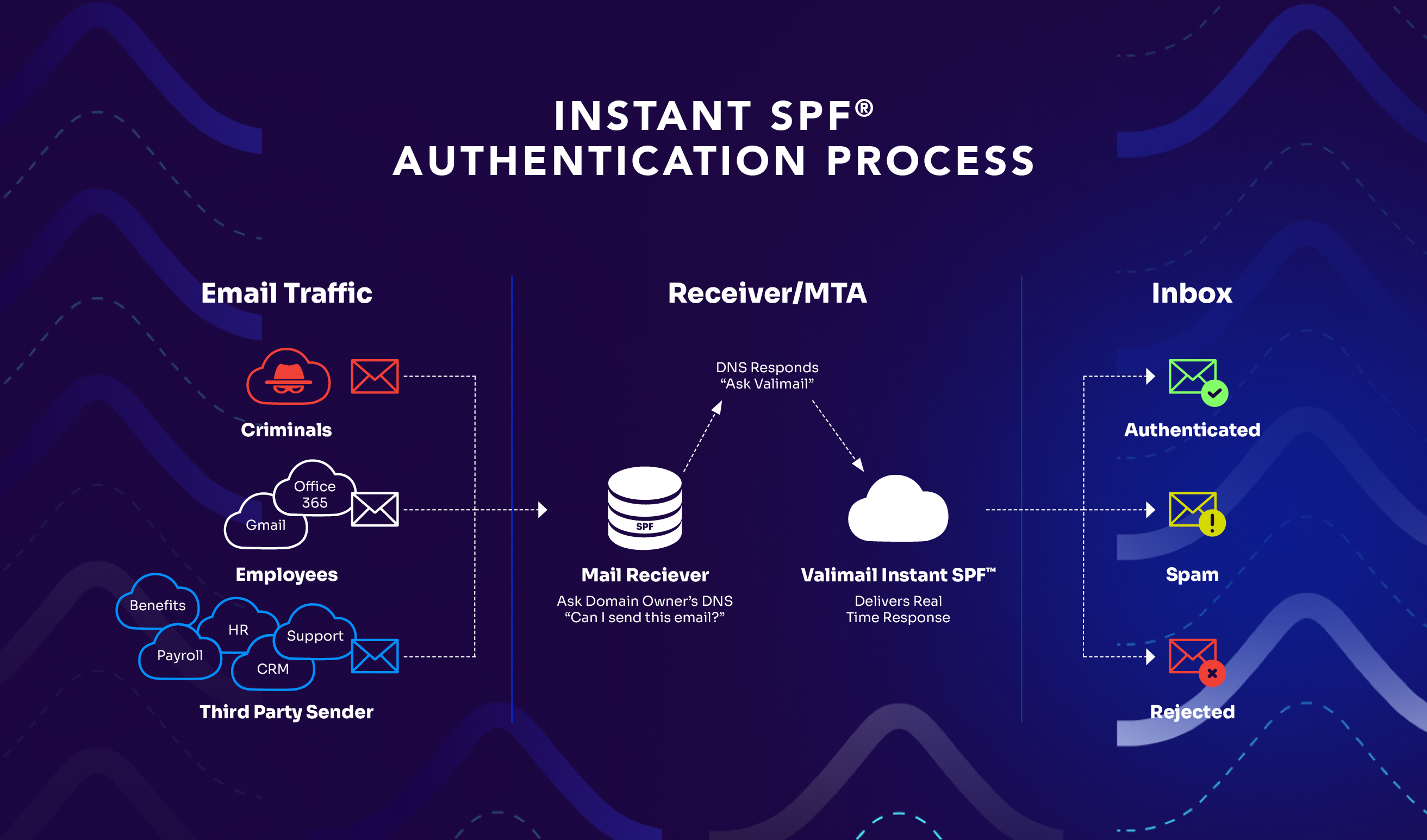
Valimail Instant SPF is a patented technology that uses SPF macros (part of the official SPF specification) to provide real-time, per-sender authentication without triggering the 10 lookup limit.
Instead of listing every service in a static SPF record that gets evaluated all at once, Instant SPF responds dynamically based on who’s actually sending the email.
Here’s the technical approach:
When you implement Instant SPF, your SPF record points to Valimail using SPF macros: v=spf1 include:%{i}._ip.%{h}._ehlo.%{d}._spf.vali.email ~all
Those %{i}, %{h}, and %{d} markers are SPF macros. These are placeholders that get filled in with real information when an email is being authenticated:
- %{i} = the sending IP address
- %{h} = the EHLO/HELO hostname
- %{d} = your domain
When a receiving mail server checks SPF for your email, it queries Valimail’s system with those specific details. Valimail then returns an SPF response tailored to that exact sender instead of your entire list of authorized services.
For example, if the email is coming from Mailchimp, Valimail returns: v=spf1 include:servers.mcsv.net ~all
And if the next email comes from Twilio SendGrid, Valimail returns: v=spf1 include:sendgrid.net ~all
Each response is targeted, accurate, and only includes what’s necessary for that specific authentication check. One lookup. Every time.
How this bypasses the 10 lookup limit
Receiving mail servers never trigger more than one or two lookups, regardless of how many services you’ve authorized in Valimail’s platform.
Your actual SPF record (the one pointing to Valimail) is one lookup. Valimail’s dynamic response adds one more. Total: two lookups, no matter if you’re using 5 services or 500.
The 10 lookup limit doesn’t apply because you’re not cramming everything into a static record that gets evaluated all at once.
Built-in security advantage
With a traditional SPF record, anyone can query your DNS and see your complete list of authorized email services. That information helps attackers:
- Identify which platforms you use
- Target specific services for phishing attacks
- Map your email infrastructure
With Instant SPF, your full sender list isn’t exposed in public DNS. Attackers querying your SPF record see the macro instead of your list of services. They can’t easily map your email ecosystem.
| Feature | Traditional SPF | Valimail Instant SPF |
| Lookup limit | Hard cap at 10 lookups | No limit—unlimited services |
| Updates | Manual DNS changes required | Automatic, no DNS updates needed |
| Maintenance | Constant monitoring and updating | Fully automated |
| Accuracy | Goes stale when providers change infrastructure | Real-time, always current |
| Scalability | Limited by lookup count | Scales infinitely |
| Security | Full sender list visible in DNS | Sender list hidden from public view |
| Onboarding new services | Days (DNS changes + propagation) | Minutes (one-click authorization) |
| Risk of breaking | High (easy to exceed limit or misconfigure) | Minimal (automated validation) |
How to use Valimail Instant SPF
Here’s what implementing and using Instant SPF looks like in practice:
- Update your SPF record: Replace your existing SPF record with the Valimail macro. This is a one-time DNS change. After this, you’ll never need to touch your SPF record again.
- Authorize your sending services in Valimail: Log into the Valimail platform and enable the services you want to authorize. Valimail already knows the SPF configurations for thousands of email service providers, so authorization is usually just clicking a button next to the service name.
And that’s it. No ongoing DNS management, no manual IP monitoring, no maintenance headaches.
In the Valimail platform, you see a list of detected email senders (identified from your DMARC reports). For each sender, you can:
- Enable it (authorize it to send on your behalf)
- Disable it (block it from passing SPF)
- Configure custom directives if needed
When you enable a service, Valimail immediately starts returning the appropriate SPF response for emails from that service.
After the initial setup, you never touch DNS again for SPF purposes. When you need to add a new service, you just enable it in Valimail. Same thing for removing a service. Everything happens through the platform, with changes taking effect immediately.
Use Valimail to permanently bypass the SPF 10 lookup limit problem
The SPF 10 lookup limit is a real problem with real business consequences, even if you’re at DMARC enforcement. Traditional workarounds like SPF flattening are brittle, high-maintenance, and ultimately don’t scale.
Don’t use them.
Automation through Valimail Instant SPF solves the problem permanently. You get unlimited sending services, zero manual DNS management, real-time authentication that stays accurate as providers change infrastructure, and complete protection against lookup limit failures.
If you’re approaching the lookup limit, already past it, or tired of managing SPF manually, it’s time to see what automated SPF management can do. Schedule a demo with our team to see how Instant SPF eliminates your lookup limits.
Frequently asked questions
Q. What happens if we enforce DMARC while over the SPF 10 lookup limit?
If your SPF record exceeds 10 DNS lookups, SPF returns a PermError during evaluation.
Most mailbox providers treat PermError the same as SPF failure.
If you’ve enforced DMARC (p=quarantine or p=reject) and SPF fails:
- DMARC may fail
- Legitimate email may be quarantined or rejected
- Inbox placement becomes inconsistent
In short: DMARC enforcement + broken SPF can cause legitimate business email to be blocked.
Q. Is using SPF macros safe? Are they part of the official standard?
Yes, absolutely. SPF macros are defined in RFC 7208, the official SPF specification. They’ve been part of the standard since the beginning and are fully supported by all compliant mail servers. Valimail Instant SPF doesn’t use any non-standard extensions or workarounds. It leverages functionality that’s built into SPF itself.
Q. Will Instant SPF work with our existing email service providers?
Yes. Instant SPF works with all email service providers that support standard SPF authentication. Valimail maintains configurations for thousands of ESPs, including all major platforms like Microsoft 365, Google Workspace, Salesforce, Twilio SendGrid, Mailchimp, and many others. If you’re using a specialized or custom ESP, Valimail can configure support for it.
Q. What happens if Valimail’s system goes down? Will our email stop working?
Instant SPF includes redundancy and high availability. Valimail operates globally distributed DNS infrastructure with multiple fallbacks. In the extremely unlikely event of a service disruption, the SPF record is configured with a soft fail (~all) rather than hard fail (-all), which means email continues flowing even if SPF can’t be validated.
That said, Valimail maintains enterprise-grade uptime that exceeds standard DNS service levels.
Q. Can we test Instant SPF before fully migrating?
Yes. Valimail provides testing capabilities where you can validate that Instant SPF is returning the correct responses for your services before changing your production SPF record. You can also implement Instant SPF while your DMARC policy is set to monitoring mode (p=none) to guarantee everything works correctly before enforcing.
Q. How does Instant SPF handle services that frequently change their sending IPs?
That’s one of Instant SPF’s biggest advantages. Because Valimail dynamically queries the service provider’s current SPF configuration in real-time, IP changes are reflected immediately. When a provider updates their infrastructure, those changes are automatically incorporated into authentication checks. You never need to update anything.
Q. Does Instant SPF increase DNS query time or slow down email delivery?
No. The DNS query process with Instant SPF is actually faster than evaluating a complex SPF record with multiple nested includes. Instead of following 10+ includes and processing dozens of IP ranges, receiving mail servers make one or two targeted queries and get a simple, direct answer. Email delivery speed is unaffected.