The DMARC pct tag controls what percentage of your email gets checked against your DMARC policy. Set it to 100 (or leave it out entirely), and your policy applies to all messages. Set it to 0, and your policy applies to nothing—leaving your domain wide open.
Unfortunately, we’re seeing more domains publish DMARC records with pct=0, often paired with p=quarantine.
On paper, it looks like enforcement. In practice, it’s the same as having no policy at all.
The pct tag was designed for gradual rollouts. It’s a way to test enforcement on a small percentage of traffic before going all-in. Used correctly, it’s a useful tool. Used incorrectly (or indefinitely), it undermines everything DMARC is supposed to do.
Below, we’ll explain what the DMARC pct tag does, why pct=0 is dangerous, when the tag actually makes sense, and how to reach real enforcement without leaving your domain exposed.
What is the DMARC pct (percentage) tag?
The pct tag is an optional setting defined on a DMARC record. This tag specifies the percentage of messages from a domain’s mail stream that will be checked to see if they pass authentication. Setting pct to 0 means none will be checked, while 100 means that all will be checked.
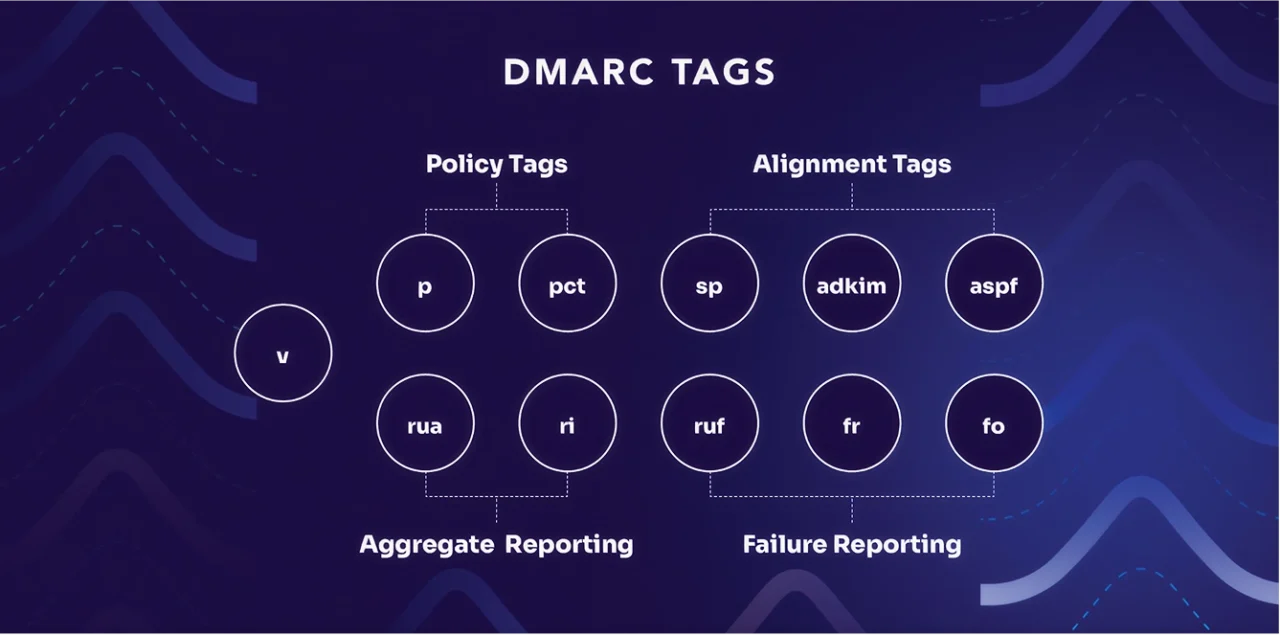
The pct tag was conceived as a way to allow domain owners to do a “slow rollout” of DMARC enforcement, building their confidence in the setup over time. The intent was to allow domains to shift to a more stringent DMARC policy for a subset of the mainstream.
As this was happening, they could monitor the new configuration for errors and complaints. If all went well, they could increase that subset’s size once they feel confident they’ve identified and addressed all issues.
However, this can still leave your domain open to impersonation attacks until you set pct=100 or remove the pct tag entirely. Therefore, the pct tag should be set to less than 100 only for a short time.
Additionally, there is a stark difference between how the pct tag is defined in the DMARC standard, how most people believe it functions, and how it has been deployed at scale globally. The misuse of the pct tag can cause more problems than it solves.
Unfortunately, we’ve been seeing an increase in the number of published DMARC records with a “pct” tag that effectively eliminates any benefit that DMARC might otherwise provide.
One particularly problematic case is when a domain publishes a record with:
pct=0 and p=quarantineThe problem with DMARC pct=0
Domain owners can set the pct to any integer from 0 to 100.
Setting it to 100 is the same as having no pct tag at all. By default, with no pct tag, the policy will apply to 100% of the messages and to those that fail authentication. Setting the pct tag to 0 (zero) is one small step up from having no policy at all.
It is increasingly becoming more common to see DMARC records in the wild with the following settings:
p=quarantine; pct=0This combination of tags means the quarantine policy will be applied to 0% of the domain’s message flow. In other words, this setting is the same as p=none. Even more alarming is that the quarantine policy is enforced, further reducing the effectiveness of the policy.
Don’t be fooled: A DMARC record with “p=quarantine; pct=0” is far from enforcement. It is potentially a useful first step along the road to enforcement. However, remember that it is effectively the same as p=none in terms of its ability to stop spoofed messages.
The same lessons apply as they do with a setting of p=none. A DMARC record with this setting may be a useful first step for gathering data on your email ecosystem via aggregate reports. But you cannot count on it to provide protection, and it needs to be considered at enforcement.
While the inclusion of “quarantine” in your record might offer some illusions of security, the truth is that the protection doesn’t exist. It may also fool a compliance checklist or simple domain checker tools, creating a false sense of security while leaving your front door wide open.
| pct value | What it means |
|---|---|
| pct=0 | Policy applies to 0% of traffic (no protection) |
| pct=25 | Policy applies to 25% of traffic |
| pct=50 | Policy applies to 50% of traffic |
| pct=100 or omitted | Policy applies to 100% of traffic (full protection) |
Applying the DMARC pct tag for mailing lists
There is one use case in which “p=quarantine; pct=0” makes sense—but only after you have spent ample time monitoring and understanding your mail flow with a setting of p=none.
Some mailing lists rewrite their From: headers when they see a domain at p=quarantine or p=reject, so that mail from domains at enforcement can be delivered when sent through the list. In mailman, for instance, this is called “from munging.”
Keep in mind, munging headers like this is not an optimal solution to the problem of mailing lists breaking DMARC authentication. At Valimail, we strongly support the ARC standard, which is a robust solution to this problem.
This munging behavior does not affect domains with p=none DMARC records and only kicks in once you move to quarantine or reject. You won’t see its impact until you change policies. Thus, there is a case to be made for using:
p=quarantine; pct=0With this policy in place, you can monitor the impact of moving to enforcement.
However, this is ultimately misguided. Because the mailing list changes the From: address to be its own, DMARC reports for this mailstream now go to the list—not to you, the domain owner. Once this change is in place, you lose all visibility into this part of your mail flow.
While this will ultimately happen once you move to enforcement, a “p=quarantine; pct=0” setting is absolutely the wrong place to start diagnosing the problem. This issue underscores why it’s so critical to start at p=none and carefully monitor your mail flow through analysis of DMARC reports that explicitly accurately identify all senders and receivers.
What is DMARC enforcement?
A domain is “at enforcement” if all non-authenticating messages that appear to come from a domain—or its subdomains—will be quarantined or rejected.
The following settings are considered to be at enforcement:
p=reject [with no pct tag]p=reject; pct=[anything]p=quarantine [with no pct tag]p=quarantine; pct=100However, if you have a policy of quarantine and a pct set to anything less than 100, you’re not at enforcement. That’s because some proportion of your message flow effectively has a policy of “none.” If that pct value is pct=0, 100% of your message flow has no policy.
In short: Watch those tags closely. If your DMARC vendor or consultant advises you to use p=quarantine in combination with anything in the pct tag, ask them why.
Why pct=0 still shows up—and why you should avoid it
Despite its flaws, you might see pct=0 settings “in the wild” for several reasons:
- Misunderstood guidance from vendors or consultants
- Compliance theater—setting a record that looks good but does nothing
- Fear of false positives leading to overly cautious rollout strategies
But a pct=0 policy ultimately hurts your brand’s email integrity. It delays enforcement, exposes your domain to abuse, and doesn’t give you the protection DMARC is designed to provide.
Ensure DMARC enforcement with Valimail
Using pct=0 to delay DMARC enforcement might seem like a cautious move—but it comes with real risks.
Valimail Monitor helps you take the guesswork out of the DMARC journey. With it, you can:
- Get visibility into all your sending sources
- Review DMARC aggregate reports in real time
- Identify and resolve authentication failures
- Build a confident path to full enforcement
Don’t let pct=0 give you a false sense of security. Monitor your domain’s email ecosystem the right way—starting today.
Frequently asked questions about pct tag
Is it ever safe to leave pct=0 in place?
Only temporarily and only for edge-case testing (like mailing list munging). Even then, it’s not ideal. The safest approach is to gather insight at p=none and move toward enforcement confidently.
Does removing the pct tag default to 100%?
Yes. If the tag is omitted, your policy applies to 100% of messages by default.
How can I safely move to enforcement?
Start with a p=none policy. Use a solution like Valimail Monitor to analyze your email ecosystem, identify legitimate senders, and correct authentication issues. Once the mail flow is understood and controlled, you can shift to enforcement.
What does the DMARC pct tag do?
The DMARC pct (percentage) tag specifies what percentage of your email traffic should be subject to your DMARC policy. If you set pct=50, only half of your messages that fail authentication will have the policy applied. The other half will be treated as if you had no policy. If you omit the tag entirely, your policy applies to 100% of messages by default.
What happens if I set DMARC pct to 0?
Setting pct=0 means your DMARC policy applies to none of your email traffic. Even if you have p=quarantine or p=reject, a pct=0 setting makes it effectively the same as p=none. Your domain remains unprotected against spoofing, and attackers can still impersonate you.