For the last four decades, email recipients have had to make a leap of faith every time they check their inbox. This is because the creators of the Internet didn’t include a way to verify the sender’s identity.
At the time, there was no indication that 91% of all attacks would start with a phishing email. They didn’t include provisions for sender authentication, which, in retrospect, is a significant flaw in the overall security of email.
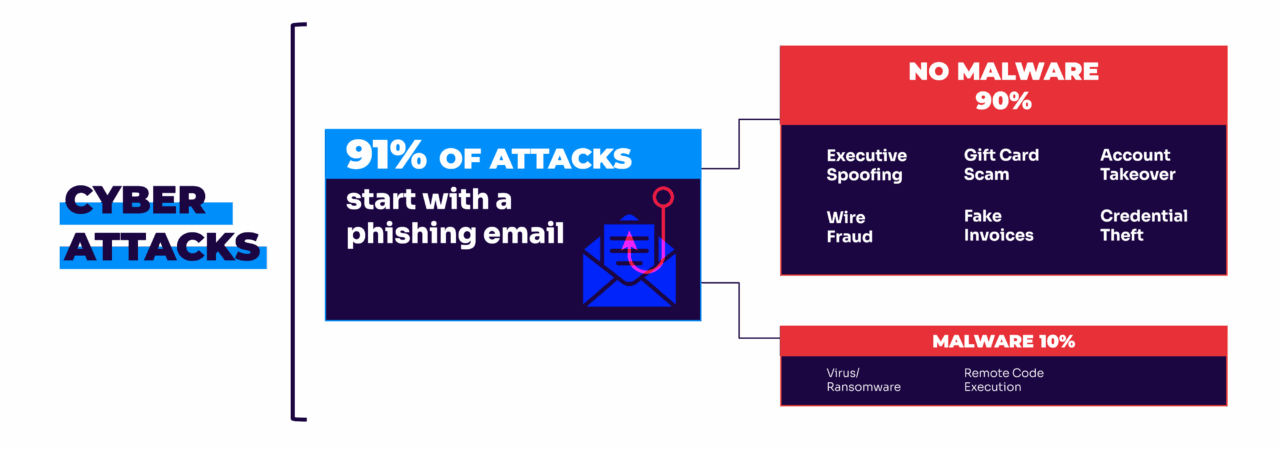
It leaves recipients to wonder, “Is this message really from who it appears to come from? Or is it fake?”
This is email’s “original sin.” It means that it’s easy for an impostor to imitate another person, company, or government agency by manipulating the From: and Reply-to: fields in an email header. Learn how to stop these spoofed and fake emails.
| Key takeaways: – Email’s original flaw allows anyone to fake a sender address. – DMARC, SPF, and DKIM work together to stop same-domain spoofing. – Continuous monitoring is essential to keep authentication effective. You can start with Valimail Monitor, which gives you actionable insights to prepare for full DMARC enforcement. |
How to stop fake emails
Email authentication is the modern fix to this legacy flaw.
Using email authentication, a domain owner can enable only those third-party senders that it explicitly authorizes to use their domain. Once email authentication is set to enforcement, everyone else who attempts to send email using that domain name gets blocked or quarantined — automatically.
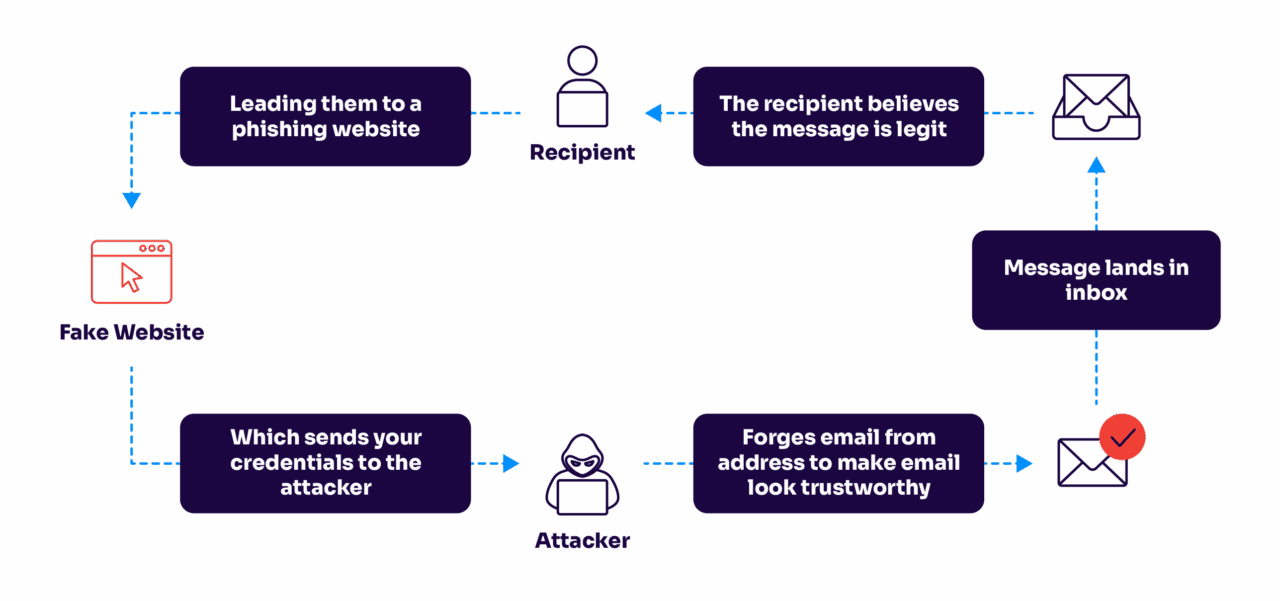
In other words, anyone receiving email from an authenticated domain can be sure that it really comes from that domain or from a service authorized by the domain owner.
How does email authentication stop fake email?
Email authentication is based on the application of several widely accepted standards. The cornerstone standard, Domain-based Message Authentication, Reporting, and Conformance (DMARC), incorporates and builds on two predecessors, Sender Policy Framework (SPF) and DomainKeys Identified Mail (DKIM).
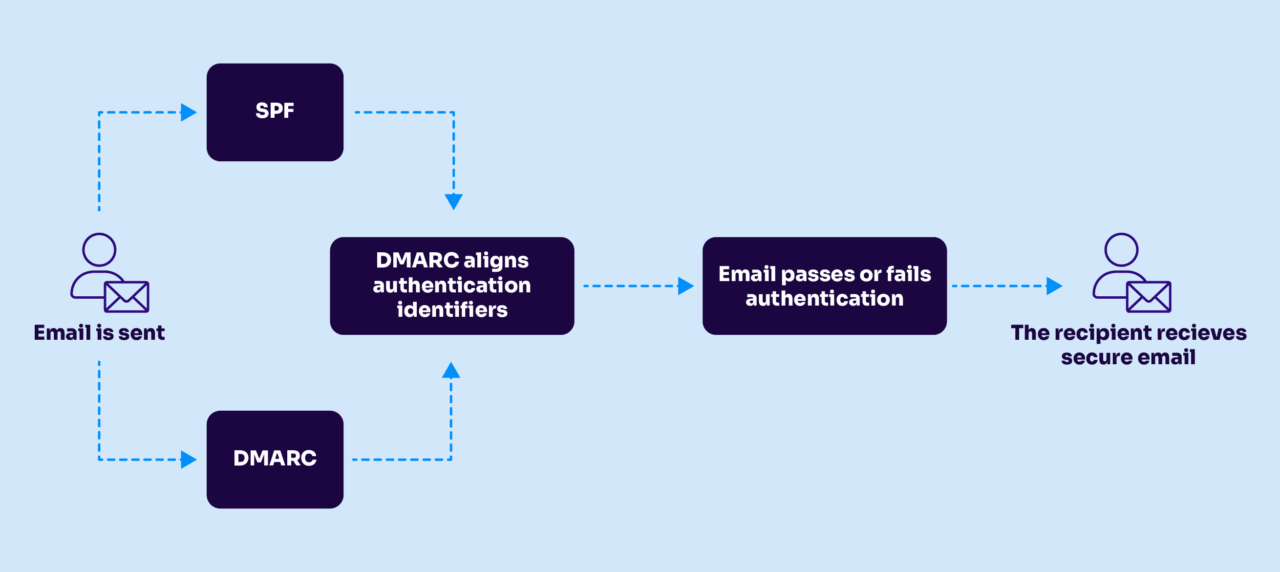
When fully enforced, DMARC ensures that only authorized senders can transmit messages on the domain owner’s behalf. This eliminates same-domain phishing attacks, which account for 91% of all fake emails.
In addition, two newer standards also play a role:
- Authenticated Relay Chain (ARC) ensures that authentication survives forwarding by email lists and forwarders.
- Brand Indicators for Message Identification (BIMI) offers domain owners a way to signal authentication by designating logo images—a digital watermark—that appears only alongside authenticated messages.
Curious what your email authentication status is? Valimail’s free domain checker makes it easy to see if your domain is vulnerable to threats. If anything is flagged as red, this means your domain could be used to send fake email.
Check your
domain now
Enter your domain to see if it’s vulnerable to spoofing or if others are sending emails on your behalf. Instantly check your DMARC, SPF, and BIMI status with a detailed security report.
You’re not fully protected, learn more here.
Check your
domain now
Enter your domain to see if it’s vulnerable to spoofing or if others are sending emails on your behalf. Instantly check your DMARC, SPF, and BIMI status with a detailed security report.
You’re not fully protected, learn more here.
Check your
domain now
Enter your domain to see if it’s vulnerable to spoofing or if others are sending emails on your behalf. Instantly check your DMARC, SPF, and BIMI status with a detailed security report.
You’re not fully protected, learn more here.
Your Domain
Not protected AGAINST IMPERSONATION ATTACKS
DMARC NOT AT ENFORCEMENT
exampledomain1.com
Authentication Status for January 10, 2025
DMARC at Enforcement
SPF Record Configured
BIMI Ready
exampledomain1.com
Authentication Status for January 10, 2025
DMARC at Enforcement
SPF Record Configured
BIMI Ready
Does email authentication stop spam?
Yes and no.
Email authentication is designed to specifically stop spoofed email, which is when someone else uses your domain for malicious reasons. Someone could send spam pretending to be you from a completely different email address. But if you have strong email authentication set up, they can’t use your exact email address to send these fake emails.
There are protocols to help prevent spam, but email authentication wasn’t originally built with the purpose of stopping spam. It was designed to protect domains from spoofers who could impersonate a domain they don’t own.
However, a large portion of spam comes from spoofed emails, which email authentication can help reduce. These are arguably some of the most damaging types of spam as well because the spoofed sender has intentions of tricking the recipient.
Stop fake emails with Valimail
Ready to stop fake emails and impersonators for good? Partner with Valimail.
Valimail helps organizations protect their domains, brand reputation, and customer trust automatically.
With Valimail Monitor, you can:
- Gain real-time visibility into who’s sending email on your behalf
- Identify and stop unauthorized senders before enforcement
- Simplify DMARC adoption with automated, data-driven insights
Start with Monitor to understand your email landscape, and take the first step toward full DMARC protection.
Frequently asked questions about how to stop fake emails
How can I stop fake emails from using my domain?
The most effective way to stop fake emails is to implement DMARC, SPF, and DKIM. These authentication standards verify that only authorized senders can use your domain name. Once DMARC is set to enforcement, all unauthorized emails are automatically blocked or quarantined, preventing spoofers from sending fake messages that appear to come from you.
Does DMARC completely stop spoofed or fake emails?
DMARC stops same-domain spoofing, which is when attackers send emails pretending to be from your exact domain. This eliminates the most dangerous type of fake email — the kind that tricks recipients into trusting a fraudulent message. While DMARC doesn’t stop every type of spam, it drastically reduces impersonation attacks and helps restore trust in your email communications.
How can I tell if someone is sending fake emails from my domain?
You can detect fake or spoofed emails using a DMARC monitoring solution like Valimail Monitor. It provides real-time visibility into who is sending emails using your domain and flags any unauthorized senders. With these insights, you can take action before enforcement to ensure legitimate traffic continues while blocking impersonators.
How do I stop fake invoice emails?
Fake invoice emails are one of the most common types of phishing attacks — often designed to trick employees into approving fraudulent payments or sharing sensitive financial data.
To stop fake invoice emails, organizations should:
- Implement DMARC, SPF, and DKIM to prevent spoofed senders from impersonating trusted domains.
- Train employees to verify invoice sources and never click links or attachments from unknown senders.
- Use DMARC monitoring solutions, like Valimail Monitor, to identify unauthorized senders and spot fraudulent activity early.
With DMARC enforcement in place, attackers can no longer send invoices that appear to come from your company’s domain — blocking a major vector for financial fraud.
How do I stop all these fake emails from my account?
If fake or suspicious emails appear to come from your account, it doesn’t always mean you’ve been hacked; in many cases, attackers are spoofing your email address to trick others. To stop this, you need to prove which emails are genuinely yours and block the rest.
Here’s how:
- Authenticate your domain with DMARC, SPF, and DKIM so receiving mail servers can verify your messages.
- Use DMARC reports to see if anyone is pretending to send from your account.
- Enable two-factor authentication (2FA) and update passwords on all email-related services to secure your real inbox.
- If you use third-party senders (like marketing tools), make sure they’re properly aligned with your authentication setup.
When DMARC enforcement is active, only authorized mail from your account passes authentication. Any impersonation attempts, even from lookalike domains, are automatically rejected before they reach inboxes. Thankfully, you can identify any potential lookalike domains with Valimail’s free domain lookalike finder.