
SPF failure occurs when a sending mail server’s IP address isn’t authorized by the domain’s Sender Policy Framework (SPF) record. The receiving server checks the sending IP against the domain’s published SPF policy, and if the IP isn’t listed as permitted, the email fails.
What happens next depends on several factors: whether the failure is a hard fail or soft fail, whether DKIM and DMARC are in place to override the result, and how the receiving server handles non-compliant mail.
This guide covers the most common SPF failure types and error messages, what each one means, and how to fix them — including SPF validation errors, sender invalid errors, permerror, temperror, the 10-lookup limit, and what to do when SPF fails in Microsoft 365.
SPF fail terminology
| Fail* | Indicates that the sending host is definitely not authorized to use the domain (often colloquially referred to as a “hard fail”) |
| Soft fail* | The sending host is probably not authorized to use the domain |
| SMTP Envelope | Email metadata, including the “envelope from address” that SPF validates |
| DKIM | A protocol that enables organizations to take responsibility for messages in a way that’s verifiable by the recipient. |
| DMARC | Uses SPF and/or DKIM to validate the usage of the domain in the visible “From” header. |
* Note that DMARC treats both hard and soft fails as equally failing SPF, and SPF failures may be overridden by DMARC if DKIM passes.
Understanding SPF
Before we try to really understand what it means to fail SPF, we should aim to understand SPF itself. A more inclusive explanation can be found in our article What is SPF?, but we’ll provide a quick overview in this section.
SPF uses TXT records in a domain’s DNS record to publish a policy defining which servers and networks are authorized to use that domain in email. For a thorough examination of the syntax of such policies, consult our article on SPF Record Syntax. To get a basic idea of what an SPF record actually looks like, let’s use the nslookup command line tool to view the SPF record of a real, live domain. For our example, we’ll use the University of Constantinople:
$ nslookup -type=TXT constantinople.edu.gr | grep -m 1 'spf'
constantinople.edu.gr    "v=spf1 -all"
So the policy is “v=spf1 -all”. This is a pretty simple policy: The v tag indicates we are using version 1 of SPF (which is the only version right now) and the -all mechanism means that we hard fail any noncompliant mail. So what IP address must a sender have to pass this policy? Well, we never include an acceptable source, meaning that any mail sent from the University of Constantinople’s main domain will fail SPF. This is because the university handles mail from a different domain, thus anything sent from constantinople.edu.gr ought to be discarded as fraudulent.
Blanket failure policies like this, where there is no legitimate source to send mail from, are common on domains that aren’t used for email but want to prevent abuse from would-be fraudsters.
A final note: SPF prevents senders from claiming that their email originates with a server approved for sending from your domain. But the actual from address that recipients see when they open an email is not verified by SPF. That from address is protected by a different protocol called DMARC.

Common SPF error types and what they mean
SPF failures don’t all look the same. Different errors have different causes and different fixes. Here’s what each one means.
SPF validation error
An SPF validation error typically means the receiving server attempted to evaluate your domain’s SPF record and found something wrong with it — a syntax problem, an invalid mechanism, or a record that couldn’t be parsed correctly. The result is that SPF fails even if the sending IP would otherwise be authorized.
Common causes include missing or misplaced semicolons, unsupported mechanisms, or records that exceed the SPF character limit. Run your record through an SPF syntax validator before troubleshooting the sending infrastructure — a formatting error is easy to miss and easy to fix once found.
SPF sender invalid
The “sender invalid” error means the IP address of the sending server is not listed as an authorized sender in the domain’s SPF record. This is one of the most common SPF failures and usually means either the sending service was never added to the SPF record, or the record was updated without including all required IP ranges for that service.
Fix: Identify the sending service responsible for the failing message, locate its required SPF include: statement or IP range (usually documented in the service’s setup guide), and add it to your domain’s SPF record. Allow time for DNS propagation before retesting.
SPF permerror — too many DNS lookups
SPF has a hard limit of 10 DNS lookups per evaluation. When a receiving server processes your SPF record and exceeds that limit, it returns a permerror result, which causes SPF to fail entirely — even for legitimate senders.
This is one of the most common issues for organizations using multiple third-party sending services. Each include: mechanism in your SPF record typically adds at least one lookup, and nested includes from third-party providers can add several more without you realizing it.
Fix: Audit your SPF record and count all DNS lookups. Consolidate where possible, remove outdated include: statements for services you no longer use, or use a hosted SPF solution that resolves the 10-lookup limit automatically without manual flattening. Valimail’s patented Instant SPF® eliminates the lookup limit entirely with a single, private include statement that handles all authorized senders dynamically.
SPF temperror
A temperror (temporary error) occurs when the receiving server encounters a transient DNS issue while evaluating your SPF record — typically a DNS timeout or intermittent unavailability. Unlike a permerror, a temperror is not caused by a misconfiguration in your SPF record. It’s a transient failure that typically resolves on its own.
If you’re seeing frequent or consistent temperrors rather than isolated incidents, it may indicate instability with your DNS hosting provider. Persistent temperrors are worth investigating with your provider.
No SPF record found
If the receiving server queries your domain’s DNS TXT records and finds no SPF record published, SPF returns a neutral or none result. Without a published SPF record, receiving servers have no instructions for handling email that fails authentication checks — leaving the domain exposed to spoofing.
Fix: Create and publish an SPF TXT record in your DNS provider’s control panel. A basic starting record looks like this:
v=spf1 include:[your-sending-service] ~allStart with a soft fail (~all) while you verify that all legitimate senders are covered, then move to a hard fail (-all) once you’re confident in the record’s accuracy.
550 SPF hard fail error
A 550 error is a permanent SMTP rejection — the receiving server refused to accept the message entirely. When triggered by SPF, the bounce notification typically includes a message like:
550 5.7.1 SPF Hard Fail: Domain [domain] does not designate [IP] as permitted sender.This occurs when your SPF record uses the -all (hard fail) qualifier and the sending IP isn’t listed as authorized. If the rejected email should have been allowed through, the sending service is missing from your SPF record. If it was unauthorized, the hard fail is working exactly as intended.
What happens when email fails SPF
If a recipient server checks the sending server’s IP and finds that it’s not authorized in an existing SPF policy, and that policy specifies that a hard or soft fail should occur, then the email can be said to have failed SPF.
In the case of a hard fail, this means the email may be discarded outright, never even arriving in the inbox of the intended recipient. In such a case, the sender will usually receive a “bounce” email from the receiving server letting them know that their email did not reach its destination. The bounce error code should be 550 and have an accompanying message akin to the following:
“550 SPF Hard Fail: Domain [your domain here] does not designate [sending IP address] as permitted sender.”
Note, however, that such an error message isn’t guaranteed.
A soft fail, on the other hand, will typically not produce a bounce on its own. Rather, the email might be marked as suspicious in the user’s inbox. Mail servers can reject messages for any reason their administrators choose, thus the ambiguity about what exactly will occur given a hard vs soft fail.
As RFC 7208 Section 8.5 puts it, a soft fail “MAY subject the message to closer scrutiny than normal.” While the RFC never breaks down “closer scrutiny” into a more actionable definition, one prevalent interpretation is to send the mail to a spam folder. For example, ProtonMail, a popular email provider focused on privacy, relegates mail that soft-fails SPF into the spam folder and attaches this message to let the user know why the message has been segregated as spam:

DMARC can alter the outcome of SPF failure in two surprising ways:
- If DKIM passes, DMARC may pass the message even if SPF fails
- DMARC doesn’t distinguish between a soft or hard SPF fail. DMARC considers either outcome to have failed SPF.
For additional information on DMARC and DKIM and their relationship to each other, check out our article on DMARC Versus DKIM.

|
Platform
|
Success Rate
|
Success Rate Frame
|
Estimated FTEs
|
Maintenance
|
Marketplace Apps Identified
|
|---|---|---|---|---|---|
|
DIY Manual
|
20%
|
12+ Months
|
2-3
|
Never ending
|
~100 services
|
|
Outsourced Manual
|
<40%
|
9-12 Months
|
1-2
|
Never ending
|
~100 services
|
|
Valimail Automation
|
97.8%
|
0-4 Months
|
0.2
|
Automated
|
6,500+
|
Ways to Avoid SPF Failures
Let’s get to the meat and potatoes of understanding how SPF can fail. This includes intentional failure (failing an email sent from an unauthorized IP) or improper behavior (implementing the record incorrectly, thus blocking mail that we’d prefer to allow). We’ll also discuss how to prevent the latter, incorrect behavior.
1. Testing a Policy Before Deployment
There are two ways to test a policy before deploying it to a live domain in production: validating the syntax or actually trying the policy out in a test environment.
The easiest method is to parse and validate the record’s syntax. For example, we can use the SPF Record Checker to verify that a record’s syntax is correct. The tool also provides helpful warnings for common errors, misconfigurations, and bad practices
After you’ve verified that the record’s syntax is correct, you can also try the record on a test domain or subdomain and test everything out before deploying to any production domains.
How to Locate a Domain’s SPF Policy
Once a policy is deployed, we can view it (and thereby study, analyze, and understand it) by performing a DNS query. We must be sure to query the TXT record, as many DNS lookup tools will only show us a domain’s IP address by default (the A or AAAA record, for IPv4 and IPv6, respectively).
One common way to accomplish this is using a command line tool like nslookup, much like we did for the University of Constantinople earlier in this article. Let’s try with a different domain this time.
$ nslookup -type=TXT pulaski-tn.com | grep spf
pulaski-tn.com    "v=spf1 a mx  include:us-spf.atmailcloud.com ~all"
Voila! We can see that in addition to authorizing IPs matching this domain’s A record (and AAAA record, if the connection is made over IPv6) as well as the IPs of the hosts in its MX records, the beautiful town of Pulaski, Tennessee uses an include mechanism to import the policy of another domain as well. If something doesn’t match, a soft fail is issued.
For users who are less savvy on the command line, a variety of web tools exist that will perform an equivalent DNS query for you and present the results on your browser. For example, Valimail’s own Domain Sender Identity Verification tool displays a domain’s SPF record (along with a treasure trove of additional security information).
2. DMARC with DKIM Pass May Override SPF Fail
Suppose you have implemented SPF with hard fail enabled, then you sent an email from an IP not authorized in your SPF policy. Yet the email arrived in the recipient’s inbox just fine. What gives?
One possible culprit is DMARC. If an email passes DKIM, DMARC will pass it even if it fails SPF. So if you are sending from a server that complies with DKIM, and you have DMARC set up, don’t be surprised if emails that you’d expect to fail make it to the inbox untouched.
3. Avoid Using the SPF Record Type Instead of TXT
SPF records are implemented using the TXT record type in DNS. However, for a time, SPF had its own dedicated kind of record. This never caught on and is largely forgotten. Nevertheless, many major domain providers still offer this record type. For example, the SPF record type appears as an option in the DNS record web panel for the popular domain registrar Gandi.net:
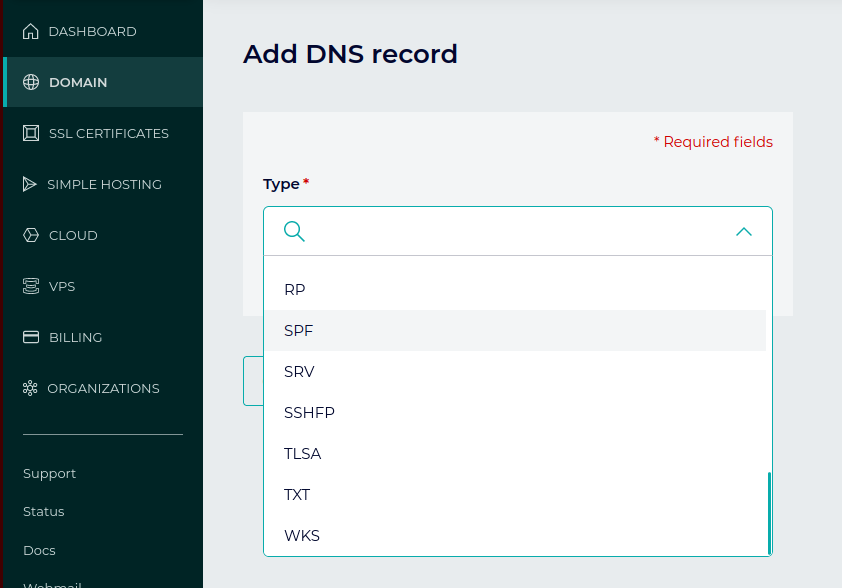
The dedicated SPF record type should not be used. If you’ve used this by mistake and are experiencing problems, there’s a good chance this is a contributing factor. SPF records should be deployed using TXT records.
No Valid Source for Mail
If -all is set (hard fail) and you neglect to authorize any IPs to send from your domain, you might end up with all mail being rejected! This can also happen if you use an include mechanism to import another domain’s policy that doesn’t include any valid sources.
This outcome is fine, of course, if it’s your intention that no mail be sent from your domain.
4. Mail Forwarding Breaks SPF
Mail that is automatically forwarded by an arbitrary server will typically fail SPF. When the forwarding server’s IP address is not known beforehand, there is no way to authorize it in an SPF policy. If you expect frequent forwarding of emails from your domain, you can set these to soft fail or set them to use DMARC. DMARC will pass an email as long as it passes one of either SPF or DKIM. DKIM can work with automatically forwarded mail, as long as there were no alterations to the message during the act of forwarding.

Minimal resource requirement with only a single one time DNS change needed
DMARC Enforcement guarantee and 97.8%+ success rate
100% Automated service discovery and 1-click validation
How to fix SPF failures
Most SPF failures trace back to one of a handful of root causes. Here’s how to fix the most common ones:
- Missing sender in your SPF record: Identify the sending service from the bounce error or DMARC report, then add its required
include:statement to your SPF record. Every service that sends email on your domain’s behalf needs to be explicitly authorized. - Exceeding the 10-lookup limit: Audit your current SPF record using an SPF lookup tool. Count every mechanism that requires a DNS query (
include:,a:,mx:,ptr:). If you’re over 10, consolidate, remove outdated entries, or use a hosted SPF solution that handles the limit automatically. - Syntax errors: Run your SPF record through a validator before and after any changes. Common mistakes include missing semicolons between mechanisms, duplicate
v=spf1tags, and using deprecated mechanisms. Even a single character error can invalidate the entire record. - Mail forwarding: SPF breaks on forwarded mail by design — the forwarding server’s IP isn’t in your SPF record and can’t be predicted. The fix is to rely on DKIM for forwarded mail scenarios, since DKIM signatures survive forwarding as long as the message body isn’t modified. Enable DKIM and configure DMARC so that a DKIM pass is sufficient for DMARC to pass the message.
- Subdomains without SPF records: Your main domain’s SPF record doesn’t automatically protect subdomains. Any subdomain used for sending email needs its own SPF record, or it should be explicitly covered by your DMARC policy’s subdomain tag (
sp=).
After making any changes to your SPF record, allow time for DNS propagation before testing again — changes can take anywhere from a few minutes to a few hours to take effect globally.
SPF failures in Microsoft 365
SPF failures in Microsoft 365 (formerly Office 365) have a few causes specific to how Exchange Online handles outbound email.
- Missing Microsoft SPF include: Microsoft 365 sends outbound email from shared IP ranges. If your SPF record doesn’t include Microsoft’s required include statement, email sent through Exchange Online will fail SPF at the receiving server. Add the following to your SPF record:
include:spf.protection.outlook.com
- Hybrid Exchange environments: Organizations running a hybrid setup (on-premises Exchange plus Exchange Online) sometimes encounter SPF failures because on-premises servers are routing through Exchange Online Protection (EOP) without being explicitly listed in the SPF record. Verify that all mail relay paths are accounted for in your record.
- Email forwarding through Exchange Online: When Exchange Online forwards email to external addresses, the originating IP changes and the original SPF authorization no longer applies. This is a known SPF limitation in forwarding scenarios. For forwarded email, DKIM is more reliable than SPF — enable DKIM signing and configure DMARC so that a DKIM pass is sufficient for authentication.
- Finding the specific error: In Microsoft 365, SPF failure details appear in the message headers as
Authentication-Results. Look forspf=failorspf=softfailand the associated reason code. The Microsoft 365 admin center and Exchange message trace are also useful for identifying the source of failures at scale.
Fix your SPF failures for good
SPF is easy to set up, and it is a valuable asset in email security when used alongside newer email security protocols like DKIM, DMARC, and others. It’s an effective tool for preventing certain kinds of abuse, so it’s important that aspiring email administrators properly understand both its applications and limitations.
The strategies and information presented above are meant to provide you with a starting point in understanding what causes an SPF policy to fail an email or go wrong more generally. From there, you should be able to begin to debug, or better yet, prevent unwanted SPF failures while making sure mail that actually is fraudulent does fail.