


BETA TOOLING 🧪

Free SPF record validator

Check your SPF record to catch syntax errors, lookup overages, and misconfigurations before they affect your email delivery.

SPF is one of the three pillars of email authentication. 

Unfortunately, SPF errors are easy to introduce and hard to spot. A missing include causing legitimate messages to bounce, a nested lookup that pushes you over the 10-lookup limit, a leftover mechanism from a service you stopped using years ago — any of these can cause authentication failures without any obvious warning sign. Your email keeps flowing, DMARC reports start showing failures, and tracking down the cause means manually parsing an impossible-to-read DNS record.

There’s a better way.

Our free SPF record validator checks your record’s syntax, lookup count, and mechanism breakdown to show you exactly what’s passing, what’s failing, and why.

What is SPF hero image

Go beyond SPF record validation and get visibility

Validate your SPF record for free

Validating your SPF syntax is a solid first step. But knowing your record is formatted correctly is different from knowing your email is technically secure. What you really need to know is who’s sending email from your domain…and whether they’re supposed to be. 

That’s where Valimail Monitor can help. 

It’s free, and it shows you every service sending on your behalf, identified by name rather than a raw IP address. You’ll see where you’re passing and failing DMARC, spot any senders that shouldn’t be there, and get a clear picture of what it’ll take to reach enforcement.

No credit card, no trial period, no obligations.

Check your
domain now

Enter your domain to see if it’s vulnerable to spoofing or if others are sending emails on your behalf. Instantly check your DMARC, SPF, and BIMI status with a detailed security report.

You’re not fully protected, learn more here.

Check your
domain now

Enter your domain to see if it’s vulnerable to spoofing or if others are sending emails on your behalf. Instantly check your DMARC, SPF, and BIMI status with a detailed security report.

You’re not fully protected, learn more here.

Check your
domain now

Enter your domain to see if it’s vulnerable to spoofing or if others are sending emails on your behalf. Instantly check your DMARC, SPF, and BIMI status with a detailed security report.

You’re not fully protected, learn more here.

View Full Report

Your Domain

Not protected AGAINST IMPERSONATION ATTACKS

DMARC NOT AT ENFORCEMENT

exampledomain1.com

Authentication Status for January 10, 2025

DMARC at Enforcement

SPF Record Configured

BIMI Ready

exampledomain1.com

Authentication Status for January 10, 2025

DMARC at Enforcement

SPF Record Configured

BIMI Ready

Learn more about SPF records

Why SPF flattening breaks

SPF automation: Why SPF flattening breaks (and what to do instead)

Read more

SPF10LookupLimitProblem

The SPF 10 lookup limit problem: why it breaks email

Read more

spf ~all vs spf ~all

SPF -all vs ~all: Which should you use in your DMARC record?

Read more

Frequently asked questions about our SPF record validator

What is an SPF record?

An SPF record is a DNS TXT record that specifies which mail servers and services are authorized to send email from your domain. When a receiving mail server gets an email claiming to be from your domain, it checks your SPF record to verify that the sending IP is on the authorized list. If it is, SPF passes. If it isn’t, SPF fails, which can cause the email to be quarantined or rejected depending on your DMARC policy.

An SPF validator parses your published SPF record and checks for syntax errors, counts DNS lookups against the 10-lookup limit, maps out the mechanisms being used (such as ip4, ip6, include, and all), and returns a pass or fail result with an explanation. It shows you what receiving mail servers will see when they evaluate your record (which is often different from what you expect).

The SPF specification limits DNS lookups to 10 during record evaluation. Each include: statement, a: mechanism, and mx: mechanism counts toward that limit — and some of those statements trigger additional lookups of their own. If your record exceeds 10 lookups, it returns a permerror, which causes SPF to fail for all email from your domain. The SPF 10-lookup limit is one of the most common causes of SPF failures for organizations with multiple sending platforms.

Syntax validation confirms that your SPF record is correctly formatted. It checks that the mechanisms are valid, the record is properly structured, and there are no obvious errors. SPF testing simulates how a receiving server would evaluate your record for a specific sending IP or service to determine whether it would pass or fail. Ultimately, syntax validation catches configuration errors, while testing helps you verify that specific senders are authorized.

When you use include: statements, you’re pulling in another domain’s SPF record. If that domain changes its IPs or adds new mechanisms, your SPF policy changes too, even though you didn’t touch your record. A sending service updating its infrastructure is one of the most common reasons SPF starts failing without any apparent cause on your end.

No. Publishing multiple SPF records for the same domain is a configuration error that causes SPF to fail. If you need to authorize multiple senders, they all need to be included within a single SPF record using include: statements or IP mechanisms. A validator will flag multiple SPF records as an error if it detects them.

For syntax errors and missing senders, you can usually fix them directly in DNS. For lookup limit issues, the most reliable long-term fix is SPF automation. Valimail’s Instant SPF® (included in Valimail Enforce) removes the lookup limit entirely by dynamically resolving your authorized senders without requiring manual DNS changes.

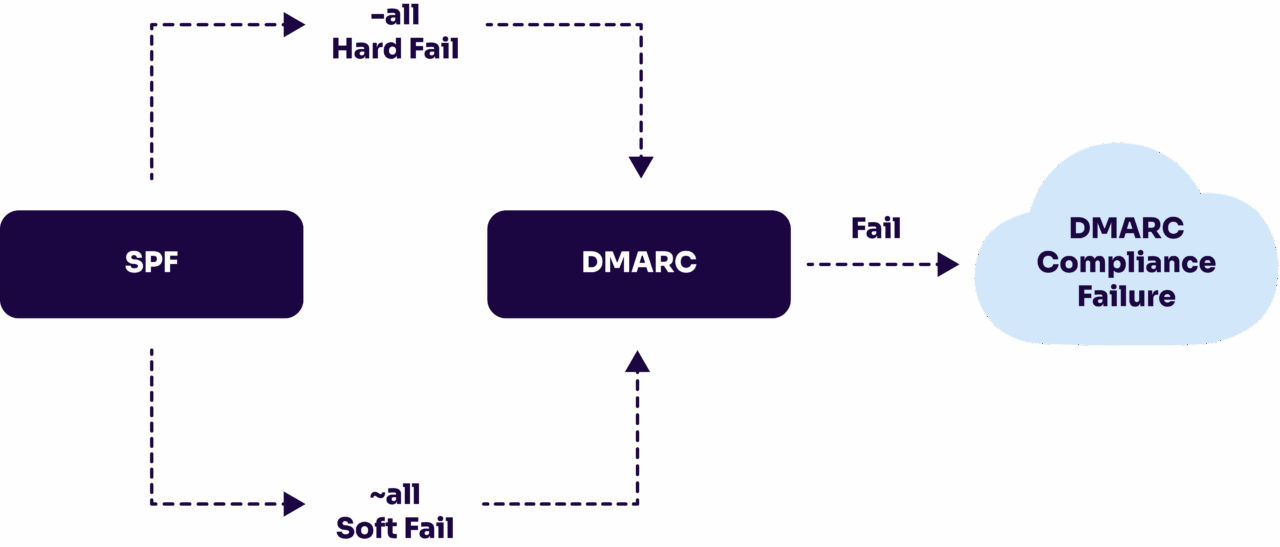
The all mechanism at the end of your SPF record tells receiving servers what to do with mail that doesn’t match any of your authorized senders. 

  • ~all (softfail) flags non-matching mail as suspicious but still delivers it. 
  • -all (hardfail) tells the receiving server to reject it outright. 

For domains at DMARC enforcement, -all is the stronger and recommended choice because it leaves no ambiguity about what should and shouldn’t be sending on your behalf.
spf softfail vs spf hardfail

Without an SPF record, receiving mail servers have no way to verify whether a message from your domain is authorized. That makes your domain easier to spoof and can hurt your deliverability, since many mail servers treat a missing SPF record as a red flag. It also means you can’t fully pass DMARC, since DMARC requires either SPF or DKIM alignment. Plus, relying on DKIM alone leaves you more exposed if a key is ever compromised.

When an email is forwarded, the sending IP changes to the forwarding server’s IP (and that’s almost certainly not listed in your SPF record). That causes SPF to fail even for legitimate mail. This is one of the reasons DKIM alignment is important alongside SPF: DKIM signatures survive forwarding, so a properly configured DKIM setup can keep DMARC passing even when SPF breaks down in forwarding scenarios.

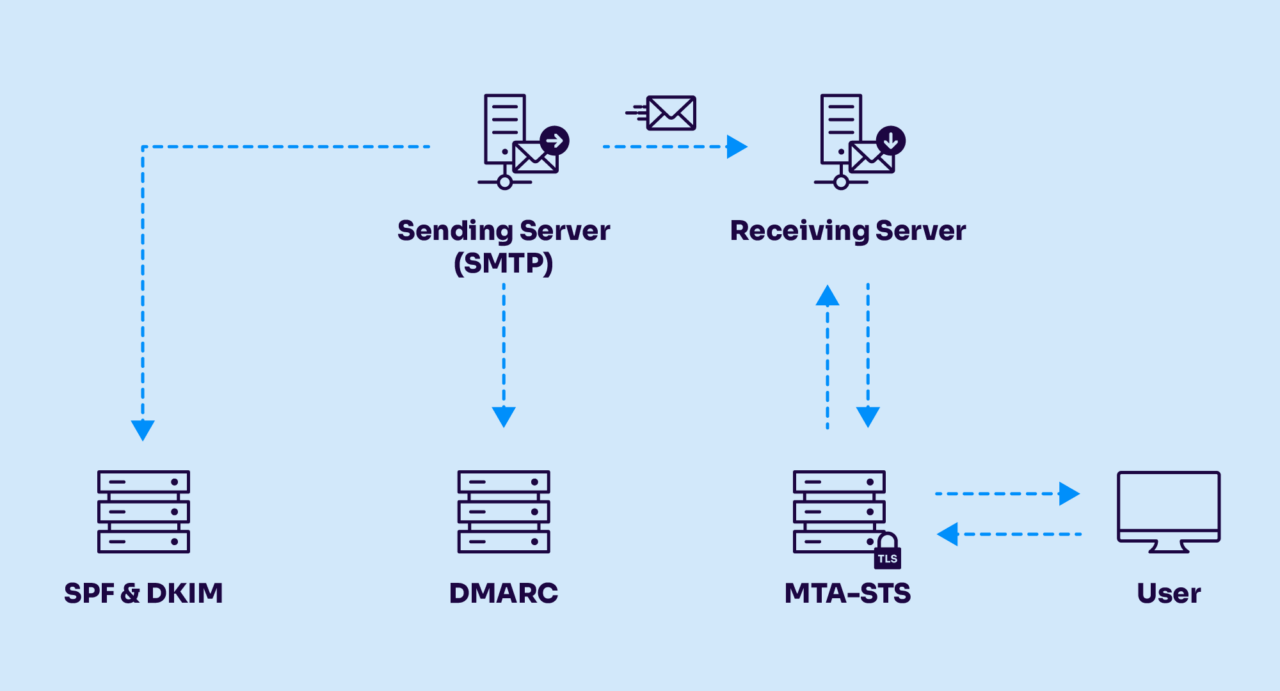
SPF verifies that a message was sent from an IP address that your domain has authorized. DKIM verifies that the message content hasn’t been tampered with in transit, using a cryptographic signature. DMARC checks whether SPF or DKIM passes, and whether the authenticated domain aligns with the visible “From” address. All three work together, and a gap in any one of them can undermine the whole setup.
how dmarc policy works with spf and dkim flowchart

Get started for free
with Monitor

Start your path to DMARC enforcement with a panoramic view of the traffic being sent on your behalf.
No trial offers, credit cards, or obligations.

Explore all Valimail
has to offer

Go one step further than visibility…Take action! Reach DMARC enforcement faster. Stay compliant with evolving sender requirements. All while protecting your brand.

[UPCOMING WEBINAR] Valimail Product Release: Get Better Brand Protection and Brand Impressions – Register HERE