BETA TOOLING 🧪
BIMI logo validator
Upload your SVG file and find out if it meets BIMI's technical requirements before it causes problems.
Getting to BIMI eligibility takes a lot of work. You have everything from DMARC enforcement and certificate acquisition to DNS configuration and implementation. The last thing you want is to stall at the finish line because your logo file doesn’t meet spec.
BIMI has strict technical requirements for SVG files. Miss any of these, and your logo won’t display or (worse) your VMC or CMC application gets rejected, and you’re back to square one.
Upload your SVG below, and we’ll check it against BIMI’s requirements so you know exactly where you stand before you publish your record or submit for certification.
Fix your BIMI logo sooner rather than later
Get your logo in the inbox with Valimail
Validating your SVG is just the first step. To display your logo in Gmail, Yahoo, and other supported inboxes, you’ll also need DMARC enforcement, a published BIMI record, and a valid VMC or CMC.
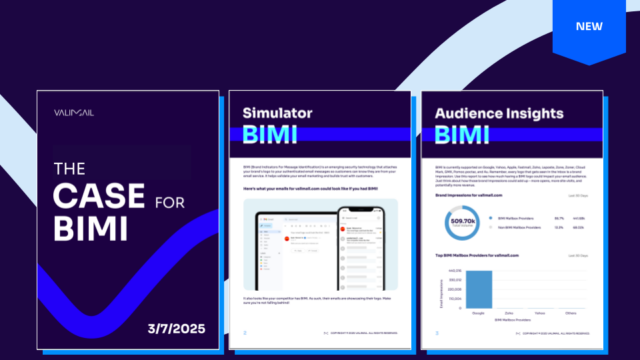
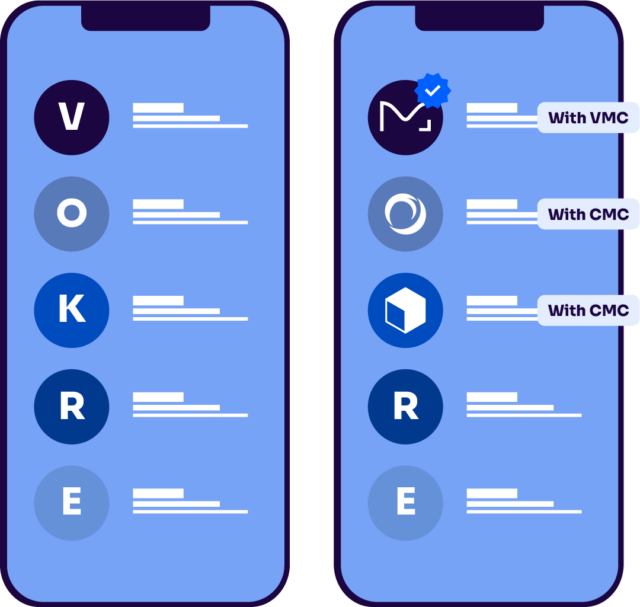
Start with our BIMI Simulator to see exactly how your brand will appear before moving forward, and uncover competitor insights. It’s free to get started.
When you’re ready to fully implement BIMI, Valimail Amplify manages the entire process — from SVG validation and certificate acquisition to record publishing and ongoing management.
Check your
domain now
Enter your domain to see if it’s vulnerable to spoofing or if others are sending emails on your behalf. Instantly check your DMARC, SPF, and BIMI status with a detailed security report.
You’re not fully protected, learn more here.
Check your
domain now
Enter your domain to see if it’s vulnerable to spoofing or if others are sending emails on your behalf. Instantly check your DMARC, SPF, and BIMI status with a detailed security report.
You’re not fully protected, learn more here.
Check your
domain now
Enter your domain to see if it’s vulnerable to spoofing or if others are sending emails on your behalf. Instantly check your DMARC, SPF, and BIMI status with a detailed security report.
You’re not fully protected, learn more here.
Your Domain
Not protected AGAINST IMPERSONATION ATTACKS
DMARC NOT AT ENFORCEMENT
exampledomain1.com
Authentication Status for January 10, 2025
DMARC at Enforcement
SPF Record Configured
BIMI Ready
exampledomain1.com
Authentication Status for January 10, 2025
DMARC at Enforcement
SPF Record Configured
BIMI Ready
Frequently asked questions about our BIMI logo validator
How do I use the BIMI logo validator?
Upload your SVG, and our BIMI logo validator will look at the following:
- SVG Tiny P/S compliance. BIMI requires logos to be in SVG Tiny Portable/Secure format. This is a strict subset of SVG that limits which elements and attributes are allowed. Standard SVG files exported from design tools typically don’t meet this requirement without modification.
- Required attributes and elements. Certain attributes must be present for the file to be considered valid. The validator confirms they’re there and correctly formatted.
- Forbidden elements. BIMI prohibits certain SVG elements like scripts, external references, animations, and others. If your file contains any of them, it won’t pass validation regardless of how the rest of the file looks.
- Inline style encoding. Inline style attributes need to be properly encoded to meet the standard. The validator flags anything that needs attention.
- Unnecessary code and comments. Extraneous code, metadata, and comments left behind by design tools can cause validation issues. The validator identifies what needs to be cleaned up.
- DigiCert certification readiness. The validator tests your SVG against DigiCert’s official BIMI validation endpoint so you know whether your file is ready for certification review before you apply.
What logo format does BIMI require, and why don’t standard SVG exports work?
BIMI requires logos to be provided as SVG files (specifically in SVG Tiny Portable/Secure (SVG P/S) format). This is a restricted subset of SVG that limits which elements and features can be used. Most SVG files exported directly from design tools like Illustrator or Figma don’t meet BIMI’s requirements without some modification first.
What is a BIMI SVG file?
A rejected VMC application means delays, back-and-forth with your certification authority, and more time before your logo shows up in the inbox. Validating your SVG file upfront takes minutes and sidesteps all of that.
If your file has issues, the validator will tell you what they are and what needs to change. Some can be corrected automatically, while others require a quick update in your design tool or a manual edit to the file.
Either way, you’ll know what you’re dealing with before it becomes a problem.
Why does my SVG file need to meet specific requirements for BIMI?
BIMI’s SVG requirements exist to guarantee logos display consistently across different email clients and devices, and to prevent SVG files from being used as a vector for malicious code. The restrictions on scripting, external references, and animations are security requirements as much as formatting ones.
What is SVG Tiny P/S?
SVG Tiny Portable/Secure is the specific SVG profile required by the BIMI standard. It’s a subset of the full SVG specification that restricts which elements, attributes, and features are permitted. A file can be valid SVG and still fail BIMI validation if it uses elements or features outside the Tiny P/S profile.
What's the difference between a VMC and a CMC?
A Verified Mark Certificate (VMC) is issued by an authorized certification authority and requires a registered trademark for your logo. It’s what enables Google’s blue checkmark verification alongside your logo in Gmail. A Common Mark Certificate (CMC) is a newer option that doesn’t require trademark registration and is supported by a growing number of inbox providers. Which one you need depends on where you want your logo to display and whether your logo is trademarked.

Can I use my existing brand logo file for BIMI?
Not quite. A valid SVG file is a requirement, but BIMI also requires DMARC enforcement at p=quarantine or p=reject, a correctly published BIMI DNS record, and a valid VMC or CMC for most major inbox providers. The SVG validator confirms your file is ready, but the rest of the setup still needs to be in place before your logo will display.
How do attackers use similar domains in phishing attacks?
You can use your existing logo as the basis, but it will likely need to be converted to SVG Tiny P/S format and cleaned up before it meets BIMI requirements. Most design teams start with their existing SVG and work through the validation process to identify and fix what needs to change. Our validator will tell you exactly what’s required.
Will this validator tell me if my logo is ready for VMC or CMC certification?
Yes. In addition to checking your file against BIMI’s technical requirements, the validator tests it against DigiCert’s official BIMI validation endpoint. This is the same check your certification authority will run when you apply. If your file passes here, you can submit for certification with confidence.
Does my logo need to be square for BIMI?
Yes. BIMI logos are displayed in a circular frame in most inbox providers, and the SVG viewBox should have equal width and height dimensions. A logo with a wide horizontal layout or significant negative space won’t display well and may not meet the standard. If your primary brand logo isn’t square-friendly, most teams create a simplified square version (often just the logomark) specifically for BIMI use.
What happens if my BIMI SVG passes validation but my logo still doesn't display?
A valid SVG file is necessary but not sufficient on its own. If your logo isn’t displaying, the issue is likely elsewhere in your BIMI setup. It could be an incorrectly published BIMI DNS record, a DMARC policy that isn’t at enforcement, an expired or missing VMC or CMC, or an inbox provider that doesn’t yet support BIMI. Valimail’s free domain checker will show you your current DMARC and BIMI status so you can identify where the gap is.
Get started for free
with Monitor
Start your path to DMARC enforcement with a panoramic view of the traffic being sent on your behalf.
No trial offers, credit cards, or obligations.
Explore all Valimail
has to offer
Go one step further than visibility…Take action! Reach DMARC enforcement faster. Stay compliant with evolving sender requirements. All while protecting your brand.