
TLDR: A fake payment or order confirmation email claims you were charged for something you never bought, betting you’ll panic and click a link (or call a number) to “cancel” it. That link steals your login details or installs malware. If you get one, don’t click anything in the email. Open a new tab, go straight to the retailer’s real website, and check your order history there.
You just got an email saying your card was charged for something you never bought. Maybe it’s a $499 Amazon order, or a Norton renewal you don’t remember signing up for. Before you hit that “cancel” button, take a breath. That email is almost certainly a scam, and clicking is exactly what it wants you to do.
These fake confirmations work by triggering panic. You see an unfamiliar charge, your stomach drops, and you act before you think. That’s the whole play.
This guide covers how to spot one, what to do if you get it (or already clicked), and, if you run a business, how to keep your brand from being the name scammers hide behind.
What is a fake payment or order confirmation scam?
It’s a phishing email that pretends to confirm a purchase you didn’t make. The message looks like it came from a company you trust, shows an order or charge alarming enough to worry about, and pushes you to act fast.
Most of these land in one of two forms:
- The fake order or charge. “Your order for a new iPhone has been confirmed. If you didn’t place this order, click here to cancel.” The item is usually expensive enough to spike your heart rate, but not so wild you dismiss it outright.
- The fake account problem. “Your account has been suspended due to suspicious activity. Verify your identity to restore access.” Same panic, different doorway.
Both want the same thing: for you to click a link, open an attachment, or call a number. Do any of those, and you might land on a fake login page that harvests your credentials, downloads malware, or talks you into reading out your card details “to verify your identity.”
Think back to your last few online purchases. Can you name every one, the date, and the exact price? Most people can’t. Scammers count on that fog. They blast the same email to millions of inboxes, and they only need a sliver of recipients to bite.
And the recipients aren’t the only ones who lose. The brands these emails impersonate (Amazon, PayPal, Netflix, or maybe even your business) take a reputation hit every time a customer gets burned by an email wearing their logo.
How to spot a fake order confirmation email
Slow down long enough to check a few things, and most of these fall apart fast. Here are the red flags to watch for:
| Red flag | How it works |
|---|---|
| Charge not recorded in bank account | Check with the bank: Did you order something by accident, or is someone actually making fraudulent charges against your account? |
| Odd attachment file extensions | The most popular of these scams often send fake PDFs that are really HTML files with the extension .pdf.html. |
| Unofficial domain name | The email wants you to click a link to a domain other than the service’s official domain, or the email originates from a domain that looks different than the service’s normal one. |
| Sketchy content | Spelling mistakes or inconsistent formatting should make you question an email’s legitimacy. |
| Attachment protected with your account password | Often, the attack will include a file that asks for your account password before opening. |
One habit beats all of these: never use the links or numbers in the email. If you want to check an order, open a new browser tab and go to the retailer’s site yourself.
Fake Amazon order confirmation emails
Amazon is one of the most impersonated brands in this scam. If you shop there, you’ll see these eventually.
A typical fake Amazon email shows a big-ticket order you don’t recognize, an iPhone, gaming console, or laptop, with a “cancel order” button and a warning that you’ll be charged within 24 hours. The panic is the point.
Here’s how to check it in under a minute:
- Go to Your Orders directly. Open a new tab, type
amazon.com, log in, and check Returns & Orders. If the order isn’t there, the email is fake. If it is there and you didn’t place it, contact Amazon and change your password. - Check the sender, but don’t trust it alone. Real Amazon mail comes from an
@amazon.comaddress. Scammers use lookalikes like@amaz0n.com, and the “From” name can be faked, so treat this as one signal, not proof. - Look for the verified logo. In inboxes that support it, real Amazon email displays Amazon’s logo next to the message. Amazon uses BIMI (Brand Indicators for Message Identification) to make that happen. The logo showing up is a good sign it’s real. Its absence isn’t proof of a fake, since not every inbox supports BIMI yet, but it’s a useful tell.
- Report it. Forward the email to Amazon at
stop-spoofing@amazon.com, then delete it.
Never call the number in the email or click “cancel.” Amazon won’t ask you to sort out a fraudulent order by phone.
Other brands scammers love to impersonate
Amazon gets the headlines, but the same script runs under other logos. Watch for these variations:
- PayPal. Fake “you sent a payment” receipts or bogus invoices, often for a few hundred dollars, with a “if you didn’t authorize this” link or a support number to call.
- Netflix and streaming services. “Your payment failed. Update your billing details to avoid interruption.” The link goes to a fake login page.
- Norton, McAfee, and Geek Squad. The “renewal” scam: a receipt claiming your antivirus or protection plan auto-renewed for $399, with a number to call for a “refund.” The refund process is where they drain your account.
Different logo, same signs, though. Unexpected charge, urgent deadline, and a link or number that routes around the company’s real website.
Real-world fake order confirmations
On September 10, 2021, the University of Minnesota announced that its students and faculty were receiving a barrage of fake payment receipt spam emails.
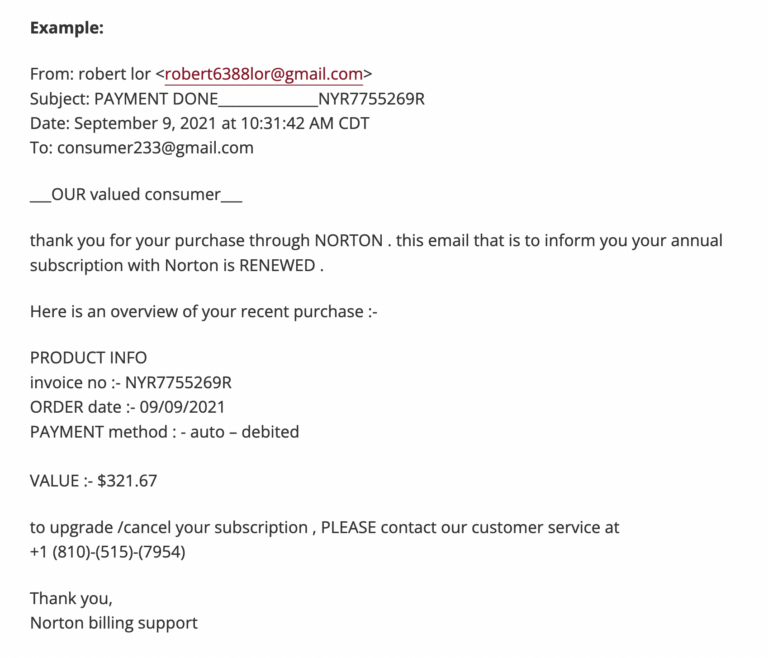
Here, we see a fairly unsophisticated version of this attack. The email claims to come from Norton, a well-known anti-malware program, yet the visible origin of the email is a Gmail address. In response, the university’s advisory gives great advice:
-
- Do not reply, click the link(s), call the phone number, or log in (if you do click the link).
-
- Report it as spam to Google.
-
- Forward the notice to phishing@umn.edu.
-
- Check your bank statement to confirm whether the charges are real or not.

|
Platform
|
Success Rate
|
Success Rate Frame
|
Estimated FTEs
|
Maintenance
|
Marketplace Apps Identified
|
|---|---|---|---|---|---|
|
DIY Manual
|
20%
|
12+ Months
|
2-3
|
Never ending
|
~100 services
|
|
Outsourced Manual
|
<40%
|
9-12 Months
|
1-2
|
Never ending
|
~100 services
|
|
Valimail Automation
|
97.8%
|
0-4 Months
|
0.2
|
Automated
|
6,500+
|
We’ll explore these defenses and others shortly. For now, we can look at a similar attack that also affected a college, this time the University of Vermont.
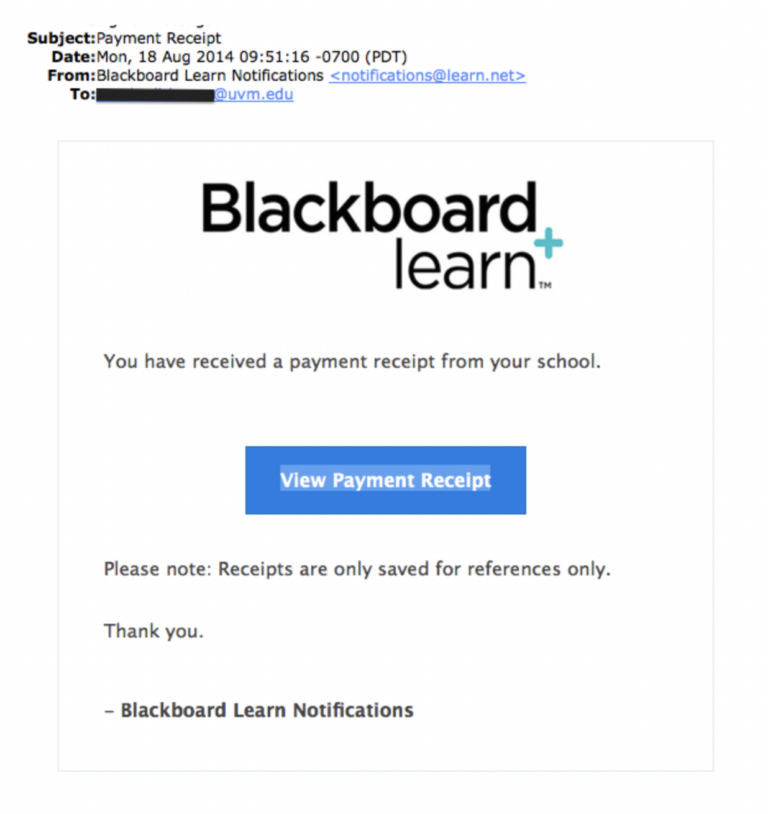
This attack takes the trickiness up a notch compared to the previous example in three ways:
-
- It forges a legitimate-seeming business domain (rather than using a Gmail address).
- It uses graphics and formatting to appear more professional and thus trustworthy.
- It links to a phishing document controlled by the attackers.
This attack also changes the approach by making the recipient believe they have received money, lowering their defenses by manipulating hope instead of fear.
Countless other variations of this attack have been documented online, but these two examples should give a general picture of the kinds of tactics typically employed.

Minimal resource requirement with only a single one time DNS change needed
DMARC Enforcement guarantee and 97.8%+ success rate
100% Automated service discovery and 1-click validation
How to prevent fake order confirmation spam
Awareness is important, but what really matters is prevention. Let’s look at some ways that you can prevent, or at least mitigate, the threat of payment confirmation email scam.
1. DMARC and BIMI
DMARC is a protocol that powers authentication in email to make it harder for attackers to forge the visible From: address of an email. You should protect all your domains with DMARC and also enable DMARC on incoming mail so you can tell when From: addresses are forged. You can learn more about DMARC with our guide: A step-by-step guide to getting DMARC done right.
Brand Indicators for Message Identification (BIMI) allows a brand owner to capitalize on the work they’ve done to protect their domain with DMARC by choosing a logo to display next to their emails. A logo makes your email stand out in the recipient’s inbox and gives them confidence that it’s mail that they want. Tools like Valimail Amplify even make BIMI readiness quick and easy.
2. General anti-phishing best practices
Although payment confirmation spam has its own quirks, the best defenses against most kinds of phishing also apply to this attack:
-
- Look for sloppy content and basic mistakes in spelling, grammar, and language.
-
- Make sure the email originates from an official domain.
-
- Enforce email security best practices.
-
- Conduct internal phishing campaigns to find weak spots and educate workers.
-
- Never interact with suspicious content (e.g., by opening links or downloading attachments).
-
- Implement security in layers so that even if an attack occurs, your organization still has some protection.
-
- Mandate multi-factor authentication and the use of password managers whenever possible.
Sophisticated phishing can be hard to beat, but with basic security hygiene and general phishing awareness, you can be a lot safer.
What if I suspect a fake email attack?
If you receive a confirmation email for an order that you suspect may be a phishing attempt, the first step is to determine if the order is real. If it is not, you will want to tip off the relevant team in your organization. Follow this simple process for handling suspected payment confirmation email scam.
-
- Determine if the payment might be real (either the result of fraud or an accident):
-
- Consult your financial institution to verify that the charge isn’t real.
-
- You may also want to let your bank know to reject the charge if it does come through.
-
- Determine if the payment might be real (either the result of fraud or an accident):
-
- Once you’ve confirmed that the email is spam, flag it;
-
- Report it to your mail client, if possible.
-
- Forward it to your organization’s security leadership.
-
- Do not respond to the email itself, click on links, or open attachments.
-
- Once you’ve confirmed that the email is spam, flag it;
These attacks often aim for strategic targets throughout an organization, so you can help defend your entire organization by increasing awareness quickly.

Educate employees by sharing this guide with them
Implement email filtering tools including inbound DMARC validation
Publish a DMARC record for your domain
How to stay safe from payment scam emails
Let’s wrap up what really matters when it comes to spotting and stopping these payment scams. Instead of just throwing a list of tips at you, here’s what you actually need to know and do:
- Keep your scam detector sharp: Before you click anything in a payment email, ask yourself: Does the sender’s address look right? Are there weird spelling mistakes? Is it pushing you to act RIGHT NOW? If something feels off, it probably is.
- Lock down your domain with DMARC and BIMI: DMARC stops scammers from pretending to be you, while BIMI puts your logo right in your customers’ inboxes so they know it’s really you.
- Don’t keep threats to yourself: If you spot a sketchy payment email, don’t just delete it and move on. Let your security team know about it. What looks like one random scam email might actually be part of a larger attack targeting your company. Plus, your report could help protect your coworkers from falling for the same trap.
- Build better security habits: We get it—remembering different passwords for every account is about as fun as doing your taxes. But using a password manager and turning on multi-factor authentication wherever you can makes a huge difference.
Whether you’re looking to protect your company’s domain or just want to check if your email security is up to snuff, start by checking your domain’s DMARC status. It’s free, takes about 30 seconds, and could save you from becoming the next target.