Your marketing team wants to launch a new email campaign using a brand-new email service provider. Sounds simple enough, right? They fill out a ticket requesting DNS changes. IT reviews it. Someone escalates it for approval. Days pass. Maybe a week.
Finally, someone with the right access manually updates the DNS records. Then you wait for propagation. Then you test. Then you realize there’s a typo, and the whole cycle starts over.
Meanwhile, your campaign is delayed, your team is frustrated, and your domain remains vulnerable to spoofing because the proper authentication records still aren’t in place.
This is the DNS bottleneck, and it’s one of the biggest obstacles to maintaining strong email security. Manual DNS management isn’t just slow and error-prone; it actively works against the agility and security that modern email authentication demands.
Below, we’ll break down why manual DNS processes create major problems for email security, what risks they introduce, and how organizations can move past this bottleneck without sacrificing control or security.
The problem with manual DNS management
Most organizations treat DNS management like nuclear launch codes. It’s tightly controlled, heavily gated, and requires multiple layers of approval before anyone can touch it.
DNS is a critical infrastructure. One wrong entry can break your website, tank your email deliverability, or create security vulnerabilities. So IT teams build protective processes around it: ticketing systems, approval workflows, change management procedures, and limited access to only a handful of trusted administrators.
Here’s what the typical manual DNS workflow looks like:
- DNS Change Request: Someone (usually from marketing, sales, or another team) realizes they need a DNS change to add a new email service, update authentication records, or fix a deliverability issue. They submit a ticket to IT with the details of what needs to change.
- IT Review: IT reviews the request to make sure it’s legitimate and won’t break anything. This might involve checking with security, confirming the requester’s authority, or validating the technical details.
- Ticket Assignment: The ticket gets assigned to someone with DNS access—often just one or two people in the entire organization who have the credentials and knowledge to make changes.
- Manual DNS Update: That person manually logs into the DNS management console, finds the right record, makes the change, and publishes it.
- DNS Propagation: Then everyone waits for DNS propagation (which can take hours or even days, depending on TTL settings).
- Testing: Someone tests to confirm the change worked correctly. If there’s an error, then you start the whole process over.
This workflow can take days or even weeks for a single DNS change.
The problem isn’t that IT is being difficult or overly cautious, either. They’re doing their job. The real problem is that manual processes can’t keep pace with the speed that modern email security demands (and the delays create vulnerabilities).
Why manual DNS updates sabotage your email security
Email authentication isn’t set-it-and-forget-it. It needs constant adjustments as your email ecosystem evolves (and it always will). Every time you add a new marketing platform, switch CRM providers, or onboard a new SaaS tool that sends email, your DNS records need updating.
And that’s where manual DNS management becomes a serious security problem:
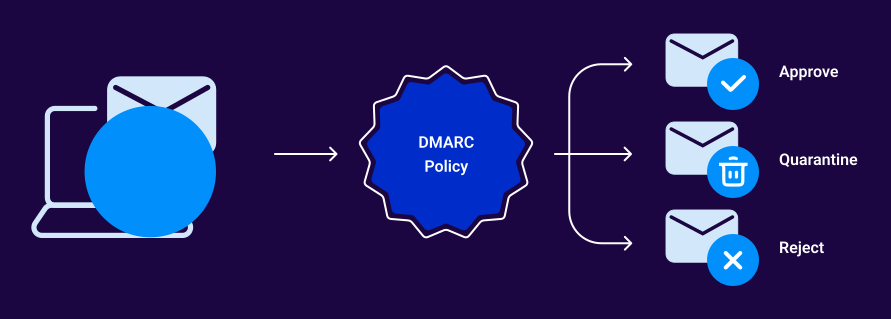
- Email authentication needs speed, but manual DNS delivers delays. When you add a new email service, it needs to be authorized in your SPF record and configured with DKIM before it can send authenticated email on your behalf. But if that DNS update takes a week to process, you’re stuck. Either you wait (and your business grinds to a halt), or you start sending unauthenticated emails that fail DMARC and get blocked or filtered to spam.
- Security threats don’t wait for approval workflows. Imagine finding that someone is spoofing your domain to send phishing emails. The fix is easy: tighten your DMARC policy from p=none to p=reject. But if that change requires a ticket, approvals, and a three-day turnaround, those phishing emails keep flowing while you wait for internal bureaucracy to catch up.
- Outdated records create vulnerabilities. You stop using an old email service, but never remove it from your SPF record. That’s because submitting another DNS ticket feels like too much hassle (and nobody has time for that). Now that the abandoned service is authorized to send email as your domain indefinitely.
- Human error multiplies with manual entries. One misplaced character, one missing semicolon, one typo in a domain name…that’s all it takes to break your entire email authentication setup. When someone is manually typing DNS records into a console, mistakes happen. And those mistakes might not be caught until emails start bouncing or failing authentication.
Manual DNS processes weren’t designed for the dynamic, fast-moving realm of email authentication. They create gaps between when security is needed and when it’s actually implemented, and attackers are happy to exploit those gaps.
The solution: Automate your DNS management
Fortunately, you don’t have to choose between security and speed. Automated DNS management solves the bottleneck problem while actually improving security and control.
Here’s what automated DNS management looks like:
When you authorize a new email service, the automated system automatically updates your SPF record. When you configure DKIM for a new sender, the keys are published instantly. When you need to adjust your DMARC policy, it happens in real-time without tickets, waiting, or manual typing.
This helps you gain:
- Speed: Changes happen in minutes instead of days or weeks. Your team can respond to business needs and security threats without waiting on approval chains.
- Accuracy: Automated systems don’t make typos. They generate properly formatted DNS records every time, eliminating syntax errors and misconfigurations.
- Auditability: Every change is logged automatically. You know exactly who made what change and when, creating a clear audit trail that manual processes often lack.
- Scalability: Whether you’re managing five domains or 500, automation handles the complexity without requiring more headcount or creating more bottlenecks.
Automation doesn’t mean losing control, either. The best automated DNS solutions maintain appropriate oversight and security while removing the friction that slows everything down.
And that’s where we come in.
Valimail uses a simple CNAME delegation method to update your DNS records. You create one CNAME record that points to Valimail, and from that point forward, all your email authentication records (SPF, DKIM, DMARC) are managed automatically through Valimail’s platform.
Here’s how it works in practice:
- Marketing wants to add a new email service: They authorize it in Valimail with a single click. The SPF record updates automatically. DKIM keys are generated and published instantly. No IT ticket required.
- A third-party service needs to be removed: Revoke authorization in Valimail, and it’s immediately removed from your authentication records.
- Your DMARC policy needs tightening: Change it in Valimail’s interface, and the update is live within minutes.
IT maintains full visibility and control through role-based access. They can see every change, set approval workflows if needed, and revoke access at any time. Now, the day-to-day management happens automatically, freeing IT from being a bottleneck while keeping them in control.
This ultimately leads to email authentication that moves at the speed of business, with accuracy and security that manual processes can’t match.
Valimail Monitor (free) gives you visibility into your current email authentication status, while Valimail Enforce automates the entire DNS management process for email security. No more tickets, no more delays, no more typos—just fast, secure email authentication that works.
Fix the DNS bottleneck with Valimail
Manual DNS management might have worked when email authentication was simple and changes were rare. But now, manual processes create more problems than they solve.
The bottleneck isn’t inevitable, and it only gets worse as your organization scales. Automated DNS management gives you the speed and accuracy you need without sacrificing control or security.
Valimail eliminates the DNS bottleneck entirely. Start with Monitor for free visibility into your email authentication, or jump straight to Enforce for fully automated DNS management that keeps pace with your business.
Feel like you’re somewhere in the middle? Stop struggling with DNS changes and talk to someone who gets it. We have Valimail experts who are here to sit down during a free consultation and explore how to solve problems with your DNS.
Frequently asked questions about manually-managed DNS
Q. Is automated DNS management secure?
Yes, when done correctly. Automated DNS management actually improves security by reducing human error, providing detailed audit trails, and enabling faster response to threats. Solutions like Valimail use CNAME delegation, which means you maintain control over your DNS while automation handles email authentication records. IT can revoke access at any time, and all changes are logged for compliance and auditing.
Q. Will automation remove IT’s control over DNS?
Not at all. Automated DNS management for email authentication doesn’t require handing over the keys to your entire DNS infrastructure. With Valimail’s CNAME delegation approach, IT maintains full visibility and can set role-based permissions and approval workflows as needed.
Q. What happens if the automation makes a mistake?
Reputable automated DNS solutions include validation checks before publishing any changes. They also maintain version history, so you can quickly roll back if needed. In practice, automated systems make far fewer errors than manual entry because they eliminate typos, syntax mistakes, and configuration errors that sabotage manual processes.
Q. How long does it take to implement automated DNS management?
With Valimail, implementation typically takes less than an hour. You create a single CNAME record in your DNS, and Valimail handles the rest. There’s no complex integration, no API setup, and no migration of existing records required.