
Sender Policy Framework (SPF) records are limited to 10 DNS lookups. If your domain is already at 7-10 lookups, adding a single new sending service could push you over that limit, causing a permanent error (called a “permerror”) that blocks legitimate email from reaching the inbox.
Nobody sets out to sabotage their own email. But if your Sender Policy Framework (SPF) record is creeping toward the 10 DNS lookup limit, that’s exactly what could happen, and most IT teams don’t see it coming until it’s too late.
SPF records aren’t static. Every time your organization adds a new email-sending service (a marketing automation platform, a CRM, a helpdesk tool), it tacks on another DNS lookup. At seven or eight lookups, you’re technically fine. But you’re also one vendor change away from a hard failure that breaks your own authenticated emails.
And it gets worse.
The third-party services listed in your SPF record can update their own DNS configurations whenever they want, without giving you a heads up. That means your perfectly compliant SPF record today could quietly exceed the limit tomorrow through no action of your own.
Fortunately, it’s entirely fixable once you know what to look for. Below, we’ll break down how SPF records hit the limit, why flattening isn’t the long-term answer, and what you can do to keep your email flowing without constantly watching your DNS.
What is the SPF 10 DNS lookup limit?
SPF is an email authentication protocol that tells mailbox providers which servers and services are allowed to send email on behalf of your domain. It works by publishing a DNS record that lists your authorized senders, and when an email arrives, the receiving server checks that record to verify the sender is legit.
Simple enough, but there’s a catch (isn’t there always).
Every time your SPF record uses an include:, redirect, a, or mx mechanism, it triggers a DNS lookup. The RFC specification (that’s the technical standard governing SPF) caps the total number of those lookups at 10.
Not 10 per service. Not 10 per subdomain. Ten total, across your entire SPF record, including any nested lookups buried inside the records of your third-party senders.
Exceed that number and the SPF check returns a “permerror,” which is a permanent error that tells the receiving server this email couldn’t be validated—thus, it’s treated as a failure. That’s not a soft warning or a temporary hiccup. It’s a hard stop.
This isn’t a best practice recommendation or a guideline you can bend. It’s a technical ceiling baked into the protocol itself, and no mailbox provider will make exceptions.
How do you end up near the limit?
Faster than you’d think. Most organizations don’t start with a bloated SPF record. It builds up gradually, one business decision at a time.
Let’s say your company runs Microsoft 365 for corporate email. That’s your first include: mechanism, and depending on the configuration, it could account for one or two lookups right out of the gate. Then:
- Marketing rolls out HubSpot for email campaigns.
- Sales starts sending through Salesforce.
- Customer support adopts Zendesk.
- Finance sets up an invoicing platform.
- HR uses a third-party tool for onboarding emails.
Each one of those services needs an include: in your SPF record to send email as your domain. And each include: doesn’t just count as one lookup. Some of those services have their own nested include: mechanisms that chain additional lookups underneath. So what looks like five entries in your SPF record might actually consume eight or nine lookups once you account for everything happening below the surface.
Now multiply that across departments.
In a mid-to-large organization, it’s completely normal for a dozen or more services to send email on your behalf. The problem is that no single team usually owns the full picture. Marketing adds their platforms, IT manages the core infrastructure, and sales configures their own sending. Before long, you’ve got an SPF record that’s been assembled by committee, and nobody’s keeping a running count of the total lookups.
Why 7 lookups today could be 11 tomorrow
Even if you’ve done everything right and your SPF record is sitting comfortably at seven or eight lookups, you’re not fully in control of that number. That’s because the third-party services in your SPF record maintain their own DNS configurations, and they can change them at any time without notifying you.
Say your SPF record includes Salesforce, and right now Salesforce’s SPF record contains two nested lookups. Your math checks out. But if Salesforce adds a new data center, migrates infrastructure, or expands its IP range, they might add another include: mechanism to their own record. That additional lookup now counts against your domain’s total, even though you didn’t touch a thing on your end.
This isn’t a hypothetical scenario.
Email service providers and SaaS platforms update their sending infrastructure regularly. Twilio SendGrid, Mailchimp, HubSpot, and others all make changes to their SPF records as their systems evolve. They’re not doing anything wrong, either. They’re just maintaining their own infrastructure. But the ripple effect lands squarely on your domain.
So that safe-looking number of seven lookups? It could quietly become 11 overnight. And you won’t get a notification, a warning email, or an alert from your DNS provider when it happens. The first sign is usually a support ticket from someone wondering why their emails stopped arriving.
What happens when you exceed the SPF limit?
Nothing good, and nothing loud. That’s what makes it so frustrating.
When your SPF record exceeds 10 DNS lookups, the receiving mail server stops processing and returns a permerror. It doesn’t try to figure out which senders are valid and which aren’t. It doesn’t partially pass. The entire SPF check fails, and every email sent from your domain is treated as unauthenticated.
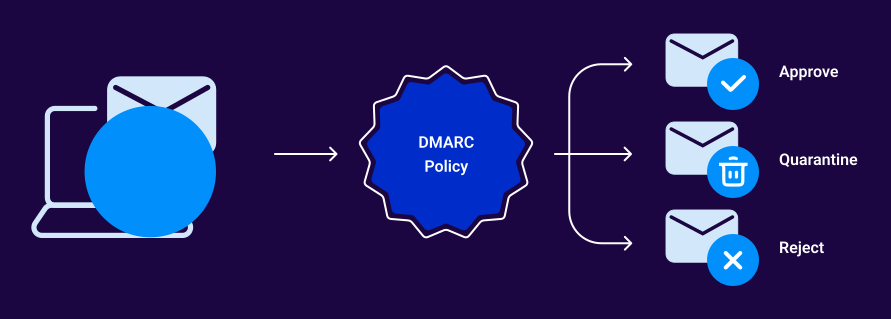
What that looks like in practice depends on your DMARC policy:
- p=none: Emails will likely still deliver, but they’ll show up as failing SPF in your DMARC reports. You’re flying blind unless you’re actively monitoring those reports.
- p=quarantine: Emails that fail SPF (and don’t pass DKIM alignment) get routed to the recipient’s spam or junk folder. Your messages are technically arriving, but nobody’s seeing them.
- p=reject: Emails that fail authentication get blocked entirely. They never reach the recipient. No spam folder, no junk folder, just gone.
And this doesn’t discriminate by email type. It hits everything your domain sends:
- Password reset emails that customers are waiting on
- Shipping confirmations and order receipts
- Invoice and payment notifications
- Internal communications between departments
- Marketing campaigns you spent weeks building
There’s no built-in alert system for this. Your DNS provider won’t flag it. Your email-sending platforms won’t warn you, and most teams only find the problem reactively, after complaints start rolling in or deliverability metrics drop.
For an IT or security leader managing dozens of systems and services, a silent SPF failure can burn hours of troubleshooting time before anyone even thinks to check the lookup count.
How to fix the SPF limit problem for good
Start with the basics. Audit your current SPF record and find out exactly how many lookups you’re using. Valimail’s free Domain Checker can show you this in seconds.
From there, you have workaround solutions like distributing lookups across separate SPF records of SPF flattening, but these aren’t long-term (or reliable) solutions.
If you want to eliminate the problem entirely, that’s where Valimail’s patented Instant SPF® technology can help. It bypasses the 10 DNS lookup limit altogether, giving your domain unlimited lookups without the fragility of flattening or the overhead of constant manual maintenance.
It also keeps your SPF record private, so competitors and bad actors can’t see which services you’re using.
Check (and fix) your SPF record sooner rather than later
The SPF lookup limit is an operational risk that grows quietly alongside your tech stack, and it only takes one new service or one vendor-side update to push your domain over the edge. When that happens, the emails you actually want delivered are the ones that stop arriving.
The fix doesn’t have to be complicated. Start with visibility. Use Valimail’s free Domain Checker to see exactly where your SPF record stands right now, including how many lookups you’re using and where your authentication might be failing.
Next, sign up for Valimail Monitor (also free) to get a full picture of every service sending on your behalf and whether they’re passing or failing authentication.
And if you’re ready to stop worrying about the SPF limit entirely, get a demo of Valimail Enforce and see how Instant SPF® eliminates the problem for good.
Frequently asked questions
What is the SPF 10 DNS lookup limit?
SPF records are capped at 10 DNS lookups per the RFC specification. Every include:, redirect, a, and mx mechanism in your record (including nested lookups inside third-party records) counts toward that total. Exceed it and SPF returns a permanent error, causing authentication to fail for all email sent from your domain.
What happens if I exceed the SPF lookup limit?
The SPF check returns a “permerror,” which means it fails entirely. Depending on your DMARC policy, that can result in emails landing in spam (p=quarantine) or being blocked outright (p=reject). This affects all email types, including transactional messages like password resets and invoices.
Is SPF flattening a good solution?
It’s a common workaround, but not a reliable long-term fix. Flattening replaces dynamic include: mechanisms with hard-coded IP addresses, which means your record goes stale every time a sending service updates its infrastructure. For teams without the bandwidth to constantly monitor and update those IPs (that’s basically everyone), flattening creates more risk than it solves.
How can I check how many SPF lookups my domain uses?
Valimail’s free Domain Checker gives you an instant breakdown of your SPF record, including total lookup count, authentication status, and any configuration issues. It takes about five seconds.
How does Valimail solve the SPF lookup limit?
Valimail’s patented Instant SPF® technology bypasses the 10 DNS lookup limit entirely, giving your domain unlimited lookups without flattening or manual maintenance. It also keeps your SPF record private, preventing competitors and bad actors from seeing which services you use.