Phishing and spear phishing are both social engineering attacks that use fraudulent email to steal data, credentials, or money. The difference is precision.
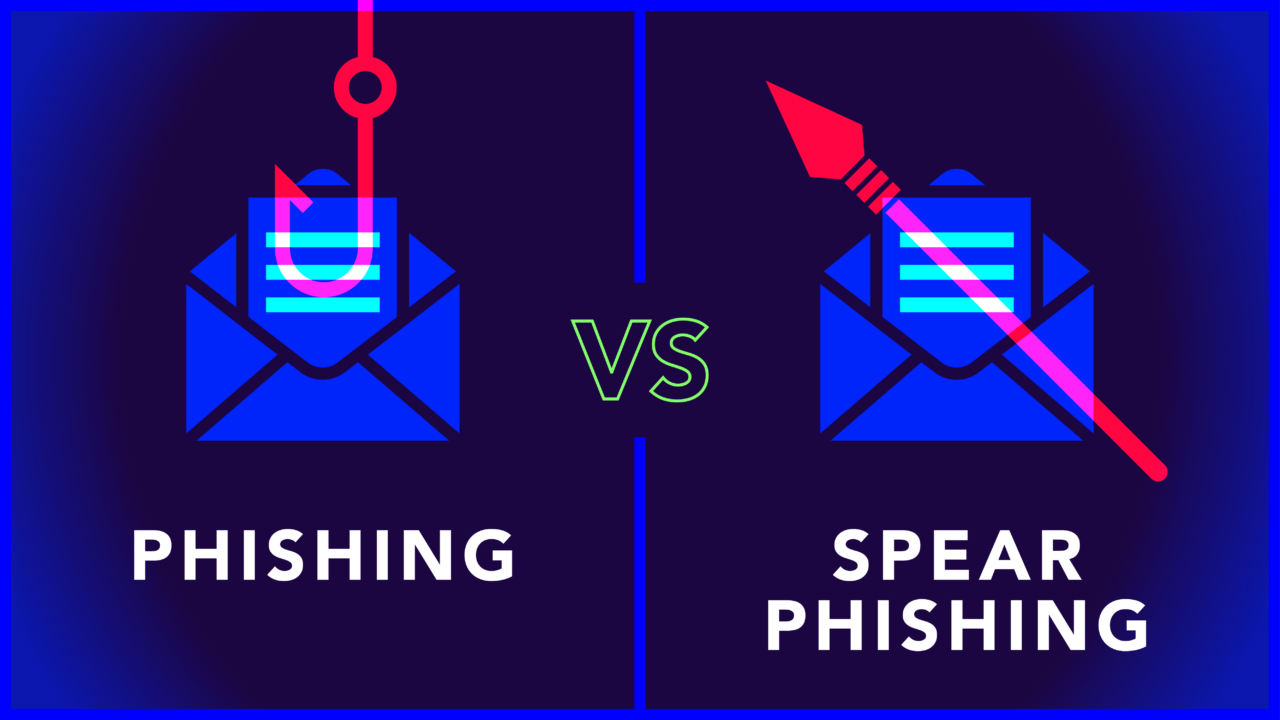
Phishing casts a wide net: thousands of generic messages sent to anyone, hoping someone takes the bait. Spear phishing is targeted. Attackers research specific individuals and craft messages that appear to come from someone the recipient knows and trusts. That precision is what makes it dangerous.
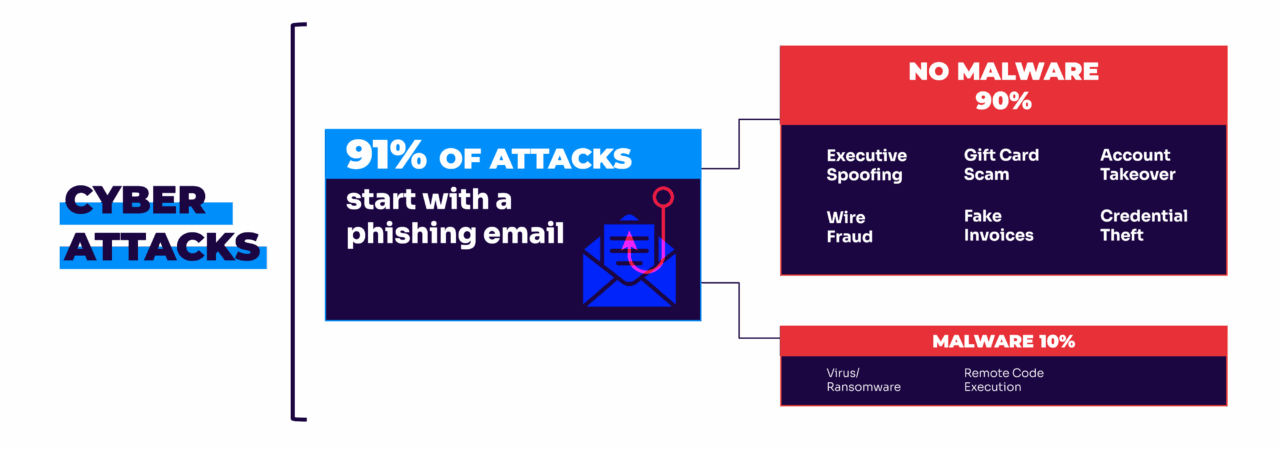
That precision makes spear phishing far more dangerous. The FBI found Business Email Compromise (BEC)—a form of spear phishing—to have caused $50.5 billion in reported losses over the last decade. Meanwhile, 91% of all cyberattacks start with a phishing email, and 90% of those don’t even contain malware.
They rely purely on deception.
Fortunately, once you understand how these attacks work, they’re easier to spot and prevent. Below, we’ll break down the key differences between phishing vs. spear phishing, real-world examples of each, and practical steps to protect your organization from both.
What is spear phishing?
Spear phishing is a targeted cyberattack in which attackers send personalized fraudulent emails to specific individuals or organizations. Unlike regular phishing, which uses generic messages sent at volume, spear phishing attackers research their targets first (pulling information from LinkedIn, company websites, and social media), then craft messages that appear to come from trusted colleagues, executives, or partners.
The meaning of spear phishing comes from the analogy: instead of casting a wide net, the attacker throws a single, well-aimed spear.
Scammers often use social media to legitimize their requests to gain information on their target.
When contacting the target, they will address them by name and use personal facts and/or casual language. They may also use malware to gather private information.
Their primary goal is to manipulate employees into revealing sensitive data or committing unauthorized actions, such as wire transfers to fraudulent companies.
Scammers of this nature commonly employ two methods of attack:
- Whaling attacks: These are attacks aimed at senior executives, i.e., individuals with the power to access confidential information and (unknowingly) enable a data breach or approve a large money transfer.
- CEO fraud: Targeted attacks against junior employees where the attacker impersonates a senior authority (for example, the CEO) or other high-level colleagues. They then pressure the reader into taking unauthorized actions.
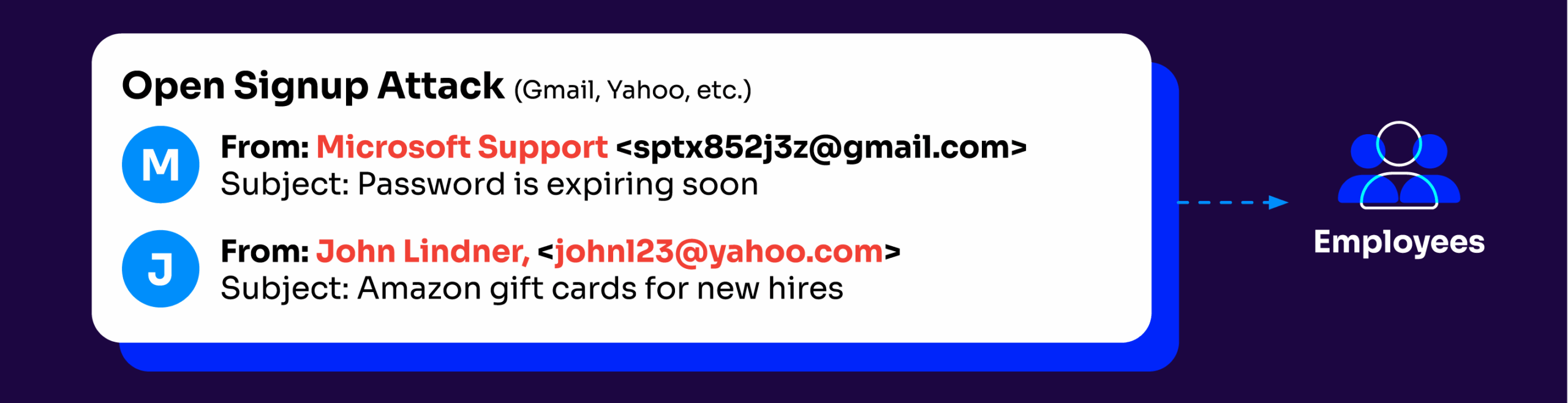
Real-world spear phishing examples (and what made them work)
Spear phishing isn’t a theoretical risk. They’re attacks that bypassed security teams, fooled experienced professionals, and cost organizations millions.
Every example below shares the same patterns:
- Executive impersonation: Attackers posed as CEOs, CFOs, or trusted vendors
- Financial requests: The goal was almost always a wire transfer or payment
- Urgency and confidentiality: Requests were framed as time-sensitive or secret
- No obvious red flags: The emails looked legitimate and referenced real business context
- No malware involved: These attacks relied purely on deception, not technical exploits
Spear phishing doesn’t need malware to cause catastrophic damage. A single convincing email is enough.
FACC: $47 million lost to a fake CEO email
In 2016, Austrian aerospace parts manufacturer FACC received an email that appeared to come from the CEO. It requested an urgent wire transfer for a confidential “acquisition project.” The email looked legitimate. The request seemed plausible. An employee transferred €42 million (roughly $47 million) to accounts controlled by the attackers.
The company never recovered the funds. Both the CEO and CFO were fired in the aftermath.
Sony Pictures: Spear phishing leads to catastrophic breach
The 2014 Sony Pictures hack started with spear phishing emails sent to employees. Once attackers gained access, they moved through Sony’s network, eventually deploying destructive “Wiper” malware that took down the company’s systems for weeks.
The damage went beyond downtime. Attackers leaked unreleased films, confidential executive emails, employee salary data, and sensitive business documents. The attack cost Sony an estimated $100 million in damages and recovery.
Ubiquiti Networks: $46.7 million wire fraud
In 2015, networking company Ubiquiti Networks disclosed that attackers had stolen $46.7 million through what they called “employee impersonation and fraudulent requests.” Spear phishing emails convinced finance employees that executives had authorized transfers to overseas accounts.
Ubiquiti eventually recovered about $15 million. The rest was gone.
What does a spear phishing email look like?
The breach stories above all started somewhere: an email that looked real enough to act on. Here’s what spear phishing emails typically contain:
- Your name and real details. Generic phishing says “Dear Customer.” Spear phishing uses your actual name, title, department, or references a real project, colleague, or vendor relationship pulled from public sources.
- A plausible sender. The “From” address mimics someone you’d recognize, like a colleague, an executive, or a service you use. The domain might be one character off, or it might be a legitimate account that’s been compromised.
- A specific request with context. Not “click here.” Instead: “Per our conversation earlier this week about the Johnson account, can you review the attached contract?” The specificity is what makes it credible.
- Urgency without pressure. Spear phishing often builds trust slowly before the ask, but when the ask comes, it typically carries time pressure: a deal closing today, a deadline in two hours, a security issue requiring immediate action.
- No malware. Most spear phishing emails contain no malicious payload at all. They rely on the recipient choosing to wire money, share credentials, or take a specific action. That’s why traditional security tools often miss them.
What is phishing?
Regular phishing campaigns cast a broad net, whereas spear phishing emails are a more targeted approach to cybercrime.
However, that doesn’t make regular phishing emails any less of a threat.
Phishers commonly spread their scams over email, though they may target random individuals over phone calls (“vishing” ) or text messages (“smishing”). Phishing is a volume play. Out of thousands and thousands of attempts, at least one will be successful.
However, unlike spear-phishing attackers, everyday scammers use impersonal but urgent language to manipulate readers into downloading a malicious attachment, clicking an unsafe link, or disclosing private information such as credit card details or login credentials.
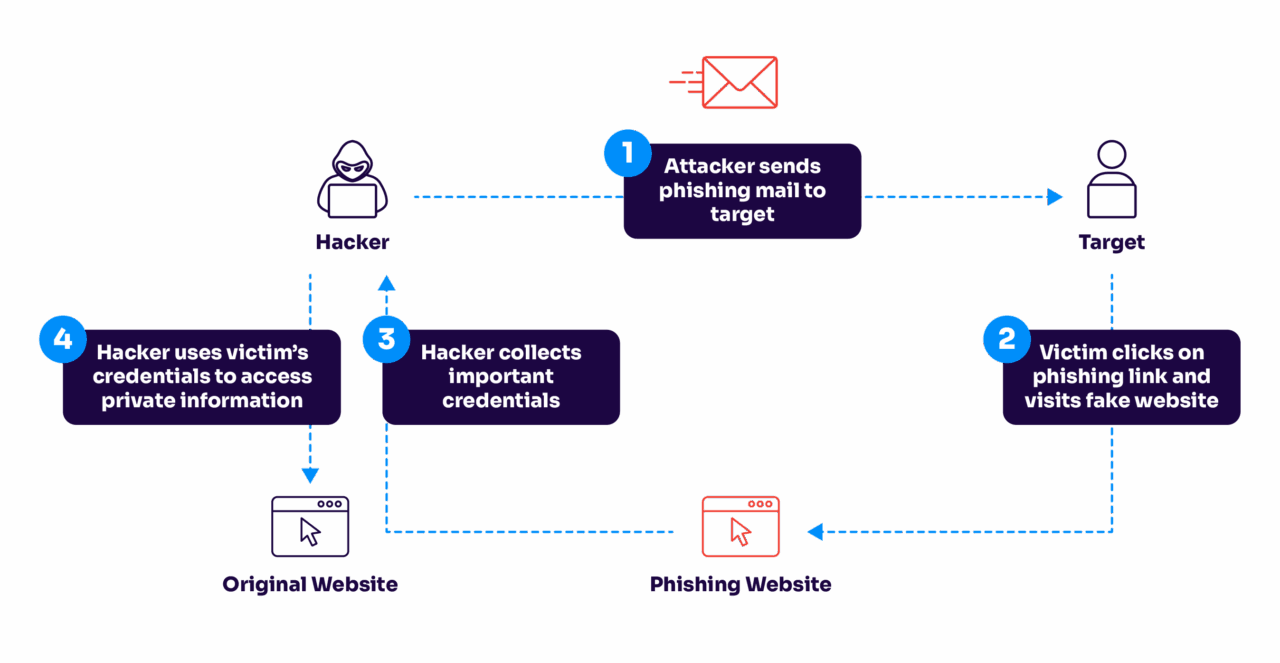
Phishing can happen in many different ways, including:
- Vishing: Phishing over phone calls or downloaded internet protocols (Voice over Internet Protocol or VoIP).
- Smishing: Phishing over text messages, also known as SMS phishing. Just as with computers, hackers can infect phones with malware.
- Business email compromise (BEC): As with spear phishing attacks, general phishing attempts use spoofed or hacked email addresses to lure in victims.
- Wire transfer phishing: This form of phishing is geared towards bank transfers to fraudulent entities.
Difference between spear phishing vs phishing
While spear phishing and phishing share a lot in common, they both threaten your business with different risks—and the security measures you take to defend against them differ. Here’s an at-a-glance list of differences between spear phishing and standard phishing:
1. Attack style
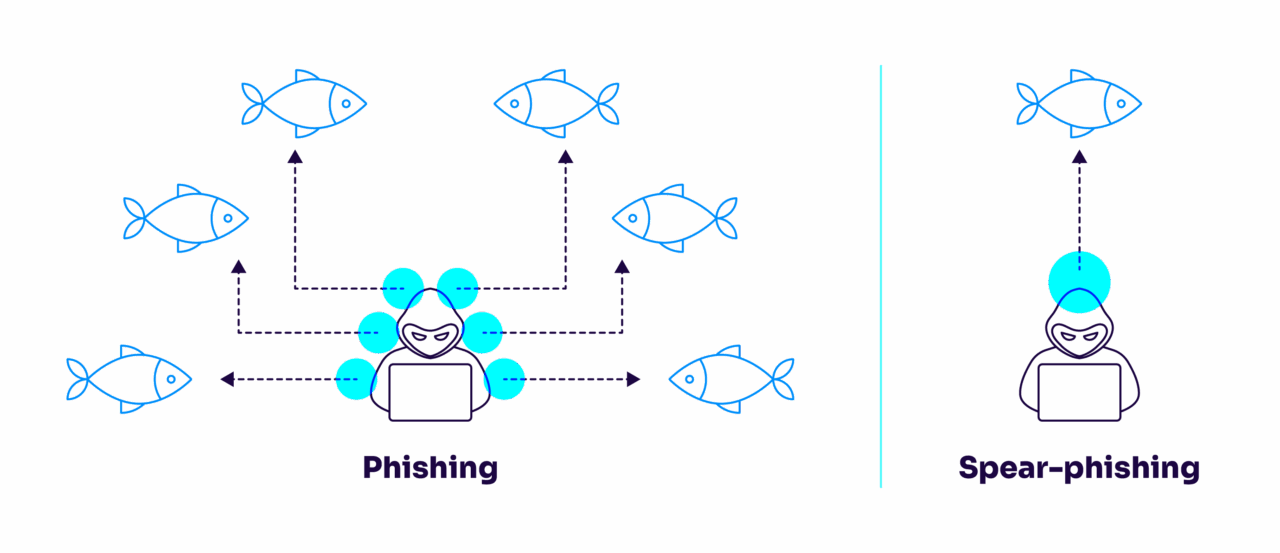
- Spear phishing: Think of spear phishing as a skilled fisher with a single line, selecting the perfect bait for a specific fish. The angler studies the fish’s habits, preferences, and environment, ensuring the lure works. This precise approach makes the catch more likely and harder for the fish to recognize as a trap.
- Phishing: On the other hand, standard phishing is like a large fishing trawler casting a wide net into the ocean. The goal is to capture as many fish as possible, without concern for the type of quality. This method is about quantity, not quality.
2. Personalization
- Spear phishing: Cybercriminals spend time understanding their target’s habits, relationships, and interests. They craft personalized messages that appear legitimate and relevant to the recipient, making the deception much more convincing.
- Phishing: Standard phishing emails lack this level of personalization. They are typically generic and sent to large groups of people. The messages might include common phrases like “Your account has been compromised” or “You’ve won a prize,” which can be easily spotted by savvy users.
3. Urgency
- Spear phishing: These attacks often build a sense of trust over time, making the recipient feel comfortable and less suspicious. The attacker might not immediately ask for sensitive information but instead gradually gain the victim’s confidence before striking.
- Phishing: Urgency is a common tactic in standard phishing. The emails often create a sense of immediate action required, such as “Click here to update your password immediately” or “Your account will be locked if you don’t respond within 24 hours.” This urgency is designed to make victims act quickly without thinking.
4. Purpose
- Spear phishing: The goals are usually more specific and high-stakes. Attackers might be after confidential company information, financial details, or access to specific systems. They often target high-ranking executives, finance departments, or individuals with access to valuable data.
- Phishing: The objectives are broader and usually aim to collect a range of information from a wide audience. Attackers might be looking for login credentials, credit card numbers, or personal information that can be sold or used in further attacks.
5. Prevention
- Spear phishing: Because of its targeted nature, spear phishing can be more challenging to detect with traditional security measures. It requires more sophisticated defense strategies, such as advanced threat detection systems, employee training, and strict verification processes for sensitive requests.
- Phishing: Standard phishing can often be caught by spam filters and basic email security tools. However, user education and awareness are still important because some phishing attempts can slip through these defenses.
Both attack types are also getting harder to detect as AI enables attackers to generate more convincing content at greater scale. See our guide to AI phishing attacks for how this is changing the threat landscape.
| Aspect | Regular phishing | Spear phishing |
|---|---|---|
| Target approach | Cast a wide net – sends thousands of emails hoping someone bites | Precise targeting – like a skilled angler choosing the perfect lure for a specific fish |
| Research effort | Minimal to none – uses generic templates and messaging | Extensive – studies the target’s behavior, connections, and preferences |
| Message style | Generic greetings (‘Dear Sir/Madam’) and cookie-cutter content | Personalized content with accurate details about the target’s life or work |
| Time investment | Quick setup, automated sending | Days or weeks of preparation for a single attack |
| Success rate | Low per email, but volume makes up for it | Much higher due to careful targeting and personalization |
7 tips to protect from spear phishing and phishing
It takes just one act to infect a computer and potentially compromise an entire organization. Fortunately, the right tools and information can thwart even the most invasive attacks. Here are a few simple steps you can take today to prevent phishing attacks of all kinds.
1. Encrypt your data
In any case, where your data or device is stolen, data encryption will ensure that the attacker cannot access or use the data.
2. Use multi-factor authentication
Multi-factor authentication is one of the best ways to ensure protection when your credentials or passwords are compromised. Attackers can only access your data if they’ve authorized entry on every single authentication channel. In almost all cases, they won’t be able to do this.
3. Authenticate your email
This best practice is meant to prevent the primary way credentials are stolen. You can authenticate your email through various methods, such as configuring DMARC, Sender Policy Framework (SPF), and DomainKeys Identified Mail (DKIM).
Want to get visibility into the bad senders using your domain? Valimail Monitor identifies all of your senders by name, rather than IP address. This way, you can ensure only authorized senders can utilize your domain.
4. Never open a suspicious email attachment
One malicious link or attachment has the power to lock you out of your device, steal sensitive data, and delete critical files. For these reasons, it’s imperative that you read through any suspicious or even unexpected emails.
Though you may recognize the sender, it never hurts to double-check with them before opening an email attachment.
5. Keep software current and updated
By enabling automatic downloads on all applications and operations systems, users are less likely to be compromised by potential security exploits and phishing attempts.
6. Use strong passwords and regularly update them
Hackers can crack 90% of all passwords in just under six hours. Most people use recycled passwords at home and in the workplace, which poses a serious security risk.
Fortunately, users can deter cybercriminals by developing strong password habits and tools like password managers.
7. Stay up to date and follow best practices
Given the right incentives, anyone can fall prey to a phishing attack. Sharpen cybersecurity know-how with regular security training sessions and briefings. Make sure to regularly check the newest best practices as phishing tactics continuously evolve.
How DMARC safeguards your entire business
Organizations are highly encouraged to implement DMARC authorization protocols and solutions to fortify their security efforts and ensure 360-degree protection.
Domain-based Message Authentication, Reporting, and Conformance (DMARC) is the gold standard for strong email authentication. It ensures that only authorized senders can send emails using your domain and restricts unauthorized users from malicious acts such as email spoofing, phishing, and spear phishing. It’s so important that multiple federal governments, including the US, UK, and Germany, require it for all government emails.
It combines and leverages the email authentication standards, SPF and DKIM. As a website or business owner, you want to ensure that all visitors or recipients will only view emails that you personally have sent or authorized. DMARC is the most effective way to completely secure your email and ensure that every email is intentional, safeguarded, and free of cybercriminal activity.
It’s also one of the few defenses that works at the infrastructure layer rather than the content layer. This means it can’t be circumvented simply by writing a more convincing email.
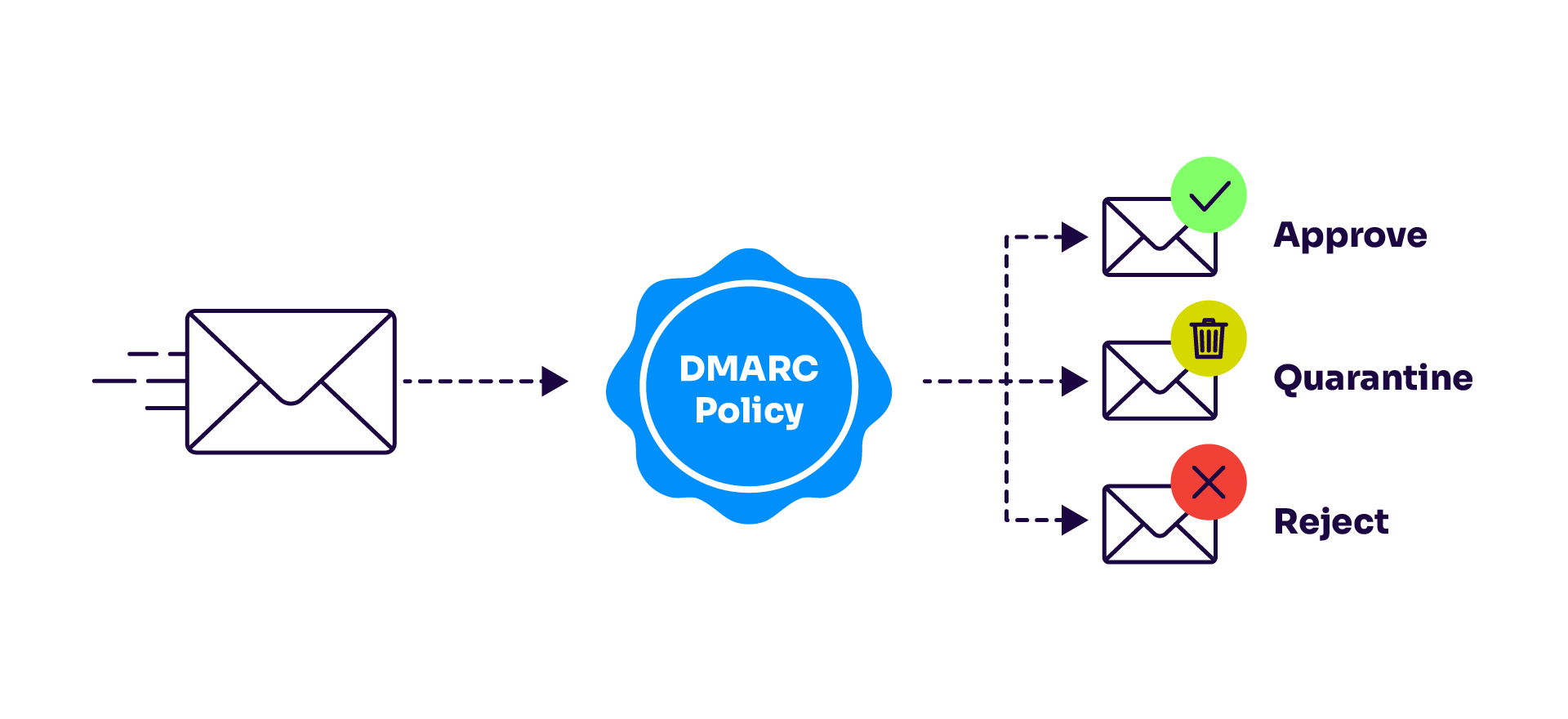
Bonus: Not only do DMARC solutions safeguard your email activity, but they can positively impact your organization’s reputation and brand. DMARC effectively protects your brand by thwarting unauthorized parties from sending malicious emails, preserving your brand’s voice and integrity.
Additionally, DMARC reports provide increased visibility and transparency into your email activity. This level of visibility allows you to identify and further prevent any suspicious acts.
Curious what your domain’s DMARC status is? Use Valimail’s free domain checker to get a baseline of your phishing protection:
Check your
domain now
Enter your domain to see if it’s vulnerable to spoofing or if others are sending emails on your behalf. Instantly check your DMARC, SPF, and BIMI status with a detailed security report.
You’re not fully protected, learn more here.
Check your
domain now
Enter your domain to see if it’s vulnerable to spoofing or if others are sending emails on your behalf. Instantly check your DMARC, SPF, and BIMI status with a detailed security report.
You’re not fully protected, learn more here.
Check your
domain now
Enter your domain to see if it’s vulnerable to spoofing or if others are sending emails on your behalf. Instantly check your DMARC, SPF, and BIMI status with a detailed security report.
You’re not fully protected, learn more here.
Your Domain
Not protected AGAINST IMPERSONATION ATTACKS
DMARC NOT AT ENFORCEMENT
exampledomain1.com
Authentication Status for January 10, 2025
DMARC at Enforcement
SPF Record Configured
BIMI Ready
exampledomain1.com
Authentication Status for January 10, 2025
DMARC at Enforcement
SPF Record Configured
BIMI Ready
Protect your business from phishing with Valimail
Both regular phishing and spear phishing campaigns have the power to damage an organization’s credibility. The right email security can avert phishing attacks with simple protocols.
At Valimail, we provide automated DMARC configuration for organizations of all sizes, boosting deliverability rates and protecting brand integrity from spoofed emails. Valimail optimizes DMARC enforcement so organizations can rest assured, knowing only authorized senders can reach out to customers, partners, and employees.
Thanks to our user-friendly authorization tools, DNS configuration requires little to no technical expertise. Just set your authorization once and keep your domain secure forever.
In addition to added security, our easy-to-use platform provides detailed analytics and rich, real-time supplemental data to help you get the outreach you need. Protect yourself with Valimail. We’ve blocked over 8.6 billion bad actors and we get you to DMARC enforcement 4x faster than legacy DMARC vendors and 8x faster than DIY so your email is protected.
Frequently asked questions about spear phishing vs phishing
Is spear phishing more dangerous than regular phishing?
Yes. Spear phishing is more dangerous because it’s highly targeted and personalized. Attackers research their victims, often through social media or company websites, and craft convincing emails that appear to come from trusted colleagues or executives. This precision makes spear phishing harder to detect and more likely to succeed compared to broad, generic phishing campaigns.
Can phishing and spear phishing use the same tactics?
They can, but the scale and intent differ. Both may use fake login pages, malicious links, or spoofed email addresses. The difference is that phishing casts a wide net, while spear phishing tailors these tactics to a specific person or organization. Think of it as the difference between a mass ad campaign and a personalized con job.
Look for context clues. Spear phishing emails often:
- Use your name, title, or department
- Reference current projects or colleagues
- Come from look-alike domains or hijacked accounts
- Request sensitive actions, like payments or credentials
If an email feels “too specific to be spam,” it’s likely a spear-phishing attempt; verify it out of band before responding.
You can spot most phishing attempts within seconds if you know what to look for. Warning signs include unexpected urgency, generic greetings, spelling errors, and email addresses that don’t quite match the legitimate company. However, sophisticated attacks might take longer to identify.
Pro tip: Hover over links (don’t click!) to preview the URL and check if it matches the supposed sender.
What should I do if I clicked on a phishing link?
Don’t panic, but act fast. Here’s what to do immediately:
- Disconnect your device from the internet to prevent malware spread
- Change passwords for any accounts you logged into after clicking the link
- Run a full antivirus scan
- Monitor your accounts for suspicious activity
- Report the incident to your IT team if it happened at work
- Contact your bank if you entered financial information
How do I report phishing attempts?
At work: Forward the suspicious email to your IT security team and delete it from your inbox. Never forward phishing emails to other colleagues.
Personal email: Forward phishing attempts to: Google (Gmail): phishing@gmail.com
Microsoft: phishing@office365.microsoft.com
US government: report@phishing.gov
Anti-Phishing Working Group: reportphishing@apwg.org
Also report to the supposed sender’s company through their official website (not via email).
Can phishing attacks bypass 2FA?
While two-factor authentication (2FA) makes phishing much harder, determined attackers can still find ways around it. They might use real-time phishing kits that capture and replay your 2FA codes, or use social engineering to trick you into giving up both factors. That’s why it’s crucial to combine 2FA with other security measures like DMARC and employee training.