A phishing email is a fraudulent message designed to trick you into revealing sensitive information, clicking malicious links, or downloading harmful attachments, all while pretending to come from a trustworthy sender.
Despite all the advanced security solutions we have today, phishing remains the most successful way criminals breach organizations. Nearly 3.4 billion phishing emails are sent every day, and the people behind them are getting smarter, more targeted, and harder to spot.
The good news is that phishing emails almost always leave clues. Below, we’ll walk you through how phishing works, what to look for, how to prevent attacks, and what to do if one slips through.
What is a phishing email?
A phishing email is a fraudulent message that impersonates a trustworthy sender to manipulate you into taking a harmful action. That action could be clicking a malicious link, downloading an infected attachment, entering your credentials on a fake login page, or wiring money to a fraudulent account.
These aren’t yesterday’s obvious Nigerian prince scams with terrible grammar and outlandish claims. Today’s phishing emails are smart, targeted, and often nearly indistinguishable from legitimate messages. We’ve seen phishing emails that perfectly mimic invoices, shipping notifications, password reset requests, and even messages that appear to come from your CEO.
Modern phishing attacks use generative AI, real company logos, accurate employee information (often scraped from LinkedIn), and messaging that’s relevant to your actual job functions. The result is email that looks, reads, and feels legitimate.
Phishing targets the psychological layer of security. These attacks are engineered to bypass logical thinking by triggering emotional responses: urgency, fear, curiosity, or authority. When you receive an “urgent security alert” from what appears to be your bank, your emotional brain often reacts before your analytical brain can catch up.
91% of cyberattacks start with a phishing email. Not a zero-day exploit. Not a brute-force attack. A single convincing message.
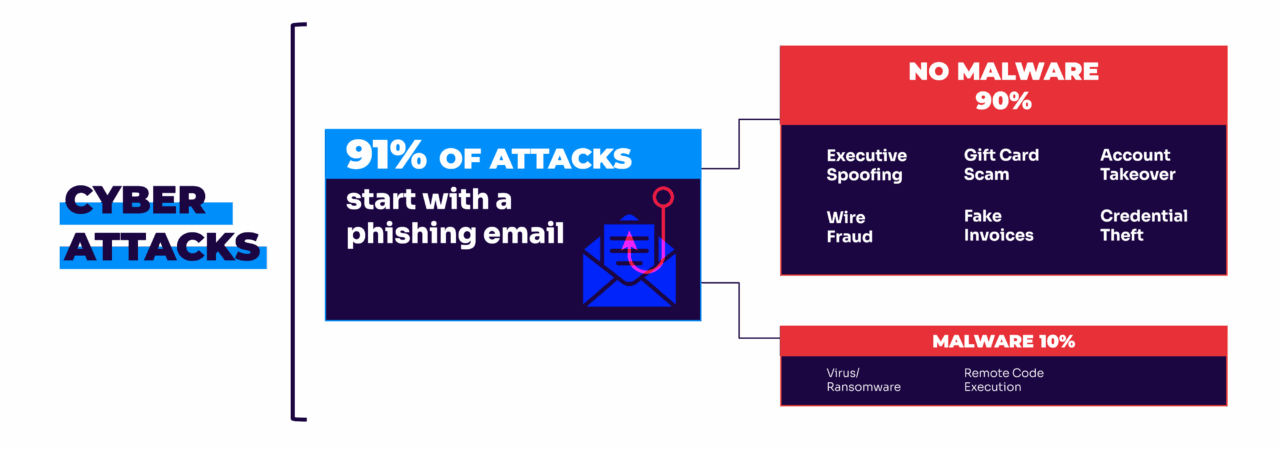
Phishing ultimately targets the psychological factor. These attacks are engineered to bypass logical thinking by triggering emotional responses: urgency, fear, curiosity, or authority. When you receive an “urgent security alert” or a “final notice” from what appears to be your bank, your emotional brain often reacts before your analytical brain can catch up.
What is the goal of a phishing email?
Phishing emails aren’t random. Each one is designed to accomplish a specific objective. The most common goals include:
- Credential theft. The attacker wants your username and password. The phishing email directs you to a fake login page that looks identical to a legitimate service (e.g. Microsoft 365, Google Workspace, your banking portal). You enter your credentials, and the attacker captures them in real time.
- Financial fraud. The email impersonates a vendor, executive, or business partner and requests a wire transfer, invoice payment, or gift card purchase. Business email compromise (BEC) attacks have cost organizations billions globally.
- Malware delivery. The email carries an attachment (often disguised as a PDF, spreadsheet, or document) that installs malware on your device when opened. This can include ransomware, keyloggers, or remote access trojans.
- Data exfiltration. Some phishing campaigns target specific employees with access to sensitive data, like customer records, financial information, or intellectual property. The email is a door to the data.
- Initial access. In more sophisticated attacks, phishing is just the first step. The attacker uses compromised credentials or a malware foothold to move laterally through your network, escalating privileges until they reach their actual target.
Types of phishing emails
Phishing isn’t one thing. It comes in several forms, each with a different level of targeting and sophistication.
- Spear phishing. Attacks customized for a specific individual using personal details. The attacker researches your name, job title, recent activity, and relationships to craft a message that feels relevant and credible. This is phishing with a sniper scope instead of a shotgun.
- Whaling. A subset of spear phishing that targets executives and high-value employees specifically. These attacks often impersonate board members, legal counsel, or regulatory bodies, and the stakes are typically financial.
- Business email compromise (BEC). The attacker impersonates an executive or trusted partner to authorize a fraudulent transaction. BEC attacks don’t always involve malware or malicious links. Sometimes the email is just a convincing request to wire money, which makes them harder to catch with traditional filters.
- Clone phishing. The attacker takes a legitimate email you’ve already received (e.g. a real invoice or shipping notification) and duplicates it with one change: The link or attachment has been swapped for a malicious version. Because you’ve seen the original, the clone feels familiar.
- Vishing and smishing. Phishing that extends beyond email. Vishing uses voice calls (often spoofed caller IDs), and smishing uses SMS text messages. These often work in tandem with email phishing, like a fake text from “your bank” following up on a fake email alert.
- Pharming. Rather than tricking you into clicking a link, pharming redirects your browser to a fraudulent website by manipulating DNS settings or exploiting vulnerabilities in your device. You type the correct URL and still end up on a fake site.
8 ways to spot phishing emails instantly
Most phishing emails contain some sort of telltale sign that can help you identify them before disaster strikes. The challenge is knowing exactly what to look for, and that’s the digital equivalent of spotting a counterfeit bill.
Here are the red flags that give away even the most convincing phishing attempts:
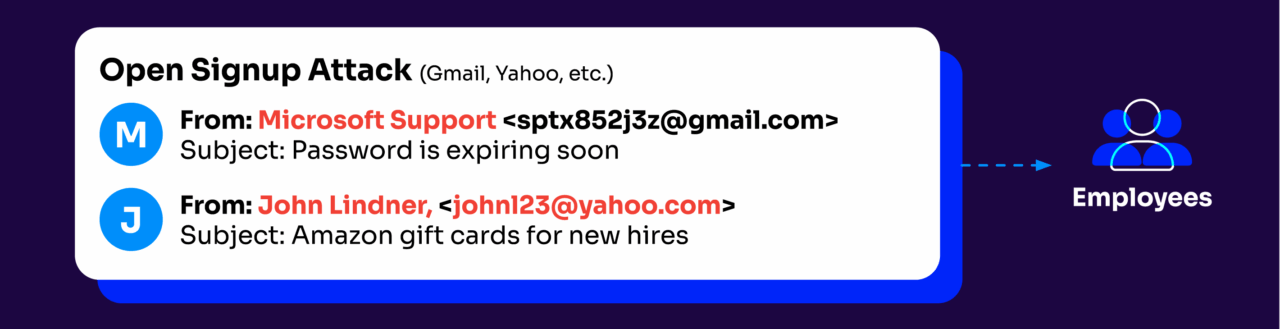
- Suspicious sender addresses: Always check the actual email address, not just the display name. Scammers often use domains that look legitimate but contain slight misspellings (like arnazon.com instead of amazon.com) or add extra words (like amazon-secure-notification.com).
- Urgent action required: Phishing emails frequently create artificial time pressure to short-circuit your critical thinking. Messages claiming “Your account will be suspended in 24 hours” or “Immediate action required” are classic pressure tactics designed to make you act before you think.
- Unexpected attachments: Be extremely wary of email attachments you weren’t expecting, especially if they have unusual file extensions (.zip, .exe, .js). These often contain malware that activates when opened.
- Suspicious links: Hover over links without clicking to see where they actually lead. If the displayed text says “bankofamerica.com” but the actual link shows “bank0famerica.co” or a string of random characters, you’re looking at a phishing attempt.
- Grammar and spelling errors: Yes, attacks have improved, but many phishing emails still contain awkward phrasing, unusual salutations (“Dear valued customer”), or spelling mistakes that legitimate organizations would catch.
- Generic greetings: Legitimate organizations that have your information typically address you by name. “Dear user” or “Valued customer” often signals a mass phishing campaign.
- Requests for sensitive information: Legitimate companies never request passwords, Social Security numbers, or full credit card details via email. Any message asking for this information is almost definitely fraudulent.
- Too good (or bad) to be true: Whether it’s an amazing offer, an unexpected refund, or a terrifying warning, emails that trigger strong emotional responses warrant extra scrutiny. Phishers rely on emotions overriding logic.

Advanced phishing detection strategies
The basic red flags help catch obvious attempts, but smart phishing attacks demand a bit more know-how. We’ve found that combining multiple verification methods creates the strongest defense against even the most convincing scams.
The most powerful technique remains the “out-of-band” verification. This means contacting the supposed sender through a different channel than the email itself. If you receive a suspicious request from your CEO, send them a text or walk to their office instead of replying to the email. This simple step defeats even the best-of-the-best impersonation attempts.
Next, do some email header analysis. The “Received:” fields in an email’s full headers reveal the actual journey the message took to reach you, and this often exposes inconsistencies. While not everyone needs to become a header expert, knowing how to access this information (usually through the “view original” option in your email client) gives you an advantage.
Modern link scanning tools don’t just check against known bad URLs. Now, they open links in secure sandboxes to observe behavior before you risk your actual device. Many organizations use these at the gateway level, but individual browser extensions can provide similar protection.
The best strategy combines technological solutions with human awareness. Neither works well without the other. Advanced phishing can bypass technical controls, and even alert humans miss things without supportive technology. The intersection is where real security happens.
Classic phishing email examples
Understanding phishing in theory is useful. Seeing what it looks like in practice makes it stick. Here are common phishing scenarios you’re likely to encounter:
- The fake invoice. You receive an email with an attached invoice for a purchase you don’t remember making. The sender name looks like a real vendor. The email urges you to “review the attached invoice” or “dispute the charge.” The attachment contains malware, or the link directs to a credential-harvesting page. The red flags: you didn’t order anything, the sender’s domain is slightly off, and the email creates urgency around a financial transaction.
- The password reset scam. An email from “Microsoft” or “Google” warns that your password is about to expire or that suspicious activity was detected on your account. It includes a button to “Reset your password now.” The link goes to a fake login page that captures your credentials. The red flags: the email came unprompted, the sender address doesn’t match the official domain, and hovering over the button reveals an unfamiliar URL.
- The CEO impersonation. Your company’s CFO receives an email that appears to come from the CEO asking them to process an urgent wire transfer for a confidential acquisition. The tone is businesslike, the request is time-sensitive, and the email warns against discussing it with others. This is classic business email compromise. The red flags: unusual request via email, emphasis on secrecy, and pressure to bypass normal approval processes.
- The IT department phishing email. An email from “IT Support” asks all employees to click a link and re-verify their credentials due to a “system upgrade.” The page looks like your company’s internal login portal. The red flags: IT departments rarely request credentials via email, the sender address is external, and the link doesn’t point to your company’s actual domain.
What to do when you spot a phishing attempt
Spotting a phishing email is just the first step. Don’t just delete it and move on (though that’s better than falling for it).
First, don’t interact with the message at all. Don’t click links, download attachments, or reply. If you’ve already clicked something, disconnect from the network immediately and contact your IT security team.
Report the phishing attempt through proper channels. Most email clients now have a “Report Phishing” button, and your organization likely has a specific reporting process. This helps protect others and improve detection systems.
For business-critical phishing (like CEO impersonation or vendor fraud), alert your security team immediately. Seriously, minutes can make the difference in preventing financial damage.
If the phishing attempt impersonated a specific company, consider reporting it directly to them. Most major organizations have dedicated security@company.com addresses exactly for this purpose.
The actions you take after spotting phishing don’t just protect you. They also strengthen the entire security ecosystem.
Phishing prevention techniques (that actually work)
There’s no single solution that provides perfect protection, but layering these techniques creates a defense that catches what individual measures might miss:
- Email authentication standards (DMARC, SPF, DKIM)
- Multi-factor authentication
- Security awareness training
- Email filtering solutions
- Zero-trust security model
- Browser email security solutions
Email authentication standards
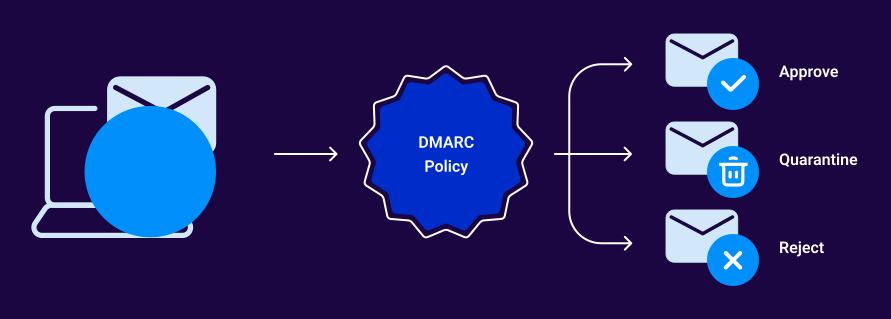
DMARC (Domain-based Message Authentication, Reporting & Conformance) works by verifying that incoming emails actually come from where they claim to. It prevents exact-domain spoofing to make it impossible for scammers to send emails that appear to come from your exact domain.
A properly configured “p=reject” policy means emails that fail authentication (SPF or DKIM) are blocked before reaching inboxes. This eliminates an entire category of phishing attacks. Plus, DMARC’s reporting capabilities show who’s legitimately sending email using your domain versus who’s trying to impersonate you.
Multi-factor authentication
Even if credentials are phished, MFA provides a second line of defense. Requiring something you have (like a phone) in addition to something you know (your password) stops most credential-based attacks early. The most secure forms now use push notifications, authenticator apps, or physical security keys (rather than SMS).
Security awareness training
Traditional security training fails because it’s boring and infrequent. Better training programs use simulated phishing attempts sent regularly throughout the year to provide immediate feedback when employees fall for them. This experiential learning creates lasting behavior change in ways that videos and quizzes just can’t.
Advanced email filtering
Modern email security gateways go far beyond basic spam filtering. They use machine learning to detect anomalies in message content, sender behavior, and attachment characteristics. These systems can identify and quarantine phishing attempts that would fool human recipients, especially when you train them on your organization’s specific communication patterns.
Zero-trust approach
The zero-trust model operates on a simple principle: Trust nothing, verify everything. This means treating all email as potentially malicious (regardless of source). Implement controls like link sandboxing (where URLs are tested in isolated environments before users can access them) and strict attachment policies.
Browser email security solutions
Browser-based protection warns users when they attempt to visit known phishing sites or download suspicious files. Most of these solutions now offer real-time protection by checking URLs against constantly updated threat intelligence databases.
What happens if you open a phishing email
Opening a phishing email itself doesn’t usually cause harm. The danger comes from what you do next.
You clicked a link. The link may redirect you to a fake login page designed to harvest your credentials. In some cases, it triggers a drive-by download that installs malware on your device without further interaction. If you entered credentials on the page, those credentials are now compromised.
You opened an attachment. Malicious attachments can install ransomware, keyloggers, remote access trojans, or other malware the moment they’re executed. Some disguise themselves as harmless documents (e.g., a Word file with macros or a PDF with embedded scripts).
You replied with information. If you responded to the email with sensitive data (e.g. passwords, account numbers, personal details), that information is now in the attacker’s hands. Social engineering doesn’t always require malware. Sometimes it just requires a convincing ask and a cooperative target.
If you’ve interacted with a phishing email, move fast:
- Disconnect from the network. Wired or wireless, disconnect your device to prevent malware from spreading or data from being exfiltrated.
- Change your passwords. Start with the account that was targeted, then change any other accounts that share the same credentials.
- Contact your IT security team. They need to know what happened so they can assess the scope, check for lateral movement, and take containment steps.
- Scan your device for malware. Run a full scan using your organization’s endpoint protection or a reputable antivirus solution.
- Monitor your accounts. Watch for unauthorized activity on any accounts that may have been exposed.
Follow this phishing protection checklist
Unfortunately, phishing protection is never one-and-done. It’s an ongoing commitment. Here’s where you can start:
- Check your domain’s email authentication: Use Valimail’s free Domain Checker to see if your current email authentication setup is actually protecting you from impersonation attacks.
- Implement DMARC with proper enforcement: Move beyond “monitoring mode” to an actual enforcement policy (p=quarantine or p=reject) that blocks fraudulent emails. This step alone eliminates an entire category of phishing threats.
- Monitor your email ecosystem: Sign up for Valimail Monitor (it’s free) to get visibility into who’s sending email using your domain (both legitimate senders and potential attackers).
- Automate your DMARC management: Consider Valimail Enforce to eliminate the technical complexity of DMARC implementation and maintenance.
Email security isn’t about perfection. It’s about making your organization a harder target than others. And the steps you take today are what determine if you survive an attack tomorrow.
Frequently asked questions
How can you tell if an email is phishing?
Check the sender’s actual email address (not just the display name), hover over links before clicking, look for urgency-based language designed to pressure you into acting fast, and watch for generic greetings like “Dear customer” instead of your name. When in doubt, contact the sender through a separate channel to verify.
What are the 4 types of phishing emails?
The most common types are spear phishing (targeted at specific individuals), whaling (targeted at executives), business email compromise (impersonating leadership to authorize transactions), and clone phishing (duplicating legitimate messages with malicious links). Each uses different tactics but shares the same goal: tricking the recipient into taking an action that benefits the attacker.
What happens if you click on a phishing email?
Clicking a link in a phishing email can redirect you to a fake login page designed to steal your credentials, trigger a malware download, or give an attacker access to your session. If you’ve clicked, disconnect from your network immediately, change your passwords, and contact your IT security team.
Can phishing emails install malware without clicking?
In most cases, no. Phishing emails typically require you to click a link, open an attachment, or take some action. Some sophisticated attacks exploit vulnerabilities in email clients that can trigger code execution when a message is opened or previewed, but these are rare.
How do I report a phishing email?
Most email clients have a built-in “Report phishing” button. You can also forward phishing email to your organization’s IT security team, report it to the impersonated company at their security@ address, or forward it to the Anti-Phishing Working Group at reportphishing@apwg.org.