BETA TOOLING 🧪

Free DMARC report analyzer

Upload your DMARC aggregate report and turn raw XML into something you can use.

DMARC aggregate reports are sent by mailbox providers to tell you how your email is being authenticated, such as which sources are passing, which are failing, and what’s being done about it. They contain everything you need, from message volume to source IPs to pass and fail rates. 

Unfortunately, they also arrive as raw XML.

There’s a better way. Our free DMARC report analyzer turns your incoherent XML data into a human-readable breakdown of who’s sending from your domain, what’s passing, and what isn’t.

Upload your aggregate report XML file below, and we’ll translate it into a readable breakdown so you can get to the data that matters.

DMARC sp=quarantine and p=policy

Stop manually wrangling DMARC reports

There’s a better (faster) way to do this

Uploading reports one at a time works for a quick diagnostic, but aggregate reports keep coming — one per mailbox provider, per domain, per day. Monitoring your authentication posture across multiple domains by hand isn’t really sustainable.

Valimail Monitor does this automatically, for free. Instead of downloading XML files and uploading them one by one, Monitor connects directly to your domain and parses your DMARC data continuously. This shows you every sending service by name rather than IP address, your alignment status across all your domains, and a running view of what’s passing, what’s failing, and what needs attention.

It’s also free, which means there’s no reason not to get started. 

Check your
domain now

Enter your domain to see if it’s vulnerable to spoofing or if others are sending emails on your behalf. Instantly check your DMARC, SPF, and BIMI status with a detailed security report.

You’re not fully protected, learn more here.

Check your
domain now

Enter your domain to see if it’s vulnerable to spoofing or if others are sending emails on your behalf. Instantly check your DMARC, SPF, and BIMI status with a detailed security report.

You’re not fully protected, learn more here.

Check your
domain now

Enter your domain to see if it’s vulnerable to spoofing or if others are sending emails on your behalf. Instantly check your DMARC, SPF, and BIMI status with a detailed security report.

You’re not fully protected, learn more here.

View Full Report

Your Domain

Not protected AGAINST IMPERSONATION ATTACKS

DMARC NOT AT ENFORCEMENT

exampledomain1.com

Authentication Status for January 10, 2025

DMARC at Enforcement

SPF Record Configured

BIMI Ready

exampledomain1.com

Authentication Status for January 10, 2025

DMARC at Enforcement

SPF Record Configured

BIMI Ready

Learn more about analyzing DMARC reports

how to read a dmarc report graphic

How to read a DMARC report (the right way)

Read more

dmarc failure report

DMARC failure reports: Everything you need to know in 2025

Read more

dmarc analyzer tools

The best DMARC report analyzer tools in 2026

Read more

Frequently asked questions about DMARC reports

Why should I use a DMARC report analyzer?

Raw DMARC data is only useful if you can read it. Most teams know they should be reviewing their aggregate reports, but they just don’t have a practical way to do it without dedicated tooling or a lot of manual effort.

And good luck hiring someone to manually parse XML files. An analyzer closes that gap:

  1. Faster troubleshooting. Authentication failures always have a cause. A readable report tells you which source is failing and why, so you’re fixing the right thing instead of guessing.
  2. Visibility into who’s sending as you. Aggregate reports surface every IP address that sent email using your domain during the reporting period. That includes services you authorized, services you forgot about, and sources you never approved in the first place.
  3. A clearer path to enforcement. Moving from p=none to p=quarantine or p=reject requires confidence that your legitimate senders are all passing authentication. Regular report analysis is how you build that confidence.
  4. Early warning on policy gaps. A source that’s failing today is a potential deliverability problem or spoofing risk tomorrow. Catching it in a report is much better than finding out when something breaks.

It’s simple. Upload your aggregate report, and we’ll surface the following information:

  • Message volume by source. See how many messages were sent from each IP address or sending service during the reporting period — including sources you may not have authorized.
  • SPF and DKIM alignment results. For each sending source, you’ll see whether SPF and DKIM passed or failed, and whether either result aligned with your “From” domain. Misalignment is one of the most common reasons legitimate mail fails DMARC.
  • Disposition applied. See whether receiving servers quarantined, rejected, or delivered messages from each source and whether that matches what your DMARC policy intended.
  • Unauthorized senders. If a source is sending email using your domain without authorization, it’ll show up here. These are worth investigating immediately because they’re either a misconfiguration or something more serious.
  • Forwarding-related failures. Email forwarding is one of SPF’s known weak spots. Our analyzer helps you distinguish between a real authentication problem and an expected forwarding quirk.

Policy effectiveness. See how well your current DMARC policy is working across the senders in the report, and get a clearer sense of what’s standing between you and enforcement.

A DMARC aggregate report (also called an RUA report) is an XML file sent by mailbox providers to show you how they handled email from your domain over a given period. It includes message volume, sending sources, SPF and DKIM results, alignment status, and the disposition applied by the receiving server. Most major providers (including Gmail, Outlook, and Yahoo) send these reports daily if you have a DMARC record published with an rua tag pointing to a valid email address.

They contain everything you need: 

  • Message volume
  • Source IPs
  • Sending services
  • SPF and DKIM alignment results
  • Pass and fail rates
  • Disposition applied by the receiving server

Aggregate reports give you a summary of authentication activity across all messages received during the reporting period. Forensic reports (RUF reports) provide detail on individual messages that failed authentication, including header information and sometimes message content. Aggregate reports are more widely supported and what this tool analyzes.

The most common causes are misalignment, missing senders in your SPF record, and DKIM configuration issues. If a third-party service sends email on your behalf but isn’t listed in your SPF record, or if the DKIM signature doesn’t align with your “From” domain, that mail will fail DMARC even though it came from a legitimate source. Your aggregate report will show you which sources are failing and why.

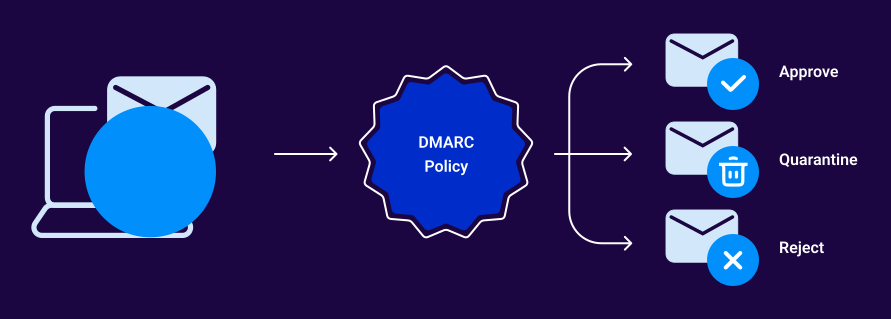
Disposition is what the receiving mail server did with a message:

  • None (delivered normally)
  • Quarantine (sent to spam)
  • Reject (blocked)

DMARC policy

This is determined by your DMARC policy setting combined with the receiving server’s own behavior. A message can fail authentication and still be delivered if your policy is set to p=none, since that policy instructs servers to take no action on failures.

Most mailbox providers send DMARC aggregate reports once per day, covering the previous 24-hour period. Organizations managing multiple domains can receive dozens of reports daily, and that’s one (of many) reasons manual analysis becomes impractical quickly.

Unknown sources are IP addresses that couldn’t be matched to a named sending service. They might be legitimate senders you haven’t identified yet, misconfigured infrastructure, open relays, or spoofing attempts. Valimail Monitor identifies sending services by name rather than IP address, which makes it much easier to figure out what an unknown source is.

Because p=none is where the work happens. At p=none, your policy is collecting data without taking action on failures. Analyzing that data is how you identify which senders need to be authorized, which configurations need fixing, and when you’re ready to move to p=quarantine or p=reject. That analysis is what separates organizations that reach enforcement from ones that stay stuck at monitoring indefinitely.

You can upload and analyze reports for any domain using this tool, one at a time. If you need a consolidated view across multiple domains (with automatic report ingestion and continuous monitoring), that’s what Valimail Monitor is built for.

The rua tag in your DMARC record tells mailbox providers where to send your aggregate reports. Without it, providers have nowhere to send the data and you won’t receive any reports. To set one up, add rua=mailto:your@email.com to your DMARC record. If you’re using Valimail Monitor, we provide an RUA address that automatically ingests and processes your reports as they arrive.

You need a published DMARC record with an rua tag to receive aggregate reports. If you don’t have one yet, start with Valimail’s free domain checker — it’ll show you your current DMARC, SPF, and DKIM status and give you a picture of where to begin. Once your record is published and reports start arriving, come back and use this tool to analyze them.

Check your
domain now

Enter your domain to see if it’s vulnerable to spoofing or if others are sending emails on your behalf. Instantly check your DMARC, SPF, and BIMI status with a detailed security report.

You’re not fully protected, learn more here.

Check your
domain now

Enter your domain to see if it’s vulnerable to spoofing or if others are sending emails on your behalf. Instantly check your DMARC, SPF, and BIMI status with a detailed security report.

You’re not fully protected, learn more here.

Check your
domain now

Enter your domain to see if it’s vulnerable to spoofing or if others are sending emails on your behalf. Instantly check your DMARC, SPF, and BIMI status with a detailed security report.

You’re not fully protected, learn more here.

View Full Report

Your Domain

Not protected AGAINST IMPERSONATION ATTACKS

DMARC NOT AT ENFORCEMENT

exampledomain1.com

Authentication Status for January 10, 2025

DMARC at Enforcement

SPF Record Configured

BIMI Ready

exampledomain1.com

Authentication Status for January 10, 2025

DMARC at Enforcement

SPF Record Configured

BIMI Ready

There’s no fixed timeline, but the goal is confidence. You want to know that every legitimate sender in your reports is passing authentication and properly authorized. Some organizations get there in a few weeks. Others, with more complex sending infrastructure, take longer. The signal to move forward isn’t time elapsed, though. It’s a consistent picture of your authorized senders passing and nothing unexpected showing up in your reports.

Get started for free
with Monitor

Start your path to DMARC enforcement with a panoramic view of the traffic being sent on your behalf.
No trial offers, credit cards, or obligations.

Explore all Valimail
has to offer

Go one step further than visibility…Take action! Reach DMARC enforcement faster. Stay compliant with evolving sender requirements. All while protecting your brand.

[UPCOMING WEBINAR] Valimail Product Release: Get Better Brand Protection and Brand Impressions – Register HERE