
Clone phishing is a type of phishing attack where a legitimate email is copied and modified to include malicious links or attachments. The attacker impersonates a sender the recipient already trusts (using cloned branding, content, and formatting) to make the fraudulent message nearly indistinguishable from the real one.
It’s one of the more sophisticated forms of phishing because it doesn’t fabricate trust from scratch. It exploits trust that already exists.
Below, we’ll show you how clone phishing works, how to spot clone phishing emails, and what defenses stop them.
What is clone phishing?
Clone phishing is a phishing technique that copies the look, feel, and content of a legitimate message to gain the recipient’s confidence. Often, a clone phishing email is nearly indistinguishable from an authentic one.
However, the attacker will alter small details, like pointing links to a phishing site or adding a malicious attachment. Although these messages can be very convincing, defenses exist for organizations that want to mitigate the risk of clone phishing attempts.
Clone phishing can also be combined with a DKIM replay attack. This is where the attacker obtains a real, cryptographically signed email and replays it to new targets. Because the original signature is valid, it passes authentication checks at the receiving server.
Clone phishing is distinct from spear phishing, which crafts personalized messages from scratch, and from generic phishing, which uses mass-volume generic lures. We’ll compare all three below.
How to spot a clone phishing email
Before we get started crafting a realistic attack and exploring clone phishing defenses, let’s take a quick look at indicators of a clone phishing attempt.
The table below details common signs an email is a clone phishing attack and can serve as a quick reference to consult when developing a mitigation strategy.
|
Indicator |
Description |
|---|---|
|
Mismatched hyperlinks |
Mismatch between hyperlink text and the domain the link points to. |
|
Illegitimate sender domain |
Domain used by the sender isn’t the authentic domain for the organization they claim to be from. |
|
Content that invokes a sense of urgency |
A sense of urgency or other pressure tactics to get you to act quickly without closely analyzing details. |
|
Email client warnings |
A warning from your webmail provider or antiphishing software that the email is suspicious. |
The challenge with clone phishing specifically is that many standard red flags won’t appear. The email may come from a domain that looks nearly identical to the real sender, use copied branding and content, and land in the inbox rather than spam.
None of these red flags are foolproof detection techniques on their own. Many clone phishing attacks won’t feature any sort of urgency. Or they might come in tandem with a DKIM replay attack, allowing them to spoof the real domain of the sender.
However, these strategies will at least give you tools to identify the majority of clone phishing emails that you receive.
Later in the article, we’ll look at defenses you can apply to protect you from clone phishing emails even if you personally don’t detect every single one. For now, we’ll begin by examining what an actual clone phishing attack actually looks like.
Clone phishing vs. spear phishing vs. regular phishing
Clone phishing is frequently confused with spear phishing and other targeted attack types. Here’s how they differ:
| Attack type | How it works | What makes it convincing |
|---|---|---|
| Regular phishing | Generic email sent to thousands of recipients | Volume — enough people fall for it |
| Spear phishing | Customized email built using research on a specific target | Personalization — uses your name, role, and context |
| Clone phishing | Exact copy of a legitimate email with malicious links or attachments swapped in | Familiarity — the recipient may have seen the original |
| Whaling | Spear phishing aimed specifically at executives | Authority — appears to come from or target senior leadership |
The key distinction between clone phishing and spear phishing is the source material. Spear phishing attackers research their target and build a convincing message from scratch.
Clone phishing attackers start with something real (a genuine email the target may have already received) and make it dangerous by swapping the payload.
Real-life clone phishing attack examples
The best way to understand clone phishing is to see how an actual attack works. Here, we’ll craft a clone phishing email example using the same tactics hackers use. Then we’ll send it and see how it looks from the recipient’s perspective.
Clone a legitimate email
First things first, we’ll need a legitimate, trustworthy email to clone. I’ve created a ticket through Valimail’s free support web interface, which also creates an email thread. Here’s the email I received:
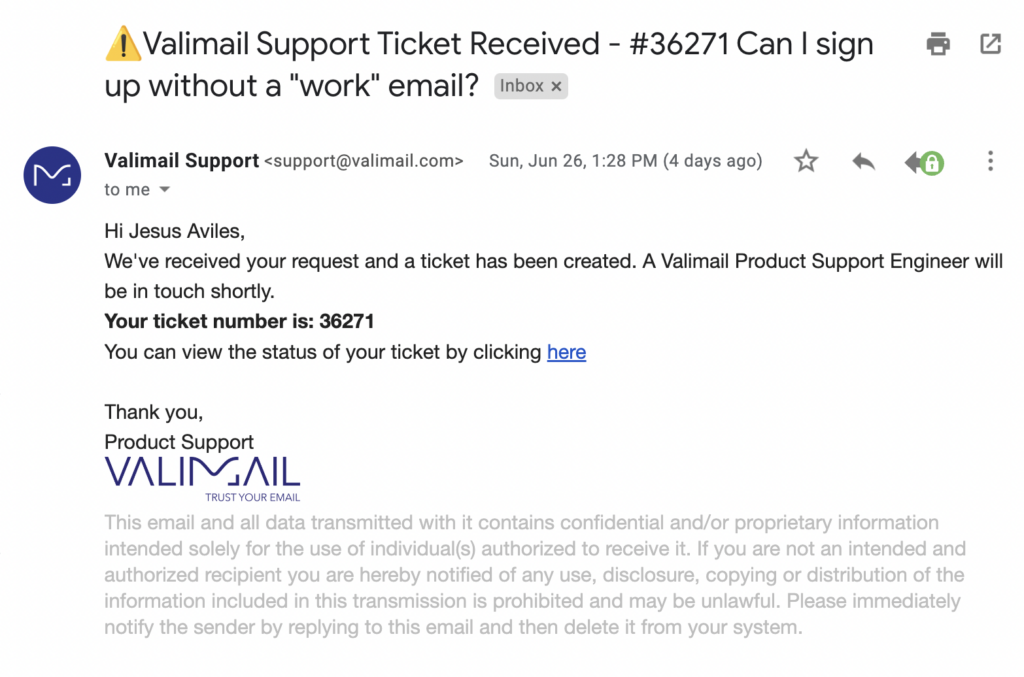
Immediately, we see elements of this email that we can copy to create a convincing clone.
- Visible
From:address - Gmail profile picture
- Subject and content
- The HTML formatting

Let’s work through them in order.
In the visible From: address, we see support@valimail.com. We could forge this address directly, but Valimail’s domain is protected by DMARC, so there’s a good chance that our email would end up in spam if it arrives at all.
But we can buy a domain that looks similar enough that our target won’t notice the difference. For example, if we replace the letter m with two n’s, we get valinnail.com.
If we look it up on Namecheap, we see it’s available. Even if it weren’t, we could easily concoct another such domain that looks similar.

Thankfully, Valimail offers a free way to find lookalike domains that could threaten your brand.
Armed with our new domain, we can set up Gmail for it by following the instructions provided by Google using their documentation: Activate Gmail with Google Workspace.
Now we can log into Workspace and create a user named “support.” Just copy over the profile picture, and we’re ready to start working on cloning the content!

|
Platform
|
Success Rate
|
Success Rate Frame
|
Estimated FTEs
|
Maintenance
|
Marketplace Apps Identified
|
|---|---|---|---|---|---|
|
DIY Manual
|
20%
|
12+ Months
|
2-3
|
Never ending
|
~100 services
|
|
Outsourced Manual
|
<40%
|
9-12 Months
|
1-2
|
Never ending
|
~100 services
|
|
Valimail Automation
|
97.8%
|
0-4 Months
|
0.2
|
Automated
|
6,500+
|
This is the easiest part – we can just copy and paste the content from the email, and it will copy all of the styling and HTML – including links.
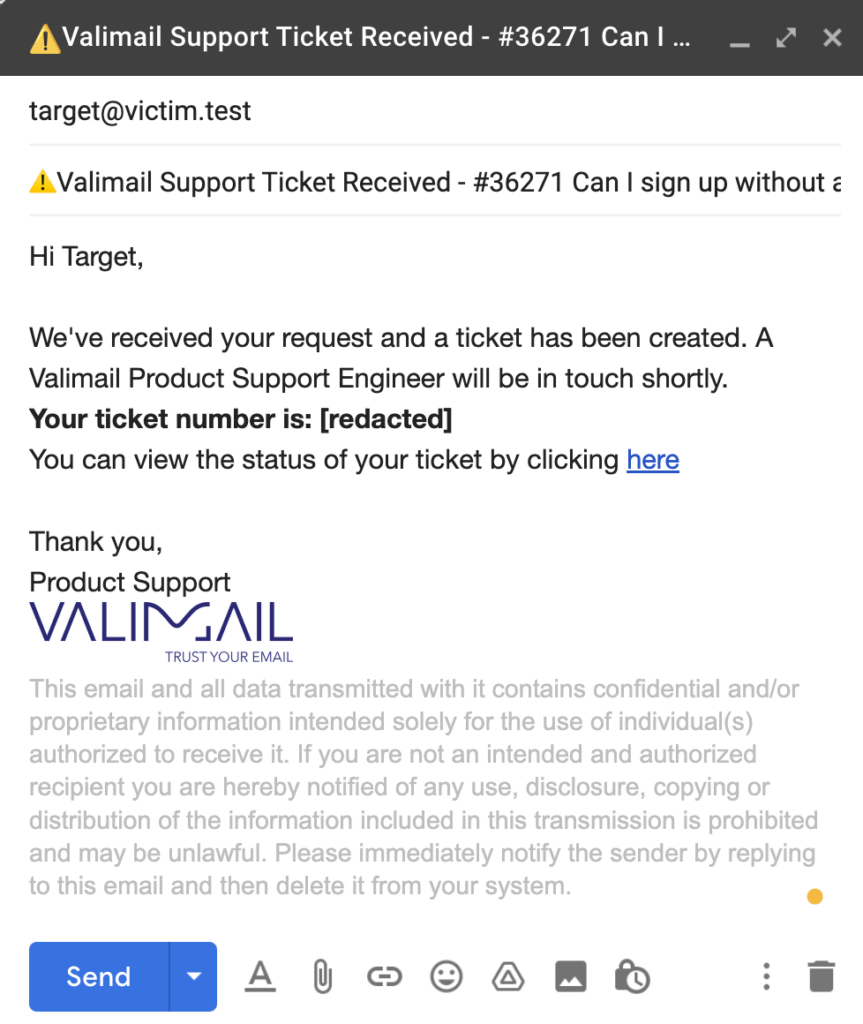
Now that we have an account that impersonates Valimail, along with HTML content cloned from a legitimate Valimail support email, we’re ready to maliciously alter the content.
Add malicious content
The email contains a link to a support thread. If the client is a Valimail customer and receives this email, they’ll likely think that there’s a problem with their account and click the link to open the support ticket. So let’s change the link to point to our own domain.
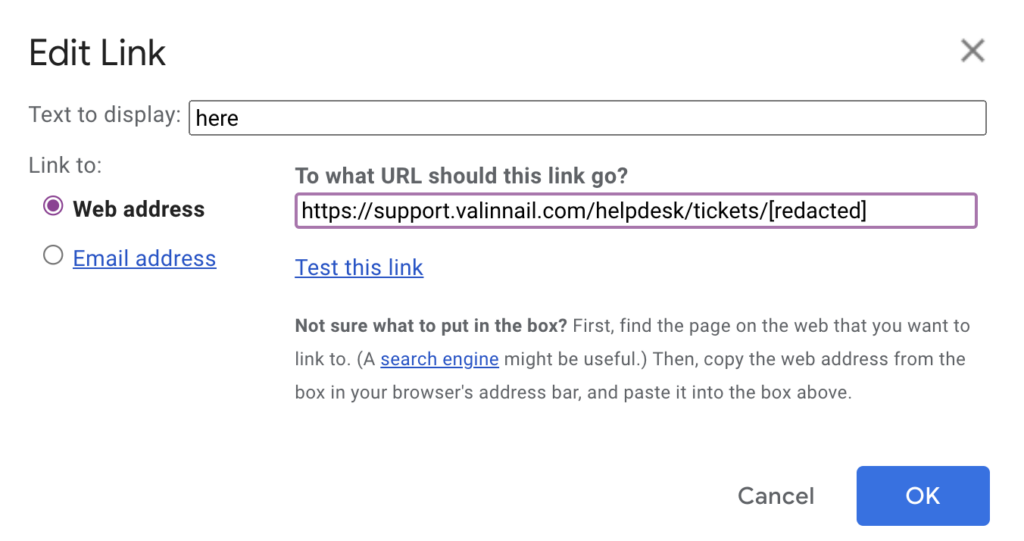
Notice that we’ve altered the domain name to use our double ‘n’ lookalike. From here, we could set up a phishing page at that URL and send the email off to our victims.
From the attacker’s perspective, phishing is a numbers game. Therefore, in a real clone phishing attempt, we’d likely target hundreds or even thousands of Valimail customers as part of this clone phishing attack.
Send the attack
Finally, let’s look at how the final email looks in the recipient’s inbox.
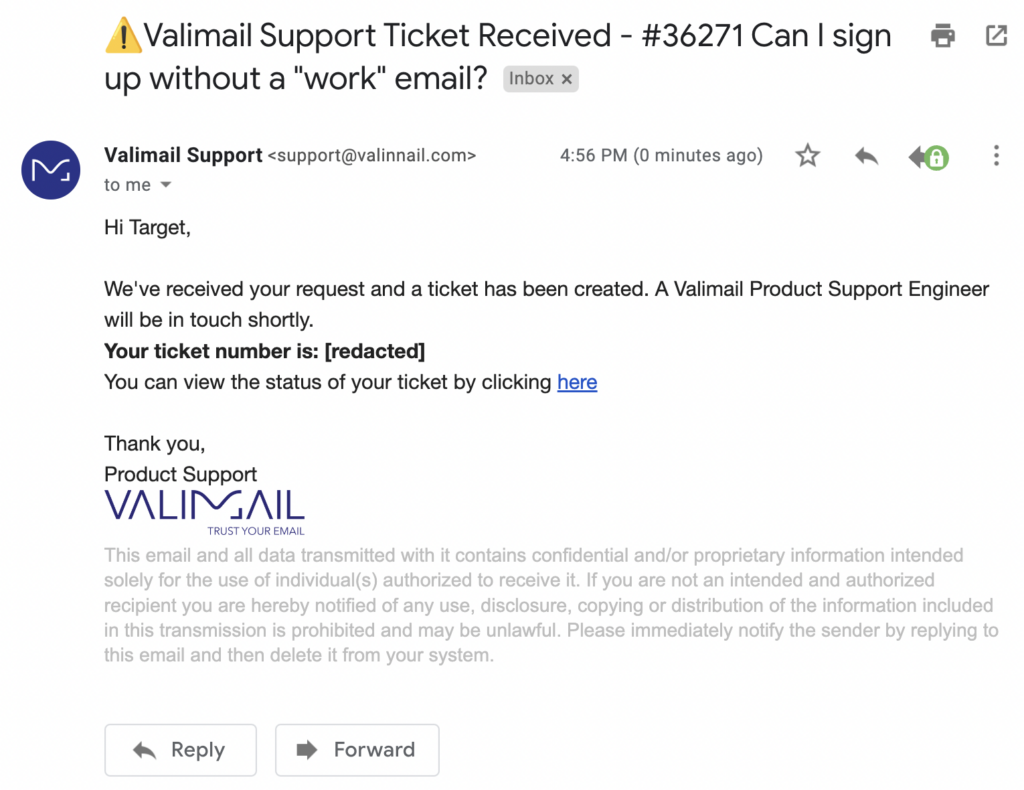
Would you notice that the domain has a double ‘n’ instead of an ‘m’? This email doesn’t end up in spam, so you only have two clues in this case: the domain in the visible From: address is wrong, and the hyperlink points to a phishing domain.
The DKIM replay attack
A DKIM replay attack is a variant of clone phishing where the attacker doesn’t need to spoof the sender domain at all. Instead, they obtain a legitimate, DKIM-signed email from the target organization — by subscribing to a newsletter, opening a support ticket, or triggering any other automated email — and replay that message to new recipients.
Because the original DKIM signature is cryptographically valid, the replayed email passes DKIM authentication checks at the receiving server. It looks completely legitimate to the mail infrastructure evaluating it.
DKIM replay attacks typically take one of two forms:
- Unchanged replay. The attacker resends the original email verbatim to new targets. This works when the original message contains content the attacker can exploit, or when the goal is to build perceived legitimacy before following up with a malicious message.
- Modified replay. The attacker alters the email content before sending, which breaks the DKIM signature. This version can be detected by DMARC, but only if DMARC is configured at enforcement (p=quarantine or p=reject). At p=none, the message still gets delivered even when authentication fails.
Defending against DKIM replay attacks requires DMARC enforcement, not just monitoring. A p=none policy provides visibility but no protection. Domain-based Message Authentication, Reporting, and Conformance (DMARC) at p=reject is the only policy level that actively blocks email failing authentication before it reaches the inbox.
How to defend against clone phishing
Clone phishing attacks are pretty sneaky. Fortunately, there are ways for you to protect yourself.
Now that you have a better idea of what clone phishing is and how the attack itself works, we can move on to actually defending yourself and others in your organization from becoming victims of this attack. Like most varieties of phishing, there is no single foolproof defense that makes you immune.
However, the tactics below will lower the odds of an attacker carrying out a successful clone phishing attack under your watch.

Minimal resource requirement with only a single one time DNS change needed
DMARC Enforcement guarantee and 97.8%+ success rate
100% Automated service discovery and 1-click validation
1. Multi-Factor Authentication (MFA)
MFA refers to the practice of requiring more than one method of authentication. For example, in addition to requiring a password, a web page might send you a special code via text message to enter before logging in.
This is great for security because it means that your account is still safe even if your password leaks to hackers. In the context of phishing, however, it’s not perfect. A dedicated attacker can simply phish the MFA code in addition to the password when you click the link.
So while this doesn’t prevent phishing entirely, MFA makes things more challenging and complicated for the attacker.
2. Phishing Awareness Campaigns
You should train employees and team members in your organization to recognize common signs of phishing, including advanced phishing techniques like clone phishing. Written training materials like this article are a great start.
However, you can go further by setting up periodic, simulated phishing campaigns. These internal phishing tests give you an idea of how your team would react to a real phishing attack.
With this information, you can figure out which kinds of attacks worked best against your team and focus on educating against that attack specifically. You can also identify which employees fell for the attack and offer them more personalized phishing awareness and defense training.
3. Anti-Phishing Software
Diligence is important, however, there are limitations to the diligence you can realistically expect from all users. And it only takes one user to slip up for a breach to occur.
Vendors offer automated software solutions to compensate for this gap and perform some of the work for you. For example, the Netcraft extension for Chrome:
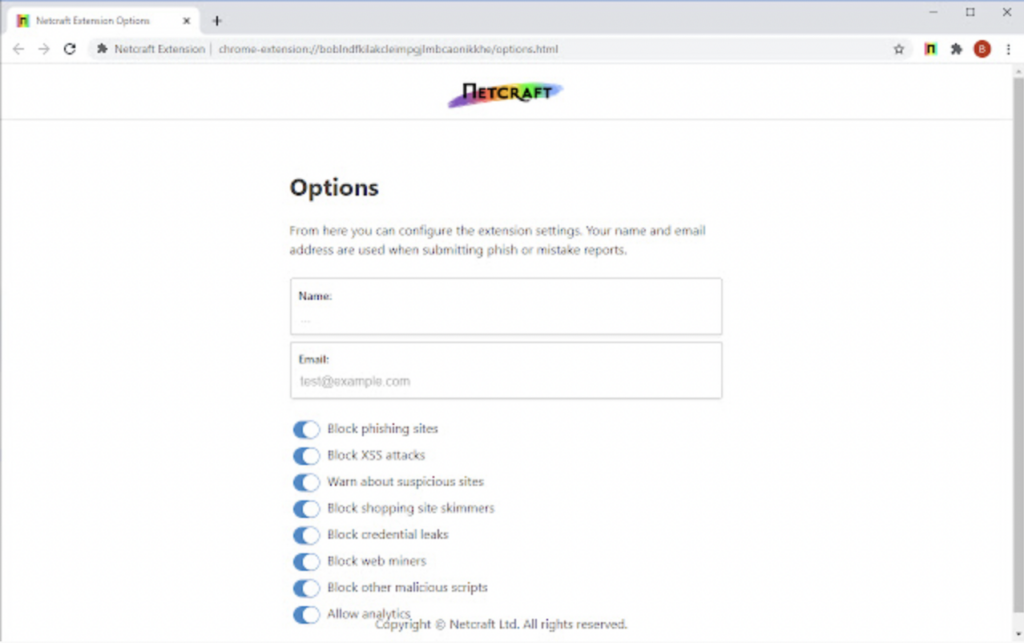
Commercial anti-phishing solutions tend to integrate with specific providers. For example, Office 365 offers enterprise anti-phishing services that are top-notch. Check what options are available for the platform you use in your organization and see if it fits your needs.
4. DMARC enforcement
DMARC prevents attackers from sending email that appears to come directly from your domain by requiring both SPF and DKIM alignment. At p=reject, any email that fails authentication is blocked before it reaches the recipient’s inbox.
This eliminates the most common clone phishing vector: exact-domain impersonation. An attacker who clones a Valimail support email and sends it from support@valimail.com (rather than a lookalike domain) would be blocked entirely if Valimail’s DMARC policy is at p=reject.
DMARC doesn’t stop lookalike domain attacks (where the attacker registers a similar-looking domain like valinnail.com), but it does close the exact-domain spoofing gap that clone phishing frequently exploits. Pair DMARC enforcement with domain monitoring to catch lookalike registrations before they’re used in an attack.

Educate employees by sharing this guide with them
Implement email filtering tools including inbound DMARC validation
Publish a DMARC record for your domain
Protect your business from clone phishing
Phishing is a scourge that both large and small organizations must grapple with if they wish to survive in the modern digital economy.
As we’ve learned in this article, clone phishing is a particularly pernicious form of phishing due to the attention to detail put into each clone phishing email. Clone phishing attacks are likely to copy as many details from a legitimate email as possible, making it as hard as possible for you to discern a phishing email from the genuine original.
Detecting phishing of any kind is hard, but you can beat clone phishing attacks. You should universally apply Multi-Factor Authentication, meticulously review links and domains before trusting them, and diligently apply antiphishing software across your organization.
With these strategies in place, you can greatly reduce your risk of becoming a victim of a phishing attack.