Domain-based Message Authentication, Reporting, and Conformance (DMARC) gives you three policy options: none, quarantine, and reject. Of the three, only one actually stops unauthorized email from reaching your recipients.
That’s p=reject.
p=reject is the strongest enforcement level DMARC offers, and it’s where every domain should eventually land. But most don’t.
According to industry data, fewer than 20% of domains with a published DMARC record have made it to p=reject. The rest are still monitoring, still quarantining, or still stuck at p=none wondering when they’ll be ready.
Below, we’ll break down what a DMARC reject policy does, how it compares to the other options, and how to get there without accidentally blocking your own email.
What is a DMARC reject policy?
A DMARC reject policy tells receiving mail servers to block any email that fails DMARC authentication. The message doesn’t land in the inbox or get routed to spam. It gets rejected outright, before the recipient ever sees it.
You set this policy by publishing a DNS TXT record on your _dmarc subdomain with the p=reject tag.
Here’s what a basic DMARC reject record looks like: v=DMARC1; p=reject; rua=mailto:dmarc-reports@yourdomain.com
The v tag declares the DMARC version. The p tag sets your policy. And the rua tag tells receiving servers where to send aggregate reports, so you can monitor what’s happening with your email.
p=reject is the end goal of DMARC enforcement. It’s what turns DMARC from a passive reporting mechanism into an active defense against domain spoofing and impersonation.
The three DMARC policies compared
DMARC has three policy levels, each with a different level of protection:
| Policy | What it tells receiving servers | Protection level | Typical use case |
| p=none | Deliver the email regardless of authentication results | None (monitoring only) | Initial setup and data collection |
| p=quarantine | Send failing email to the spam/junk folder | Moderate | Transition phase while verifying senders |
| p=reject | Block failing email entirely | Full enforcement | Ongoing domain protection |
- p=none gives you visibility
- p=quarantine gives you a safety net
- p=reject gives you actual protection.
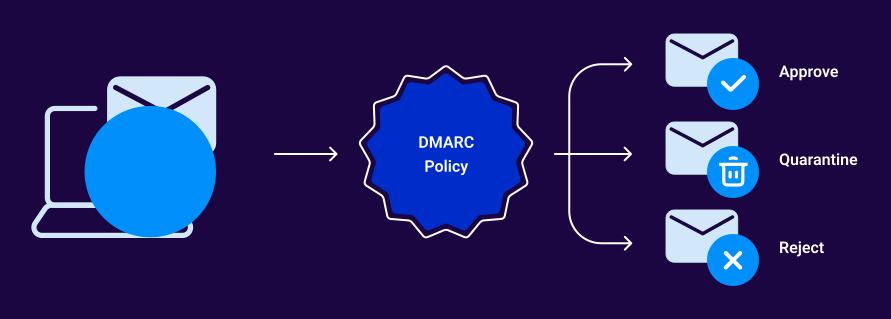
Most organizations should move through all three in order. Starting at p=none to collect data, graduating to p=quarantine to test enforcement, and eventually reaching p=reject once all legitimate senders are properly authenticated.
For a deeper breakdown of all three policies, see our DMARC policies guide.
What happens when an email fails DMARC at p=reject
Here’s the sequence:
- A sender sends an email using your domain in the “From” address.
- The receiving mail server checks your domain’s DMARC record and sees p=reject.
- The server evaluates whether the email passes Sender Policy Framework (SPF) and/or DomainKeys Identified Mail (DKIM) authentication, and whether those results align with your domain.
- If authentication fails or alignment doesn’t match, the server rejects the email. It never reaches the recipient.
This applies to anyone sending from your domain, not just attackers. If a legitimate sending service (your CRM, marketing platform, or helpdesk) isn’t properly configured for SPF and DKIM alignment, its email gets rejected, too. That’s why preparation matters.
Why p=reject matters
p=reject is the only DMARC policy that actively prevents unauthorized email from being delivered. The other two policies leave the door open: p=none takes no action at all, and p=quarantine still delivers the message (just to the spam folder, where a recipient can still open it).
With p=reject in place, attackers can’t spoof your domain to send phishing email to your customers, partners, or employees. It directly reduces your exposure to business email compromise (BEC) and exact-domain impersonation attacks.
Beyond security, p=reject is increasingly expected. Google, Yahoo, and Microsoft all encourage senders to move toward DMARC enforcement. And if you want to implement Brand Indicators for Message Identification (BIMI), which displays your brand logo next to your email in the inbox, you need DMARC enforcement at p=quarantine or p=reject.
No enforcement, no logo.
DMARC reject vs. quarantine
This is one of the most common questions, and the answer is straightforward: quarantine is a step on the way to reject but never a substitute for it.
p=quarantine routes failing email to the spam folder. That’s useful during the transition period because it lets you catch misconfigurations before they turn into delivery failures. If a legitimate sender breaks alignment, their email lands in spam instead of getting blocked entirely. You can find the issue, fix it, and move on.
But quarantine isn’t full protection.
A phishing email that lands in a spam folder can still be opened by a curious or confused recipient. p=reject eliminates that risk. The progression should be sequential:
- p=none → Collect DMARC reports and identify all senders.
- p=quarantine → Test enforcement with a safety net. Monitor for legitimate failures.
- p=reject → Full enforcement. Unauthorized email is blocked before delivery.
Sure, skipping quarantine and jumping straight to reject is possible. However, it’s super risky if you haven’t thoroughly identified and authenticated every service sending on your behalf.
When your domain is ready for p=reject
Moving to p=reject isn’t something you do on a whim. You’ll want to double-check you’re ready:
- All legitimate senders are identified. You know every service, platform, and system that sends email using your domain. No blind spots.
- SPF and DKIM are aligned for every sender. Each service passes authentication, and the authenticated domain matches your “From” address. Alignment is what DMARC actually checks.
- DMARC reports show clean results. Your aggregate reports consistently show minimal or zero authentication failures from authorized sources. If you’re still seeing legitimate senders fail, you’re not ready.
- You’ve spent time at p=quarantine without issues. This is your proving ground. If quarantine isn’t catching any legitimate email in spam, you’re in good shape to move to reject.
- Subdomains are accounted for. DMARC policies on your root domain apply to subdomains by default (unless you set a separate subdomain policy with the sp= tag). Make sure you’re not accidentally blocking email from subdomains that aren’t ready for enforcement.
How to set up a DMARC reject policy
The record itself is a DNS TXT entry published on the _dmarc subdomain of your domain. Here’s an example:
_dmarc.yourdomain.com TXT “v=DMARC1; p=reject; rua=mailto:dmarc@yourdomain.com; sp=reject”
Here’s what those specific tags mean:
- v=DMARC1: Declares the DMARC version (always DMARC1).
- p=reject: Sets the policy for your root domain.
- rua=: Specifies where to send aggregate reports.
- sp=reject: Sets the policy for subdomains (optional but recommended).
If you’re moving from p=quarantine, you can also use the pct= tag to apply the new policy to a percentage of failing messages first. For example, pct=25 applies reject to 25% of failures while quarantining the rest, letting you ease into full enforcement.
Get to p=reject faster with Valimail
Most organizations that attempt DMARC enforcement on their own never make it to p=reject. Valimail Enforce changes that. With automated sender identification, one-click authorization, and patented Instant SPF® technology, Valimail gets organizations to full DMARC enforcement with a 95%+ success rate and 4x faster than doing it manually.
That’s not hyperbole, either. It’s real.
Check your domain to see where your DMARC policy stands today, or sign up for Valimail Monitor for free to get full visibility into your sending services and authentication status.
Frequently asked questions
What does p=reject mean in DMARC?
p=reject is a DMARC policy that tells receiving mail servers to block any email that fails authentication. The email is rejected before it reaches the recipient’s inbox or spam folder.
Is DMARC reject better than quarantine?
p=reject provides stronger protection because it blocks unauthorized email entirely, while p=quarantine only routes it to spam. That said, quarantine is a useful intermediate step during the transition to full enforcement.
Can p=reject block legitimate email?
Yes, if a legitimate sending service isn’t properly configured with SPF and DKIM alignment. This is why monitoring with DMARC reports and spending time at p=quarantine are both recommended before moving to p=reject.
Do I need p=reject for BIMI?
BIMI requires DMARC enforcement at p=quarantine or p=reject. However, p=reject provides the strongest foundation for BIMI implementation and is the recommended policy level.