We’ve made some changes! Read on to learn how we’ve improved Valimail Amplify so you can make trust visible with Brand Indicators for Message Identification (BIMI). Our goal? To make BIMI easier to set up correctly, easier to manage ongoing, and to better align the BIMI workflow with how organizations actually collaborate across technical and marketing teams.
BIMI is more than just a logo in the inbox. When a domain reaches DMARC enforcement and publishes a valid BIMI record, participating mailbox providers display a verified brand logo next to authenticated email messages. That visual cue reinforces brand recognition, signals legitimacy to recipients, and helps differentiate trusted communication from spoofed or lookalike messages.
For marketing teams, that can translate into stronger brand recall and improved engagement. For security teams, it reinforces the value of DMARC enforcement by visibly demonstrating that authenticated mail is the only mail that represents the brand.
Amplify is now part of Enforce, enabling you to manage BIMI alongside your enforcement workflows in a single unified platform, and we’ve made it even simpler for you to manage SVG logo images and PEM certificate files.
Easier domain and logo management
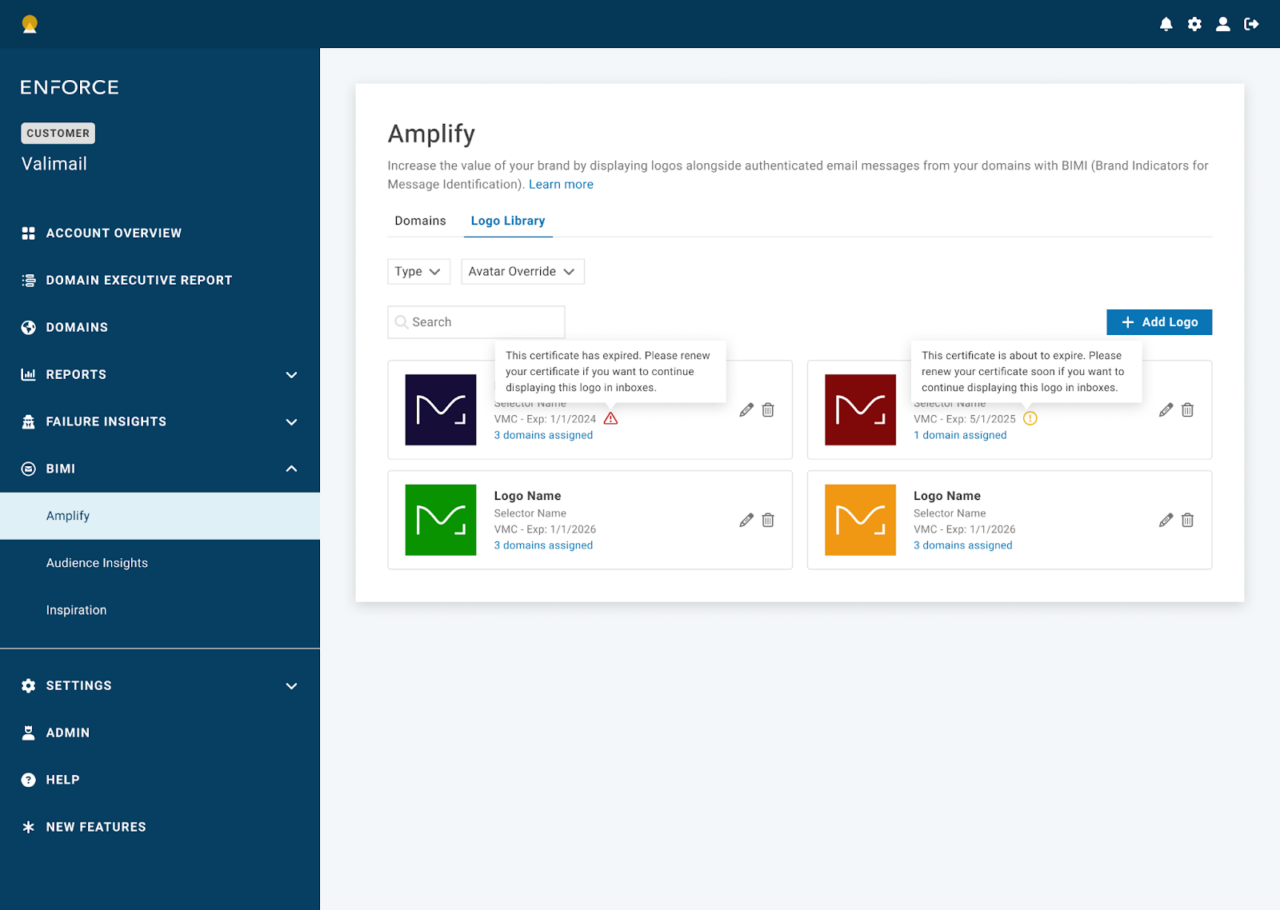
Valimail Amplify is now organized around two primary views: Domains and Logo Library.
The Domains view provides a complete list of domains within the account, with filtering options that allow customers to quickly identify “Logo Live” domains. (A domain qualifies as Logo Live only if several conditions are met: a valid certificate is in place, an SVG is associated, the domain is at enforcement, and the BIMI record points to Valimail.)
When those criteria are satisfied, customers can see subdomains, associated logos, and Brand Impressions data pulled directly from Audience Insights. This gives immediate visibility into how many messages are reaching BIMI-supporting mailbox providers. Think of it as the potential number of impressions your BIMI logo would see, post-implementation. Certificate type and expiration date are visible at a glance, and users can search, filter, edit, delete, and link logos to domains directly from this view.
The Logo Library serves as the centralized repository for all uploaded assets, including both SVG files and certificate-backed logos (managed as PEM files). Customers can filter by certificate type or view self-asserted SVG logos. We’ll warn you of certificates that are nearing expiration or already expired, allowing for renewals before logos go dark. From this view, users can open a side panel to see exactly which domains are associated with a specific certificate file. Edit and delete actions are available here as well, and the add logo workflow is streamlined: upload the certificate file and associate domains in one process.
We’ll also help you ensure that you’re linking the correct certificate file to the right domain name, avoiding the potential for glitches due to a domain/certificate mismatch.
Improve collaboration
We’ve introduced a dedicated BIMI Marketer role, allowing IT teams to grant logo management access to marketing stakeholders. Users in this role will have access only to specific BIMI-related features, including Amplify, Audience Insights, Inspiration, and the BIMI Simulator.
Need to get granular? User access can be configured to allow access only to certain domains, meaning that marketers (and other users) only see and manage the domains they are authorized to access. This gives IT the ability to invite marketing to collaborate in BIMI implementation and management as appropriate, while keeping configuration settings appropriately safe and secure.
Learn more about the new changes
We’re excited about this next step in bringing Amplify and Enforce together into a single, more powerful platform. If you have any questions or need support during the transition, please don’t hesitate to reach out.
And if you’re not yet a client but want to learn more about Valimail and our support for BIMI logos, reach out to us for a demo today!