TLDR: The email marketing improvements that pay off most aren’t campaign-specific. They’re foundational: authenticating every sending service, keeping your sender identity consistent, maintaining a clean list, and making the exit easy. Get those right once and every campaign benefits. Then optimize the email itself (subject lines, CTAs, mobile design) and measure what matters after it lands (clicks and complaints).
Most email optimization advice is campaign advice. Test this subject line. Move that button. Try sending on Tuesday.
Yes, that advice is super important, and you should be following it. However, there’s a lot that you should be optimizing far before you build any individual campaign or email.
These include email authentication, list cleaning, segmentation, and one-click unsubscribes, to name a few. Fix those, and every future campaign starts with a significant advantage. Below, we get into all the different levers you can pull to boost your open rates, improve email engagement, and lower those spam complaints.
Email marketing optimization tactics
We organized our tactics into three stages—before the campaign, inside the email, and after the send. Here they are at a glance:
| # | Best practice | Stage | What it improves |
| 1 | Authenticate every sending service | Before | Deliverability |
| 2 | Put your logo in the inbox | Before | Opens, trust |
| 3 | Keep your sender identity consistent | Before | Opens, trust |
| 4 | Clean your list on a schedule | Before | Deliverability, every metric |
| 5 | Set expectations at signup | Before | Unsubscribes, complaints |
| 6 | Segment by behavior | Before | Clicks, unsubscribes |
| 7 | Separate marketing and transactional mail | Before | Deliverability |
| 8 | Write subject lines that say something | Inside | Opens |
| 9 | Use the preheader | Inside | Opens |
| 10 | Give every email one job | Inside | Clicks |
| 11 | Design for mobile first | Inside | Clicks |
| 12 | Make unsubscribing easy | Inside | Complaints, deliverability |
| 13 | Measure clicks over opens | After | Decision quality |
| 14 | Watch your complaint rate | After | Deliverability |
| 15 | Monitor who’s sending as you | After | Deliverability, security |
Before you hit send
Your individual emails aren’t the foundation of your email program. No, every campaign and send starts with email authentication, trust, and a healthy list.
1. Authenticate every sending service
Gmail, Yahoo, and Microsoft check whether your email can prove it came from your domain before they look at anything else. That proof comes from three protocols:
And these are now required (read: not optional) from all major inbox providers.
This requires verifying every service with permission to send email from your domain. That’s your ESP, CRM, help desk, HR software, and billing platform (to start), but you might have dozens of other senders. Each sends as your domains, but it needs to be appropriately configured.
One misconfigured platform can drag down your reputation for all of them, not to mention it compromises your customers and your brand.
2. Put your logo in the inbox
BIMI (Brand Indicators for Message Identification) shows your verified logo next to your emails in Gmail, Yahoo, Apple Mail, and other supporting inboxes. It’s a visual cue at the perfect moment, when someone is deciding whether to open or not.
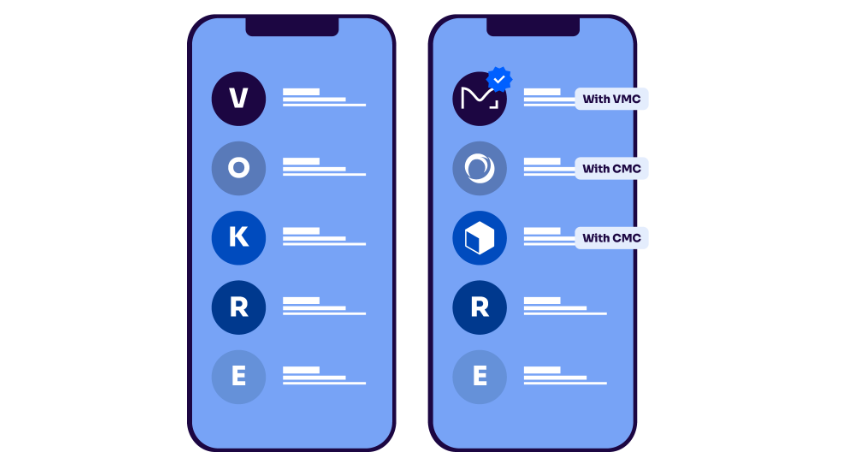
BIMI requires DMARC at enforcement, plus a verified mark certificate in most major inboxes. Valimail Amplify handles the setup once you’re there.
3. Keep your sender identity consistent
Use the same From name and sending address every time. Subscribers decide whether to open based on who an email is from before they even read the subject line, and a familiar name wins that split second.
Try to avoid:
- Rotating sender names
- Switching addresses between campaigns
- Sending as an unrecognizable person
4. Clean your list on a schedule
Remove subscribers who haven’t opened or clicked in six months or more. Send them a re-engagement email first, keep anyone who responds, and suppress the rest.
Yes, it always hurts to shrink your email list, but a smaller, engaged list improves open rate, click rate, and sender reputation. It also lowers the odds of hitting spam traps, which are old addresses mailbox providers use to catch senders with poor list hygiene.
Big, unengaged lists are just a poor vanity metric. Smaller, engaged lists—that’s where the magic happens.
5. Set expectations at signup
Tell people what they’ll get and how often. Then deliver. “Weekly product tips and one promo a month” sets up a promise you can keep.
And you have to keep it. Even when your c-suite wants to blast everyone about the latest-and-greatest feature release, never deviate from your promise to subscribers.
Most unsubscribes and spam complaints trace back to a gap between what someone expected and what showed up.
6. Segment by behavior
People who clicked on a topic before are more likely to click on it again. Send them more of it, and send less to people who’ve ignored it.
Behavioral segments (recent clickers, past purchasers, product interest) almost always outperform demographic ones. They also reduce the fatigue that leads to unsubscribes.
7. Separate marketing and transactional mail
Send promotional email from a different subdomain than order confirmations and password resets. Something like promo.yourbrand.com and orders.yourbrand.com.
You don’t want poor marketing performance to potentially impact password resets, recipients, or order confirmations.
If a promotional campaign generates complaints, that reputation damage stays with the promotional subdomain instead of pushing transactional mail into spam. It takes IT setup, so plan it ahead of busy seasons.
Inside the email
These next tactics improve the email itself. They’re campaign-level, but they’re habits worth building into every send.
8. Write subject lines that say something
Clear beats clever. “Your March report is ready” outperforms “You won’t believe this” with almost every audience, and it’s less likely to trip a spam filter, too.
Avoid all caps, stacks of exclamation points, and fake “RE:” prefixes. Those patterns raise flags and erode trust.
9. Use the preheader
The preheader is the preview text shown next to or under your subject line. If you leave it blank, it often defaults to “View this email in your browser,” but that’s a waste of prime inbox real estate.
Treat it as a second subject line: add context, a detail, or a reason to open.
10. Give every email one job
Focus on one primary call to action. Sure, secondary links can stay, but make it obvious what you want people to do, and use a clear button rather than a buried text link.
11. Design for mobile first
Most emails get read on a phone. That means single-column layouts, buttons big enough to tap, readable font sizes, and the main CTA visible without scrolling.
12. Make unsubscribing easy
This sounds backward, but it’s one of the best things you can do for deliverability. A subscriber who unsubscribes costs you one contact. But a subscriber who can’t find the unsubscribe button just hits “report spam”—this damages delivery for your entire list.
Gmail, Yahoo, and Microsoft all require one-click unsubscribe from bulk senders. Keep a visible footer link, too (make it go to your preference center).
After the send
What gets measured gets improved. Keep an eye on your email campaign performance. Watching your metrics week-to-week and month-to-month gives you a target. If you’re slipping, you can catch it early and do something about it before it becomes a problem.
13. Measure clicks over opens
Apple Mail Privacy Protection registers opens for plenty of emails nobody actually read, so open rates run high and subject line tests based on opens get noisy. Clicks require a person to act, which makes them a more reliable signal.
Keep tracking opens for trends, but make decisions on clicks and conversions.
14. Watch your complaint rate
Spam complaints are the metric that hurts deliverability fastest. Google’s sender guidelines set clear thresholds:
- Under 0.1%: where you want to be
- Approaching 0.3%: deliverability starts slipping
- At or above 0.3%: out of compliance for bulk senders
Check your rate in Google Postmaster Tools regularly, and after every large send. If it climbs, look at list quality and frequency first.
15. Monitor who’s sending as you
Marketing teams add sending tools all the time:
- Survey platform
- SMS partner
- Webinar service
- Seasonal promo app
Every one of them sends email as your brand, and every one is another door into your domain that someone should be checking.
If a tool isn’t authenticated correctly, its emails fail checks and drag down your reputation. If an unknown service shows up sending as you, you want to check sooner rather than later.
DMARC reporting surfaces all of it, but raw reports arrive as XML that nobody wants to read. That’s where monitoring comes in (Valimail Monitor interprets your XML for free).
Start with the improvements that last
Subject line tests improve one campaign. Authentication, sender identity, and list quality improve all of them, and they keep paying off long after this quarter’s campaigns are forgotten.
Valimail Monitor is free and shows every service sending email as your domain, by name, along with whether each one is passing authentication. Check your domain to see where you stand today.
Heading into a busy season? Our guides to Black Friday email marketing and Cyber Monday email campaigns cover holiday setup and send-week deliverability.
Frequently asked questions
What are the most important email marketing best practices?
The ones that affect every campaign: authenticating every service that sends as your domain, keeping your sender identity consistent, cleaning your list regularly, and making it easy to unsubscribe. These improve deliverability and trust across your whole program. Campaign-level tactics like subject lines and CTA design matter too, but they build on that foundation.
How can I improve my email marketing?
Start before the send. Confirm your domain passes SPF, DKIM, and DMARC checks, remove subscribers who haven’t engaged in six months, and segment by behavior. Then improve the email itself with clear subject lines, one main call to action, and mobile-first design. Measure success on clicks, conversions, and complaint rates rather than opens alone.
What is email marketing optimization?
Email marketing optimization is the ongoing process of improving how your emails perform, from whether they reach the inbox to whether recipients open, click, and convert. It covers technical factors like authentication and list hygiene, content factors like subject lines and design, and measurement practices like testing and complaint monitoring.
How often should you send marketing emails?
There’s no universal number. The right frequency is the one your subscribers expect and engage with. Set expectations at signup, watch unsubscribe and complaint rates as you adjust, and send more often to highly engaged segments than to your full list.