The old phishing email awareness training had a very specific villain in mind. Bad grammar. Generic greetings. An urgent request from a Nigerian prince. Something that felt off.
That villain is getting harder to find.
Generative AI writes phishing emails now. They’re grammatically clean, contextually accurate, and tailored to the specific person receiving them. The obvious tells that security training decks have relied on for a decade are becoming less reliable by the month.
That doesn’t mean phishing is impossible to catch, though.
It means the signals worth looking for have changed. Some red flags still hold up well. Others have been undermined. This guide focuses on which is which to help you protect your business, customers, and employees.
Why the classic warning signs are losing their edge
For years, the phishing email checklist looked something like this:
- Watch for spelling errors
- Be suspicious of urgent language
- Check if the greeting is generic
- Don’t click unexpected attachments.
That advice is good, but it’s become increasingly incomplete.
The reason is AI phishing. Large language models can generate a personalized, flawless email in seconds. They can pull your name, title, and recent activity from LinkedIn, match your company’s communication style, and write something that reads exactly like a message from your IT team or bank.
No typos, awkward phrasing, or strange salutations in sight.
Content quality used to be a meaningful signal. It’s becoming less so. The red flags to rely on now are the ones attackers can’t write their way around.
6 phishing email red flags in 2026
These are the warning signs that remain reliable even when the email itself looks professional and legitimate.
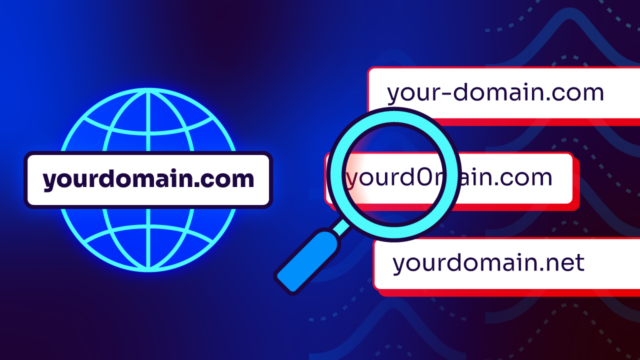
- The sender domain. This one still matters a lot. Email clients show a friendly display name by default, and most people never look past it. But the actual sending domain is what counts. support@amaz0n.com displays as “Amazon Support” in your inbox preview. Check the actual address instead of the name on the label.
- The URL destination doesn’t match the anchor text. Hover over any link before clicking. If the link text says “Reset your password at valimail.com” but the actual URL points somewhere else, that mismatch is one of the most reliable pre-click signals available. Legitimate services don’t hide where their links go.
- The request skips your normal process. Wire a payment. Approve a purchase. Change your direct deposit. Legitimate financial or administrative requests follow established workflows. An email that bypasses that process and asks you to act through a single message chain, especially with time pressure attached, demands caution.
- The context doesn’t match what you expect. You didn’t open a support ticket. You didn’t request a password reset. You’re not expecting an invoice from this vendor. The mismatch between what arrived and what you have in flight is a meaningful signal, even if the email looks right in every other way.
- The email discourages verification. “Don’t contact IT about this — I’ll handle it directly.” “This is confidential, don’t discuss with others.” Any instruction designed to keep you from verifying the request through a separate channel is, on its own, a red flag worth to take seriously.
- A QR code where you’d expect a link. QR code phishing, or quishing, embeds a malicious URL inside an image specifically because email security scanners can analyze links but can’t read QR codes. A QR code in a business email that would normally contain a hyperlink deserves the same skepticism you’d apply to a suspicious link — and then some.
The phishing email warning sign checklist
If you’re in doubt about an email, run through these before acting:
- Does the sending domain (not the display name) match who it claims to be?
- Does hovering over the links show destinations that make sense?
- Was this email expected, or did it arrive without prior context?
- Is it asking you to do something that would normally go through a different channel?
- Is it discouraging you from verifying through another channel?
- Is there a QR code where you’d expect a regular link?
- Is urgency combined with a high-stakes outcome?
Any one of these isn’t a verdict. A combination of two or three usually is.
The check that works on (just about) everything
Contact the sender through a channel you initiate yourself.
Yep, that’s it.
If you get an email from your CFO asking you to approve an urgent wire transfer, don’t reply to the email. Call her. Slack her. Walk to her office. Use a phone number or channel you already have instead of the one the email provided.
This works on AI-generated phishing, clone phishing, deepfakes, business email compromise — all of it. It’s the human version of what DMARC does for email infrastructure: verify identity through a trusted channel rather than accepting the claim at face value.
It takes 30 seconds, but it defeats the whole attack.
What to do when you’re not sure about an email
You suspect something. You’re not certain. Well, here’s what to do:
- Don’t click anything.
- Don’t reply.
- Don’t forward the email to someone asking them to take a look (you’d just be moving the risk around).
- Report it through whatever phishing reporting mechanism your organization uses.
- Contact the apparent sender through a separate, known channel to check whether the email was legitimate.
If you already clicked something: disconnect from the network immediately and contact your IT or security team. The faster that happens, the better the containment options.
How to go the extra mile against phishing
Training people to spot phishing is still worth doing. It’s just not the whole picture.
Attackers have gotten very good at defeating content-based detection, and they’re getting better. The right organizational posture is to reduce how often employees are put in the position of making that call in the first place.
DMARC enforcement stops anyone from sending email that claims to come directly from your domain. If your organization is at p=reject, a phishing email pretending to be from your CEO can’t reach your employees’ inboxes because it never passes authentication.
That’s not user training. That’s removing the attack vector.
Valimail Monitor is free and shows you exactly who’s sending email as your domain right now. You can also check your domain to see where you stand in 3 seconds.
Frequently asked questions
What are the most common signs of a phishing email?
The most reliable warning signs are a sending domain that doesn’t match who the email claims to be from, link destinations that don’t match the anchor text, requests that bypass your normal workflow, and context that doesn’t match anything you’re expecting. Grammar and tone have become less reliable indicators as AI-generated phishing has improved.
Can you spot an AI-generated phishing email?
Sometimes, but not consistently (and that’s the point). AI-generated phishing is designed to eliminate the content-quality signals that people have been trained to catch. Behavioral signals hold up better than content signals. Out-of-band verification holds up best of all.
What should you do if you’re not sure whether an email is phishing?
Don’t act on it until you’ve verified through a separate channel. Contact the apparent sender by phone, Slack, or in person. Don’t reply to the email in question. If your organization has a phishing reporting mechanism, use it. If you’ve already clicked a link, disconnect from the network and contact IT immediately.