
Executive phishing, also called CEO fraud, is a cyberattack in which criminals impersonate a senior executive to trick employees into transferring funds or handing over sensitive data. Executive phishing exploits the authority of an executive’s identity to manipulate people below them. It’s one of the most financially damaging forms of phishing, with the FBI reporting billions lost annually to related Business Email Compromise schemes.
Most phishing attacks cast a wide net and hope for the best. Executive phishing works differently. It targets specific people, exploits real authority, and often arrives looking exactly like a message from someone the recipient trusts completely.
Rather than targeting the executive directly, attackers weaponize the executive’s identity against the people who work for them. The authority of a CEO, CFO, or VP carries enough weight that most employees won’t stop to question an urgent request, and that’s exactly what attackers count on.
This guide covers how executive phishing works, what real attacks have looked like, how to tell CEO fraud from whaling, and what your organization can do to reduce the risk.
What is executive phishing?
Executive phishing is where cybercriminals impersonate the CEO or another high-ranking executive to deceive employees. They typically target employees in finance or HR to execute unauthorized transactions or reveal sensitive data or information.
But anyone with access to information or systems an attacker wants can be a target.
The attack works because authority is a powerful social engineering lever. An email or message that appears to come from the CEO carries an implicit instruction to act quickly and without question. Attackers know this, and they engineer their attacks specifically to trigger that response.
What is CEO fraud?
CEO fraud is another name for executive phishing. The terms are used interchangeably, though CEO fraud tends to emphasize the financial angle: the most common objective in these attacks is convincing an employee to wire money to a fraudulent account.
Other names you’ll see for the same attack type include:
- Executive phishing: the broadest term, covering all impersonation of senior leadership.
- CEO fraud: typically refers to attacks targeting financial transactions.
- BEC (Business Email Compromise): the FBI’s umbrella term for email-based fraud that impersonates internal leadership or trusted vendors.
- Whale phishing or whaling: often used as a synonym, though technically distinct (more on that below).
The FBI’s Internet Crime Complaint Center (IC3) categorizes these attacks under BEC and consistently identifies them as one of the most financially destructive forms of cybercrime.
Executive phishing vs. whaling: what’s the difference?
These terms get used interchangeably, but they describe different attack patterns.
| Executive phishing (CEO fraud) | Whaling | |
|---|---|---|
| Who is impersonated | A senior executive | A senior executive |
| Who is targeted | Employees and customers below them | Other executives or high-value targets |
| Primary goal | Wire fraud, data theft, payroll redirect | High-value data, system access, strategic intelligence |
| Common vector | Email, WhatsApp, phone, SMS | Highly targeted spear phishing email |
| Defense focus | Email authentication + employee verification protocols | Executive-level security training + access controls |
Executive phishing uses an executive’s identity as a weapon against people lower in the organization. Whaling uses an executive as the victim. Both are dangerous, and organizations serious about security need defenses against both.
How does executive phishing work?
While not every executive phishing attack will look the same, here’s the basic process of how it works:
- Target selection: Attackers choose an executive or senior official within an organization to impersonate. This could be the CEO, CFO, or another high-ranking individual.
- Email compromise or spoofing: Attackers either compromise the executive’s email account or create a spoofed email address that closely resembles the executive’s actual email. The goal is to make the email appear as if it’s genuinely coming from the executive.
- Crafting the message: The attacker, posing as the executive, crafts a message targeting an employee, often someone in finance or HR. The message might request an urgent wire transfer, ask for sensitive employee data (like W-2 forms), or request other confidential information.
- Sense of urgency: Similar to other phishing attacks, these emails often convey a sense of urgency. The “executive” might say they need the information or funds for a confidential deal or time-sensitive opportunity.
- Payload delivery: If the targeted employee believes the email is genuine, they might process the wire transfer, send out confidential data, or provide access to restricted systems.
- Exploitation: Once the attackers have the funds or information, they can disappear, often making it challenging to trace or recover the stolen assets.
Signs of an executive phishing attack
Sophisticated phishing attacks are much harder to detect than old-fashioned spammy junk mail about Nigerian princes. Scammers put more effort into these attacks to avoid detection. When combined with clone phishing and BEC, executive phishing can be so difficult to detect that only an additional verification outside of email itself suffices in thwarting this technique.
Here are some common indicators of an executive phishing attack.
| Indicator | What it looks like |
|---|---|
| External sender domain | Email claims to be from the executive’s “personal” account, or the domain is slightly off (examp1e.com vs. example.com) |
| Abnormal communication channel | Message arrives via WhatsApp, Signal, or personal email rather than the company’s standard systems |
| Claims of lost account access | “I’m locked out of my work email, can you handle this for me?” |
| Unusual tone or style | The writing doesn’t quite sound like the executive, or the request is out of character |
| Urgency combined with secrecy | “This needs to happen today, and please keep it between us for now” |
| Unsolicited attachments | Mass emails with files attached that prompt recipients to enable macros or click links |
Sophisticated attackers do their homework and will try to avoid triggering these red flags. The real defense is process, not pattern-matching on individual signals.
Real-world CEO fraud examples
Snapchat, 2016
The attack that put executive phishing on the map. Scammers impersonated Snapchat’s CEO and convinced an HR employee to email payroll data for a significant portion of the company’s workforce. The employee believed the request was legitimate. No money was transferred, but the personal and financial data of hundreds of current and former employees was exposed.
Scoular, 2014
Grain trading company Scoular lost $17.2 million when an attacker impersonating the CEO convinced a finance executive to wire funds to a bank account in Shanghai, framing it as necessary to close a confidential acquisition deal. The attacker also impersonated an outside auditor to reinforce the legitimacy of the request.
FACC, 2016
Austrian aerospace manufacturer FACC lost approximately $47 million after an employee was deceived by a fraudulent email impersonating the CEO. The request appeared to relate to a confidential acquisition project. FACC later sued its own CEO and CFO over the incident, arguing they failed to implement adequate safeguards.
AI-powered executive phishing: the 2024-2026 threat landscape
The attacks described above relied on email spoofing and social engineering. What’s happening now is way more advanced.
Generative AI has made it possible to clone a person’s voice from as little as three seconds of audio, create realistic video deepfakes in real time, and run multi-participant fake video calls where every face and voice is synthetic. These capabilities have been weaponized against businesses with devastating results.
Arup, 2024: $25.6 million lost to a fabricated Zoom call
Engineering firm Arup lost HK$200 million (approximately $25.6 million USD) after an employee was invited to a video conference with what appeared to be the company’s UK-based CFO and several other senior executives. Every person on the call was an AI-generated deepfake. The participants looked and sounded exactly like the real executives, moved naturally, and responded coherently throughout the meeting. The employee authorized 15 separate transactions before anyone realized the call had never happened.
Ferrari, 2024: stopped by a personal question
Scammers targeting Ferrari cloned the voice of CEO Benedetto Vigna and called senior executives claiming to need urgent help with a confidential acquisition. The fraud was stopped when one executive, suspicious of the request, asked the caller to identify a book Vigna had recently recommended to him. The deepfake couldn’t answer and ended the call.
LastPass, 2024: WhatsApp impersonation
Attackers targeted a LastPass employee using AI-generated voice cloning to impersonate the company’s CEO over WhatsApp, sending calls, texts, and voicemails. The employee recognized several red flags: communications arrived outside business hours, the urgency was unusual, and the channel didn’t match how company leadership normally communicated. The attack was prevented and reported to LastPass’s security team.
WPP, 2024: deepfake video call prevented
Criminals created a fake WhatsApp account using publicly available photos of WPP CEO Mark Read, then used it to set up a Microsoft Teams meeting with a senior executive. During the call, they combined voice cloning with YouTube footage of Read to impersonate him in real time. The attack was unsuccessful. Read later noted publicly: “We all need to be vigilant to the techniques that go beyond emails to take advantage of virtual meetings, AI, and deepfakes.”
Recreating an executive phishing attack
Now that we’ve covered the concept let’s review what this executive phishing looks like in practice.
Imagine you help with payroll as a human resources manager for a small to medium-sized business that sells paper accessories. Most employees aren’t tech savvy. You only need to know enough to operate a simple point-and-click payroll application.
You receive a message from your boss on WhatsApp:
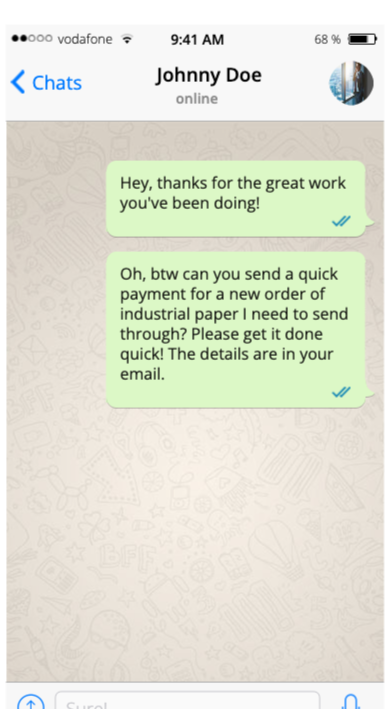
You don’t know this, but it isn’t actually your boss. The phone number is correct, but an attacker has SIM-swapped your boss’s phone number to hijack their WhatsApp account. However, you have no idea, so you check your email.
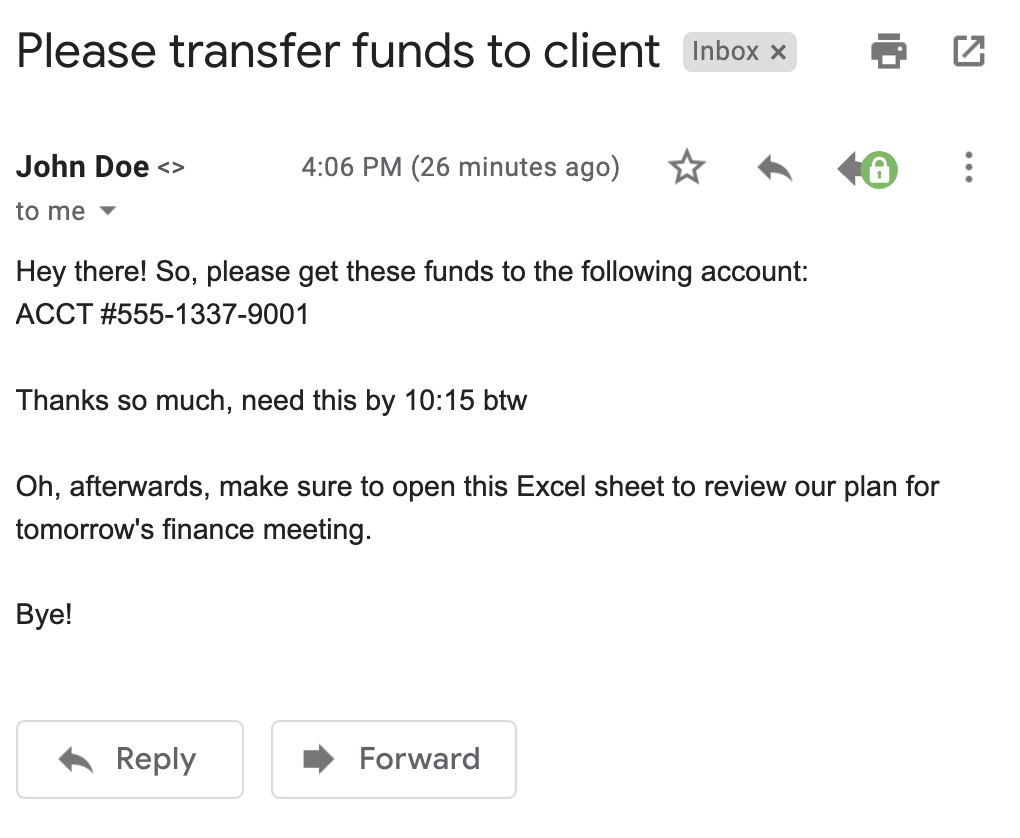
Sure enough, you have an email from your boss:

|
Platform
|
Success Rate
|
Success Rate Frame
|
Estimated FTEs
|
Maintenance
|
Marketplace Apps Identified
|
|---|---|---|---|---|---|
|
DIY Manual
|
20%
|
12+ Months
|
2-3
|
Never ending
|
~100 services
|
|
Outsourced Manual
|
<40%
|
9-12 Months
|
1-2
|
Never ending
|
~100 services
|
|
Valimail Automation
|
97.8%
|
0-4 Months
|
0.2
|
Automated
|
6,500+
|
It seems easy enough, so you go ahead and transfer the funds. You don’t know that you’ve just sent ten thousand dollars to scammers who have been studying the business you work at for months. As part of their reconnaissance, they noticed that SPF, DKIM, or DMARC don’t protect your company’s domain name.
The lack of SPF, DKIM, and DMARC allows the attacker to impersonate your boss’s email address. After sending the funds, you follow the remaining instructions and open the attached Excel spreadsheet. When you open it, a message indicates the spreadsheet needs permission to run macros. Of course, you click it.
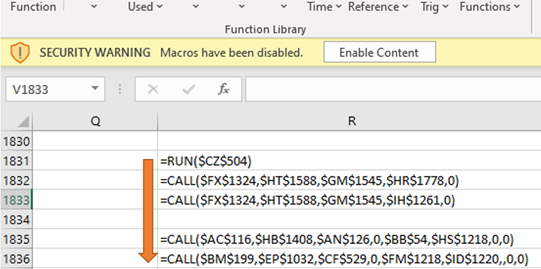
That’s when you realize something is wrong. After a few minutes, your computer shuts down. You walk out into the hallway and find total pandemonium – every computer in the building is shut down.
Then a message pops onto every screen at the same time.
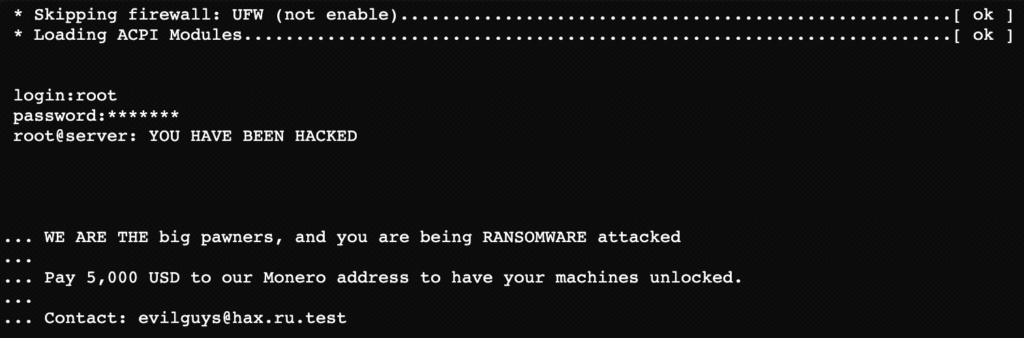
You feel sick to your stomach. Everyone is dead silent. If only you could have noticed. But how could you have done anything? After all, you’re an HR professional, not a cybersecurity wizard. Why didn’t the IT team prevent this?
Defense and mitigations for executive phishing attacks
Old email phishing scams from the late 90s and early 2000s were easy to detect. Most victims were elderly or didn’t understand the Internet well enough to realize they were being victimized.
Today, most users are familiar with these scams. That’s why attackers have developed more sophisticated attacks like executive phishing. However, you can significantly reduce the risk of executive phishing in your organization by understanding the indicators of executive phishing, protecting your digital identity, and implementing strong security controls.
Layer 1: email authentication (DMARC, SPF, and DKIM)
Email-based executive phishing depends on the ability to spoof your domain. DMARC enforcement removes that ability. With a DMARC policy at p=reject, spoofed emails using your domain are blocked before they reach the recipient’s inbox.
SPF defines which mail servers are authorized to send on your behalf. DKIM adds a cryptographic signature to outgoing email that proves it hasn’t been tampered with. DMARC ties both together and tells receiving mail servers what to do when either check fails.
This is the most direct technical control available against exact-domain executive phishing. Valimail Enforce automates the entire process — identifying all authorized senders, managing SPF and DKIM records, and reaching DMARC enforcement significantly faster than manual approaches. Start with a free domain check to see where you stand.
Now, DMARC stops domain spoofing, but doesn’t stop an attacker who has already compromised a legitimate email account, and it doesn’t protect phone calls, WhatsApp messages, or video calls. Those require the additional controls below.
Layer 2: out-of-band verification for sensitive requests
No financial transfer, payroll change, or data disclosure should be approved based solely on an email or message request, regardless of who it appears to come from.
Establish a policy: any request involving money movement or sensitive data must be confirmed through a second channel, using a contact method already on file, not one provided in the request itself.
Call the executive directly on a known number. Walk down the hall if you can. The extra step takes two minutes and stops most attacks cold.
Layer 3: flag external emails
Most enterprise email platforms allow administrators to tag emails from outside the organization with a visible warning. Enable this.
Layer 4: protect executive identities
Attackers research their targets before launching a campaign. Limit how much organizational information is publicly available. Org charts, direct report relationships, personal contact details, and executive schedules all feed reconnaissance. Encourage executives to audit their LinkedIn profiles and public social media presence with this in mind.
For multi-factor authentication on email accounts, phone-based SMS codes are not sufficient given SIM-swapping risks. Use hardware security keys or authenticator apps instead.
Layer 5: build a verification culture, not just awareness
Security training that teaches employees to spot phishing red flags is valuable, but it’s not enough on its own. The more durable protection is a workplace culture where employees feel empowered to verify unusual requests, even when those requests appear to come from leadership.
An employee who pauses, calls back on a known number, and confirms a request is doing their job correctly. Build verification into process.
Protect your company (and executives) with Valimail
Executive phishing is an advanced attack in which scammers impersonate the CEO of a company to exploit the power dynamic of that position. Typically, the attack targets employees and customers. Worse yet, advanced persistent threats have taken this attack to the next level by combining it with other sophisticated techniques like smishing, vishing, and social media phishing.
However, strong defenses exist that you can take advantage of to stay safe. You can keep yourself safe by adding warnings for emails from external domains, managing identity using cryptography, and applying other tactics discussed in this article.
Start protecting yourself today by getting a free security scan (and authentication report) of your website with our domain checker.
Frequently asked questions
What is another name for CEO fraud?
CEO fraud goes by several names: executive phishing, business email compromise (BEC), whale phishing, and whaling are all used to describe related attacks. CEO fraud specifically refers to attacks where a criminal impersonates the CEO or another senior executive to extract money or data from employees.
What is the difference between executive phishing and whaling?
Executive phishing (CEO fraud) uses the identity of an executive to target employees below them. Whaling uses an executive as the victim, targeting the executive themselves with sophisticated spear phishing. Both involve impersonation, but the target is different.
What does a CEO phishing email look like?
CEO phishing emails typically come from an address that closely resembles or exactly matches the executive’s real email, contain an urgent request framed as confidential, ask for a wire transfer, data disclosure, or payroll change, and discourage the recipient from verifying through normal channels. Without DMARC enforcement on the sending domain, exact-domain spoofing is straightforward for an attacker.
Can DMARC stop executive phishing?
DMARC stops email-based domain spoofing, which is the technical foundation of most executive phishing attacks. With DMARC at enforcement (p=reject), emails that fraudulently use your domain are blocked before delivery. However, DMARC doesn’t stop attacks that use compromised email accounts, voice calls, SMS, WhatsApp, or video deepfakes. Those require separate controls.
What should I do if I receive a suspicious email from my CEO?
Don’t reply to the email and don’t click any links or open any attachments. Contact the executive directly using a phone number or contact method you already have on file. Report the message to your IT or security team. If a financial transfer was already processed, contact your bank immediately.