TL;DR: Social engineering is the practice of manipulating people into giving up information, access, or money, rather than breaking into systems technically. It covers phishing, pretexting, baiting, tailgating, and business email compromise, and the overwhelming majority of it arrives by email. Employee training has been the standard defense for twenty years, but generative AI has made it far less reliable.
Most cyberattacks don’t start with someone breaking through a firewall. They start with someone being asked nicely. That might be a call from IT asking you to confirm your password, an email from the CFO about an urgent wire transfer, or a stranger in the lobby with their hands full, hoping you’ll hold the door.
None of this requires exploiting a technical vulnerability because the target is a person. That’s social engineering, and it remains the most reliable attack method available. That’s because it works on organizations that have (ironically) spent millions on security tooling. Email is still the #1 route of attack for social engineering, which is why it’s so important to go beyond security tooling and invest in measures that help to verify legitimate senders and block illegitimate or suspicious senders.
Below, we walk through how these attacks work, the main types to watch for, and why the standard advice about defending against them is outdated.
What is social engineering?
Social engineering is the manipulation of people into performing actions or divulging information that compromises security. Rather than exploiting technical vulnerabilities, social engineering exploits human ones:
- Trust
- Urgency
- Deference to authority
- Desire to be helpful
In cybersecurity terms, it’s the attack category that targets the operator rather than the machine. An attacker who convinces an employee to hand over credentials doesn’t need to bypass multi-factor authentication, defeat a firewall, or find a zero-day.
They’ve simply been let in.
Social engineering shows up in almost every major breach category. Phishing is social engineering. Business email compromise is social engineering. So is the phone call that talks a help desk into resetting a password for someone who isn’t the account holder.
How social engineering attacks work
Almost every social engineering attack follows the same four-stage pattern, regardless of the specific technique.
- Research. The attacker gathers information about the target: names, roles, reporting lines, vendor relationships, recent company news. LinkedIn, company websites, and press releases supply most of it. Generative AI has compressed this stage from hours to seconds.
- Pretext. The attacker builds a believable scenario and identity. A vendor following up on an invoice. An IT technician resolving a ticket. The pretext gives the target a reason to comply that fits their normal working day.
- Exploitation. The attacker makes the ask. Credentials, a payment, a file, physical access, or a click. The request is engineered to feel routine, urgent, or both.
- Exit. The attacker gets what they came for and disappears, often covering their tracks so the target doesn’t realize anything happened until much later.
The psychological levers are consistent across all social engineering attacks:
- Authority: People comply with perceived seniority
- Urgency: Time pressure suppresses scrutiny
- Scarcity: Limited windows force fast decisions
- Social proof: If others did it, it must be fine
- Liking: People help those they find agreeable
13 types of social engineering attacks
Social engineering covers a wide range of techniques, and they’re changing everyday. While this isn’t a comprehensive list of every type of social engineering attack you’ll encounter, it’s robust enough to start with:
- Phishing. Fraudulent messages sent at volume to trick recipients into clicking a malicious link, opening an attachment, or handing over credentials. Phishing is by far the most common social engineering attack, and it’s the parent of several variants below.
- Spear phishing. Targeted phishing aimed at a specific individual, using researched personal details to make the message convincing. Far higher success rate than generic phishing. We compare the two in phishing vs. spear phishing.
- Whaling. Spear phishing aimed at executives, who have both authority and access to high-value assets. Learn more about whaling attacks.
- Business email compromise (BEC). An attacker impersonates an executive, vendor, or partner to authorize a fraudulent payment or extract sensitive data. BEC typically contains no malware or malicious links, which is exactly why it dodges most security tooling.
- Pretexting. The attacker invents a scenario and assumes a false identity to extract information. A caller claiming to be from the bank’s fraud department, or a new employee in accounts payable asking a colleague to confirm vendor banking details. Pretexting is less a discrete attack than the foundation most other social engineering is built on.
- Baiting. The attacker offers something appealing to trigger the compromise. The classic version is a malware-loaded USB drive labeled Q4 Salaries left in a parking lot. The digital version is a free download, pirated media, or a prize offer that installs malware.
- Quid pro quo. The attacker offers a service in exchange for information or access. A fake IT support call offering to fix a problem that really steals the user’s login credentials.
- Vishing. Voice phishing, conducted over a phone call. Increasingly powered by AI voice cloning, which lets an attacker sound convincingly like a person the target knows.
- Smishing. Phishing delivered by SMS, often impersonating a delivery service, bank, or employer.
- Quishing. QR code phishing, where a malicious URL is embedded in a QR code to bypass email link scanning. Covered in depth in our quishing guide.
- Clone phishing. An attacker copies a legitimate email the target already received and resends it with the links or attachments swapped for malicious versions. See clone phishing.
- Tailgating and piggybacking. Physical social engineering, where an attacker follows an authorized person through a secured door, often while carrying something to prompt a helpful door-hold.
- Watering hole attacks. The attacker compromises a website the target group is known to visit, then waits for victims to arrive on their own.
Real-world social engineering examples
These are documented incidents with the same things in common: a plausible sender, a routine-looking financial request, time pressure, and no technical exploit anywhere in the chain.
FACC ($47 million)
In 2016, the Austrian aerospace manufacturer received an email appearing to come from the CEO, requesting an urgent transfer for a confidential acquisition. An employee sent roughly €42 million to attacker-controlled accounts. Both the CEO and CFO lost their jobs. No malware was involved.
Ubiquiti Networks ($46.7 million)
In 2015, attackers impersonating executives convinced finance staff to wire funds to overseas accounts. The company recovered about $15 million. The rest was gone.
Orion S.A. ($60 million)
In 2024, the carbon-black manufacturer disclosed that an employee had been tricked into making multiple wire transfers to fraudulent accounts, resulting in an expected one-time charge of $60 million.
Johnson County Schools ($3.4 million)
A Tennessee school district received an email appearing to come from textbook publisher Pearson, requesting updated banking details. Two transfers later, $3.36 million in state education funding was gone, with under $750,000 recovered.
How to spot a social engineering attack
The warning signs are behavioral rather than technical, which is what makes them work even as the content quality improves.
- The request bypasses normal process. Legitimate payments, credential changes, and data requests follow established workflows. An ask that arrives by email alone, with no ticket and no prior conversation, deserves scrutiny regardless of who appears to be sending it.
- You’re discouraged from verifying. Any instruction designed to prevent you from confirming through another channel is the strongest single indicator available.
- Urgency is paired with consequence. A deadline today, an account about to be suspended, a deal about to collapse. Time pressure exists to prevent you from taking a second to stop and think.
- The context doesn’t match. You didn’t open a ticket, request a reset, or expect an invoice from this vendor.
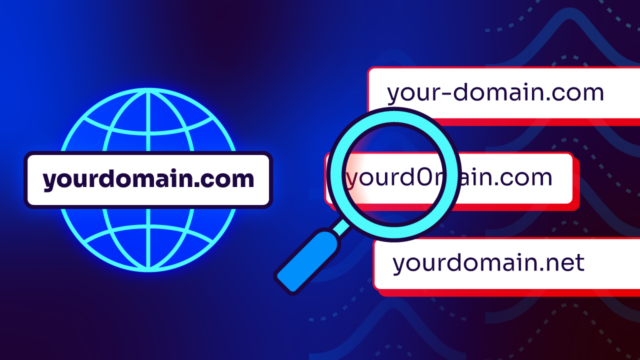
- The sender domain is close (but not exact). Check the actual address instead of the display name. A single swapped character is all the attacker needs.
How to defend against social engineering
For twenty years, the standard answer has been employee training. Teach people to spot bad grammar, generic greetings, and suspicious links, and they’ll catch the attacks.
That advice is aging very poorly.
Generative AI removed every content-quality signal that training relied on. The grammar is perfect, the greeting uses your name and title, and the message references a real project and matches your company’s tone. Your employees can’t detect it, and your IT team probably couldn’t based on content alone.
Our piece on AI phishing attacks covers how far this has moved.
A defense that holds up needs layers that don’t depend on gut checks and feelings.
- Verify out of band. The single most effective human control. Any request involving money, credentials, or sensitive data gets confirmed through a channel you initiate, using contact details you already have. It takes thirty seconds and it defeats the entire attack category, including deepfakes.
- Stop domain impersonation at the protocol level. A large share of social engineering arrives as email claiming to come from a domain the attacker doesn’t own. DMARC at enforcement blocks that outright. The message never reaches the inbox, so no one has to evaluate it. This is the layer that doesn’t degrade as attacker content improves because it verifies identity cryptographically rather than judging how a message reads.
- Monitor for lookalike domains. DMARC protects your domain, but it can’t stop an attacker registering a similar one. Typosquatted domains pass authentication because the attacker controls them, which makes domain monitoring a necessary companion to authentication.
- Enforce process controls. Dual approval on payments above a threshold. Mandatory callback verification for banking changes. Controls that don’t rely on judgment under pressure.
- Deploy phishing-resistant MFA. Hardware keys and passkeys resist credential relay in ways SMS codes don’t.
- Retrain toward behavior, not appearance. Awareness programs still matter. They should teach people to recognize unusual requests rather than unusual writing.
Protect your business from social engineering attacks
Most organizations underestimate how much email is sent using their domain, but the unrecognized senders are where impersonation risk happens. It’s about all the emails claiming to be from you that aren’t from you, and possibly aren’t from any domain you even remember.
Valimail Monitor is free and identifies every service sending as your domain by name. Check your domain (it takes less than a minute) to see your current authentication status.
Training your people is still worth doing, but removing the attacker’s ability to impersonate you is worth doing first.
Frequently asked questions
What are the three main strands of a social engineering attack?
Social engineering attacks generally combine three elements: research (gathering information about the target), pretext (a believable false identity and scenario), and exploitation (the request for money, credentials, or access). The psychological levers that make them work are authority, urgency, and trust.
What is pretexting in social engineering?
Pretexting is inventing a false scenario and identity to extract information or access. An attacker might pose as an IT technician resolving a ticket, a bank fraud investigator, or a new employee needing help with a process. Pretexting underpins most other social engineering, since nearly every attack needs a believable reason for the request.
How do you prevent social engineering attacks?
Prevention layers technical and process controls rather than relying on employee vigilance. Deploy DMARC at enforcement to block domain impersonation, monitor for lookalike domains, require out-of-band verification for financial and credential requests, enforce dual approval on payments, and use phishing-resistant MFA. Training helps but shouldn’t be the primary control, since AI-generated attacks are getting too good for humans to reliably spot.